
Best Instagram Bio Tactics to Drive Clicks and Branding
Your Instagram bio link is your most powerful evergreen asset — here's how to use it to consistently drive traffic and build your brand.


Your link in bio is the only way to generate clicks and leads on Instagram without proactively creating new content. Here are three tactics to make the most of your Instagram bio:
- Use a link-in-bio tool like LTX.bio to host multiple links from a single, branded landing page.
- Update your landing page regularly to reflect seasonal campaigns, promotions, or new content.
- Add an emoji and a short CTA in your bio to actively direct followers to click your link.
- Reference your bio link in photo captions using contextual CTAs to remind followers it exists.
- Choose a custom domain that matches your Instagram handle to improve discoverability in search.
Instagram limits clickable links to your bio and Stories, making your bio link a critical asset for driving traffic without constant content creation. By linking to a multi-link landing page, adding a CTA with emojis, and referencing your bio link in post captions, you can significantly increase clicks and leads. Tools like LTX.bio and Namify help you build a branded, updatable destination that works across platforms.
Link to an Instagram-friendly landing page
Instagram only allows a single link in the bio, but tools like LTX.bio let you create a well-branded landing page that links to all your digital properties. You can customize the page with themes that match your brand, create a custom URL, and easily update it based on seasonality, marketing campaigns, or special offers. This makes it a flexible and visually engaging solution for audiences who want to explore more of what you offer.
Add a CTA and emojis
Most Instagram users won't think to click a link unless you explicitly invite them to. Using a well-positioned call to action combined with an emoji is an effective way to direct followers' attention to your bio link. Simple phrases like 'Click here to download' or 'Check us out' paired with a pointing emoji can significantly improve your link's clickability.
Remind people of your link in updates
Since Instagram doesn't allow clickable links in post captions, you can still remind followers where to find your link by including contextual CTAs in your photo captions. Experimenting with a question-and-answer format — such as 'Would you like to know what this is? Check the link in the bio!' — is especially effective because questions trigger instinctive elaboration, compelling people to seek out answers. Tools like Answer The Public, Text Optimizer, and Twitter question searches can help you generate engaging questions to drive traffic to your bio link.
Historically, Instagram hasn’t liked people leaving the platform by clicking links; therefore, there are so few places where you can put a clickable link on Instagram.
These are:
- Instagram bio
- Instagram stories
While links in stories only live for 24 hours, and you have to create new stories again and again to keep those clicks coming, your link in bio is always there.
Your link in bio is the only way to generate some clicks and leads on Instagram without proactively creating new content.
To add a link to your Instagram bio:
- Go to your profile page (by tapping on your profile picture at the bottom-right)
- Tap “Edit Profile” on top of your feed
- Paste your link in the “Website” section
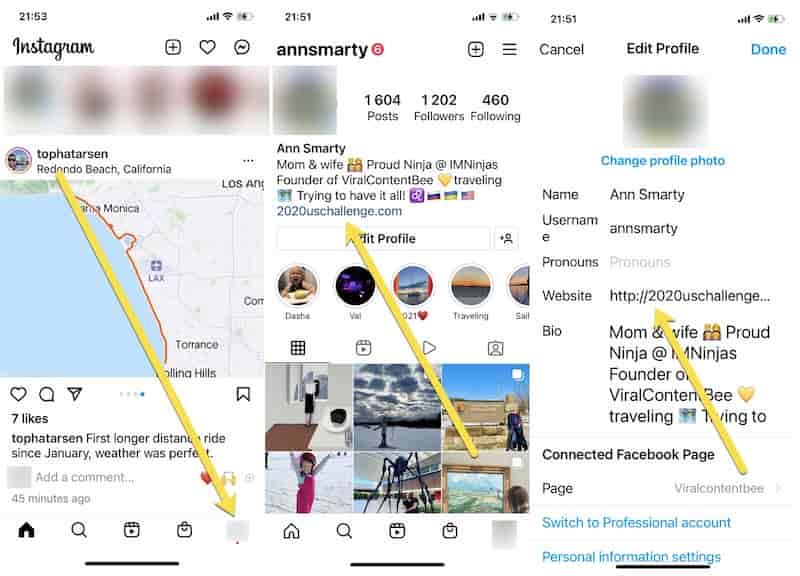 Now, that’s done, how to make the most of this section?
1. Link to an Instagram-friendly landing page
Instagram allows a single link in the bio. But what if you do a lot? What if you have something new to link to daily or weekly? What if you don’t have a website but instead you have several other social media profiles to link to?
Get a Free Reputation Assessment
Find out what people see when they search for you online. No obligation — results in 24 hours.
There are a few tools out there allowing you to create your own Instagram-friendly page to link to from the bio section. LTX.bio is a free tool that helps you create a well-branded page linking to all your digital properties:
- Choose any of many themes
- Customize to match your brand
- Create a custom URL that reflects your (brand) name:
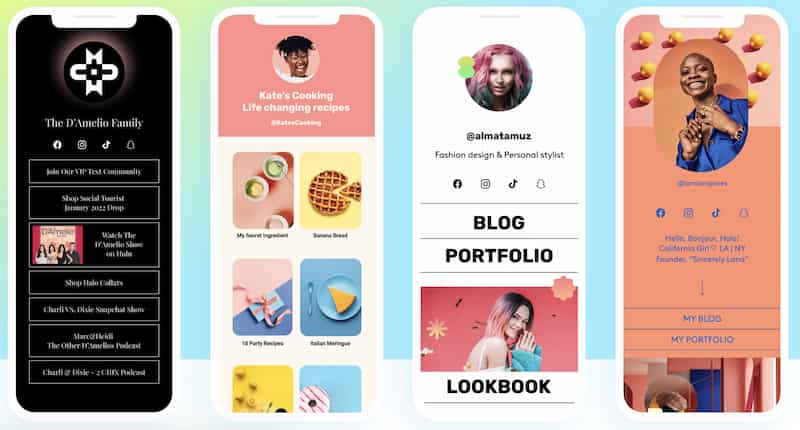
One of the advantages of using “Link in bio” tools is that you can easily update it based on seasonality, your current (pre-holiday) marketing campaigns, or special offers. It is a very easy way to create something exciting for a visual audience on Instagram. You can also use the page to curate customer reviews.
You can use this link on any social media platform, like TikTok or Twitter.
Selecting a domain that best reflects your personal brand or business is also a great idea. Namify will help you pick a domain that is available on Instagram if you are still planning to launch your digital project.
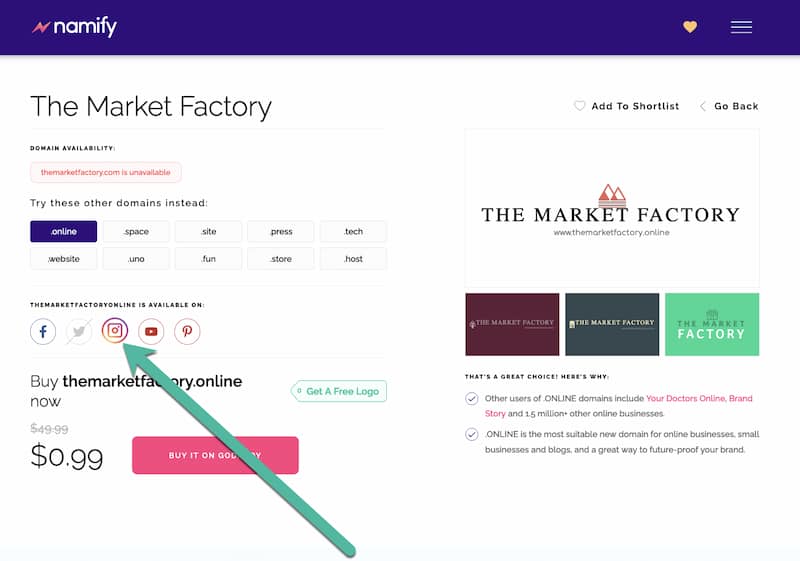
This will ensure both your website and your Instagram account will be findable in Google, which is another way to generate followers. Your current customers may be interested in becoming your Instagram subscriber. You can also pick a theme reflecting your Instagram feed.
There are also quite a few plugins allowing you to show Instagram content on your site.
Don’t forget to verify your Instagram account to build a better-performing profile.
2. Add a CTA and emojis
Not many Instagram users would even think about clicking any links unless you point it out to them. The Instagram crowd is all about scrolling, liking, and commenting: They are never on Instagram to check out someone else’s websites.
However, they won’t mind clicking your link if you invite them to.
Like in many other digital marketing tactics, a well-positioned and nicely designed call to action is all it takes to get those clicks.
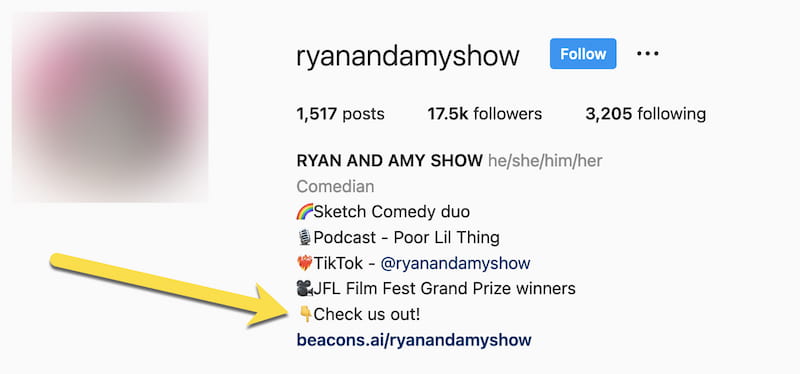
Instagram doesn’t allow any graphic modifications to the bio section but you can use an emoji, which can be a great way to direct your followers’ attention to your link. In fact, lots of Instagram users are already doing that:
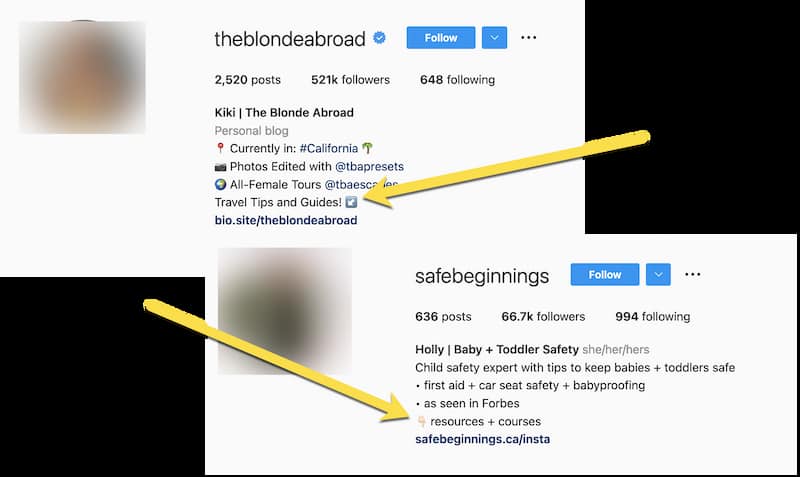
An even better idea is to combine the emoji with a quick CTA because – let’s face it – oftentimes, people need verbal instructions to do what you’d like them to do. So things like “Click here to download” or even “Check us out” could make all the difference to your bio link clickability:
3. Remind people of your link in updates
Finally, why can’t you add clickable links in updates? There’s nothing stopping you from reminding your followers where to find them.
Create engaging updates and put contextual CTAs inside photo captions inviting people to click your link in a bio to read more, watch more, or download for free.
Experiment with a question-answer format to drive attention to your bio link, for example:
- Would you like to know what this is?
- Check the link in the bio!
Overall, questions are the most engaging form of content because they trigger a reflex in human beings called “instinctive elaboration.” We cannot help but look for answers when we hear or read a question, which is why asking questions on social media is such a good idea.
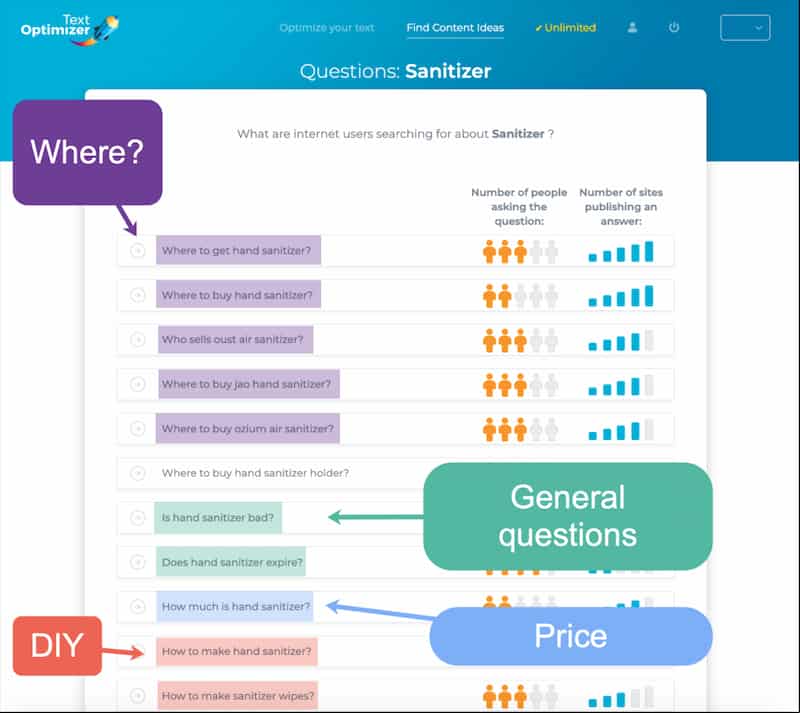
There are many ways to come up with interesting questions to engage your social media audience. You can check tools like Answer The Public and Text Optimizer to determine which questions people are asking:
You can also check out Quora or search for questions on social media. Twitter is a social platform that supports question searches.
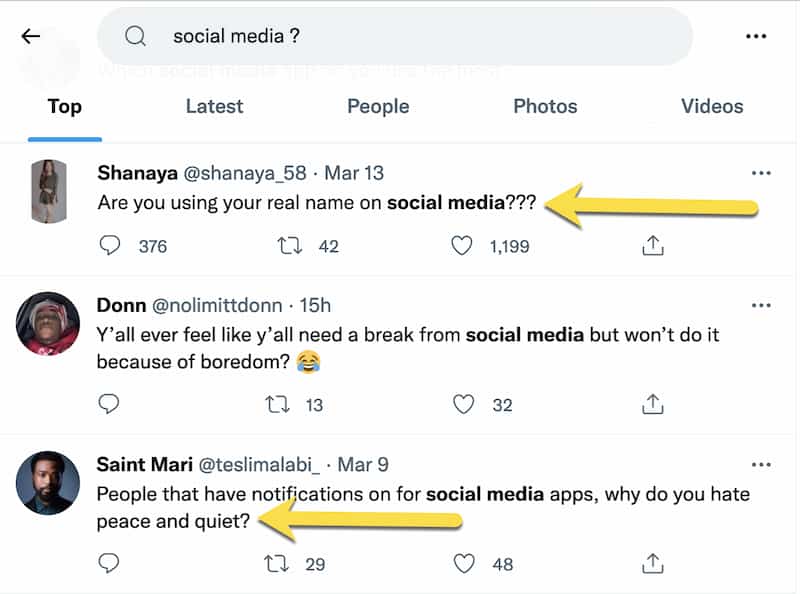
All you need to do is to type your keyword, then – after space – add a question mark. Here you go: Your Twitter search is filled with questions to ask on Instagram and direct people to your link:
[This is also a great way to engage in interesting discussions on Twitter while you are there as well]
The only downside to including your CTA in Instagram updates is that, if you embed your Instagram update on your page (or anyone else does), that caption won’t make much sense.
Final thoughts
Instagram is a great social media platform, only it is not the easiest to generate traffic from. Instagram is also a powerful reputation management platform allowing you to rank your own asset for your brand name.
As you are building your Instagram presence, keep experimenting with your bio section and stick to the tactics that seem to resonate with your audience.
Good luck!
Frequently Asked Questions







Protect Your Online Reputation
Every day you wait, negative content gets stronger. Talk to our experts about a custom strategy for your situation.
Get Your Free Analysis