
2026 Guide: The Fastest Ways to Remove Google Search Results: Ranked
From contacting authors to filing Google requests, here are the most effective removal methods ranked by speed so you can protect your reputation now.

- Contact the author first — it works best when the post was an honest mistake, not intentional harm.
- If the author refuses, escalate to their editor, who may have more flexibility to remove content.
- Use Whois tools like Whois.net to find webmaster contact details when authors and editors won't help.
- Avoid sending cease and desist letters without strategy — they can backfire and amplify negative content.
- Once source content is removed, submit a request to Google to clear it from search results quickly.
Removing negative Google search results is possible and often faster than most people expect. The most effective approach is to contact the author, editor, or webmaster of the site hosting the content and request removal directly. This guide ranks the fastest methods, provides free email templates, and includes a real case study showing how a falsely accused individual had damaging news articles removed and landed his dream job.
How to Remove Google Search Results Fast
-
1
Contact the author directly
Reach out to the person who originally posted the content and request removal or an edit. This works best with bloggers who made an honest mistake, rather than journalists who have a financial incentive to keep inflammatory content live. Use a polite, non-confrontational tone and consider using a pre-written email template to improve your chances of success.
-
2
Escalate to the editor
If the author refuses to act, contact their editor with a clear explanation and any supporting evidence. Editors have authority over published content and may be more receptive, especially when presented with proof that the content is inaccurate or harmful. Once the editor agrees to delete the content, Google will typically remove it from search results within days or weeks.
-
3
Reach out to the webmaster
The webmaster controls the technical side of the website and can remove or modify content directly. Use a Whois tool like Whois.net or DomainTools to find the owner's contact details, or check the site's Contact Us page and LinkedIn if the registrant data is redacted. If full deletion is refused, ask the webmaster to remove specific identifying phrases, such as your name or company name, to prevent the page from ranking in search results.
-
4
Request a noindex tag on the page
Ask the webmaster to add a noindex meta tag to the page's HTML header, which instructs search engines to drop the page from their index entirely. Frame the request around the webmaster's own interests, explaining that the page could attract legal scrutiny or liability for their site. The page will typically disappear from search results within a few weeks once the tag is implemented.
-
5
Contact the website's hosting provider
If the author, editor, and webmaster all refuse to help, escalate to the company hosting the website. Hosting providers like GoDaddy have their own Terms of Service and have shown willingness to remove sites or content that violates those terms, such as content that incites violence or distributes harmful material. This approach is most effective when the content clearly breaches the host's published policies.
When negative information appears in Google search results, it can damage your reputation and career. But removal is possible. This guide covers the fastest methods to remove personal Google search results, delete negative or misleading content, and manage your online reputation — including access to free templates.
How to get a result removed
Fastest first, and check the motive before you ask
The methods are not interchangeable and they are not equally quick. Worked in order, the cheap ones come first — but only after one check that can save you from making the problem worse.
Fastest Method: Contact the Author Directly
The quickest way to change search results is to make content disappear from the website where it was published. There are two ways to remove search results at the source:
- Via the person who originally posted it, or the person they work for
- From the webmaster who manages the site
This method works well with bloggers who made an honest mistake or have the empathy to regret their post. It works less well with journalists, who often have a financial incentive to keep inflammatory content live because it drives clicks and ad revenue.
Here are free email templates to request that content be removed or edited.
In most cases, journalists simply don’t have the incentive to take something down — even if what they wrote is harming an innocent person. They will often cite the First Amendment or “preservation of the public record” as justification.
Contact the Editor to Ask for Removal
If the author won’t remove the content, their editor might. We provide free templates to get you started here. If the editor agrees to delete the content, Google will typically remove it from search results within a few days or weeks.
As with contacting authors, consider the potential outcomes before making contact. Not every outreach attempt will succeed.
Case Study: How We Removed an Article from a News Site
Get a Free Reputation Assessment
Find out what people see when they search for you online. No obligation — results in 24 hours.
A young man falsely accused of a crime could not get a job. This is how we fixed it.
One case involved a college student falsely accused of rape. He paid for school by performing private strip shows. After performing at a birthday party, he was falsely accused the next day.
The boyfriend of one of the women at the party was a police officer who, apparently, did not approve. He pressured his girlfriend to file an accusation. The case was later dropped — but not before local newspapers published the young man’s photo and name alongside the criminal allegation. The damage remained even after the charges disappeared.
Reputation X contacted the news organization. The author refused to remove the article, but the editor agreed after multiple communications. We provided proof and a written statement from the young man. The article was removed. We then contacted Google and had it removed from search results as well.
One month later, he got his dream job.
Need Help Removing Negative Search Results?
Our reputation specialists have helped thousands of individuals and businesses take back control of their online presence. Let's talk about your situation.
How to Contact the Webmaster to Delete Content
Every organization is different. There may be an author, an editor, or a blogger — but there is almost always a webmaster. The webmaster runs the technical aspects of the website, and they can often remove or modify content directly.
You can find the owner of a web page using a Whois tool like Whois.net or DomainTools. If a website does not have domain privacy enabled, you can often find the owner’s name, address, and phone number. If that information is anonymized, try the site’s Contact Us page or search LinkedIn for the webmaster’s name, then use an email finder like Hunter (hunter.io) to get their contact details.
Note that since GDPR enforcement began in 2018, many domain registrars now redact personal registrant data by default. Whois results may show limited information depending on where the domain is registered.
If the Webmaster Won’t Remove It, Maybe They’ll Modify It
If the webmaster is unwilling to delete the page entirely, ask them to remove specific search phrases from the content. For example, if your company name is Acme Widgets, removing that name from the article makes it far less likely to rank for your brand. The next time a search engine crawls the page, it will not find the phrase and should, over time, demote and then drop the result.
The NoIndex Method: Making a Web Page Invisible to Google
Another option is to ask the webmaster to add a noindex meta tag to the page’s HTML header. This tag instructs search engines not to include the page in their index, effectively making it invisible in search results. The page is typically dropped within a few weeks.
Note that this must be implemented via the meta robots tag or X-Robots-Tag HTTP header. Google no longer supports noindex directives in robots.txt files.
Removing Content at the Host Level
If you cannot get content removed through the author, editor, or webmaster, consider contacting the company hosting the website. Hosting providers like GoDaddy have their own Terms of Service and have demonstrated willingness to act on violations.
For example, GoDaddy removed the website Daily Stormer in 2017 because it violated their terms of service by publishing content that could incite violence. More recently, hosting providers have taken similar action against sites distributing harmful or illegal content. This method applies only in specific cases where a clear terms-of-service violation exists.
Direct Removal from Google
If the webmaster or author cannot be contacted, the next step is to request removal directly from Google. This process — known as de-indexing — removes the page from Google’s index. It is only available in limited cases, such as when content violates Google’s terms of service, infringes copyright, or includes certain types of personal information.
Here are the main grounds for direct removal:
- Terms of service violation
- Personal information (via Results About You)
- Right to Be Forgotten (EU and qualifying countries)
- Copyright infringement (Digital Millennium Copyright Act)
When Can You Remove Search Results Directly from Google?
Google removes content in the following situations:
- Identity theft or financial harm: Content that includes bank account numbers, credit card numbers, signature images, or other information that could enable financial fraud.
- Sexually explicit information: Content posted without the subject’s consent.
- Legal grounds: Content that violates copyright laws or other legal regulations.
- Right to Be Forgotten: Personal information that breaches European privacy laws.
- Doxxing and related harms: Involuntary fake pornography, content involving minors, and certain medical, legal, or financial records.
- Results About You: Personal contact details such as home addresses, emails, and phone numbers via Google’s Results About You tool.
Google’s removal policies have expanded in recent years. For the most current list of qualifying removal categories, visit Google’s removal policies page.
The Results About You tool lets you request removal of your home address, email, or personal phone number directly from search results. Learn more about how to use the Results About You tool.

According to Google: “When you’re searching on Google and find results about you that contain your phone number, home address, or email address, you’ll be able to quickly request their removal from Google Search — right as you find them.”
To submit a removal request, click the three dots next to the result in Google Search. For the latest guidance, visit Google’s help center.
Removal Using “Right to Be Forgotten”
If you are an EU citizen or a resident of a country that recognizes the Right to Be Forgotten, you may have strong options available. Google will remove personal information that breaches European privacy laws, government ID numbers, bank account details, or images of handwritten signatures.
U.S. residents do not have a federal equivalent. However, several states — including California (under the CCPA/CPRA), Virginia, and Colorado — have enacted privacy laws that grant residents limited rights to request deletion of their personal data. Google’s Results About You tool also provides a practical, if narrower, removal option for Americans. Read our complete guide to the Right to Be Forgotten for more detail.
This is what typically appears on a Google results page when results have been removed under data protection laws:

Deletion of Content Using DMCA
The Digital Millennium Copyright Act (DMCA) is U.S. legislation enacted in 1998 to address copyright challenges in the digital age. It criminalizes technology designed to circumvent digital rights management (DRM) protections and heightens penalties for copyright infringement online.
One of its most notable provisions is the “safe harbor” clause for online service providers like Google. This shields them from liability for users’ copyright infringements, provided they promptly remove infringing content once notified by the copyright holder. The legal landscape around DMCA safe harbor (Section 512) continues to evolve — consulting a qualified attorney is advisable for any specific situation.
This has led to widespread use of “DMCA takedown notices,” where content owners can request removal of infringing content from websites and platforms. For a full overview, see our guide on what the DMCA is and how it works.
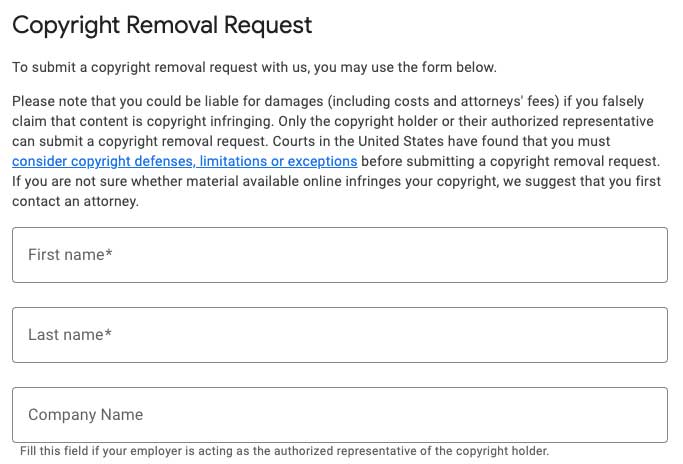
Want to try a DMCA removal? Here is a link to Google’s copyright removal tool.
A Note About the Lumen Database
Google often sends a copy of each legal notice it receives to the Lumen Database (lumendatabase.org) for publication and annotation. This means that even after content is removed from Google search results, a notice may still appear at the bottom of the results page:

When a searcher clicks the notice, they may see the name of the person or entity that requested the removal.
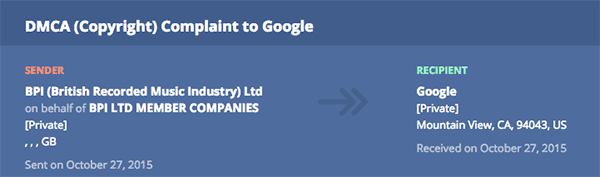
The Lumen Database reports DMCA, trademark, defamation court orders, private information, data protection, and government requests on its site.
Suppress (Push Down) Search Results
If the above methods don’t work, the next step is to suppress the search result so it becomes less visible. Suppression campaigns take time but work in many cases. The upside is that they reduce the visibility of negative content and replace it with positive content — so when someone searches your name, they find only favorable results unless they dig deep.
How Does Search Result Suppression Work?
Search result suppression reduces the visibility of damaging results by promoting positive or neutral content optimized for the same search terms. Negative articles, posts, images, videos, and social media posts get pushed down so they are seen far less often, if at all.
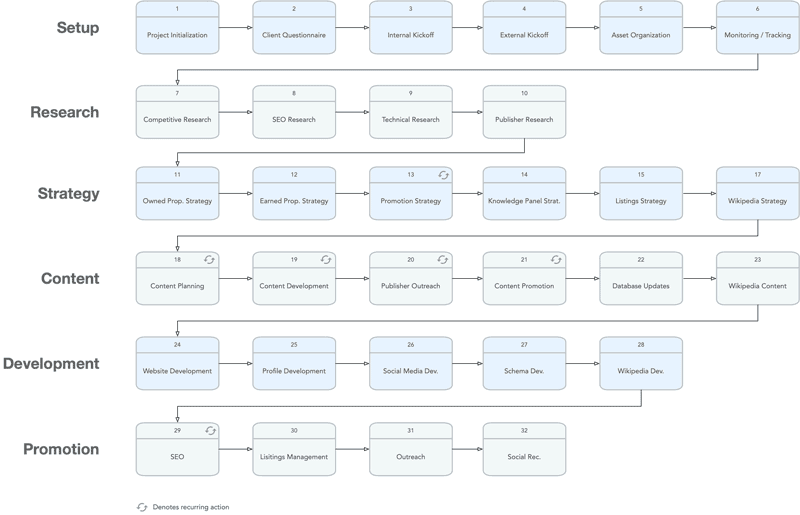
As preferred content rises in rankings, unwanted results organically fall further down the page — where they are far less likely to be seen. The main objective is not to eliminate negative results entirely, which is often impossible. Instead, the focus is on making them difficult to find.
While eliminating negative search results entirely is the ideal outcome, it is not always achievable. Suppression is often the most practical and attainable goal. For a deeper look, see our guide on how to suppress negative content in Google search results.
The Legal Route
If personal appeals and direct communication fail, legal counsel may be the next step. It is also likely the most expensive option. But if all other methods have been exhausted and you can afford it, the legal route may be worth pursuing.
When dealing with potentially libelous content, one strategy is to approach the legal team of the publishing entity. Most established organizations have dedicated legal departments. It is important to provide evidence that clearly demonstrates the defamatory nature of the content.
Involving lawyers can increase your odds of success. A letter on official legal letterhead signals seriousness and can persuade parties to retract negative content. If you need a recommendation for a defamation attorney, ask us. That said, legal proceedings can be lengthy and costly, and positive results are never guaranteed.
Attorneys versed in libel and defamation can argue for content removal or pursue damages if your reputation has demonstrably suffered. Weigh the potential benefits against the costs before proceeding — for many, restoring a damaged reputation justifies the investment when all other options have failed.
Conclusion
Maintaining a positive online reputation can be a matter of survival. While removing negative content from Google may seem daunting, it is entirely possible with the right approach and patience. Whether you contact the webmaster, request removal directly from Google, pursue a legal remedy, or run a suppression campaign, each method can help you regain control over your online image.
Frequently Asked Questions








Protect Your Online Reputation
Every day you wait, negative content gets stronger. Talk to our experts about a custom strategy for your situation.
Get Your Free Analysis