
Unlocking the Power of Voice Search: A Guide for Marketers Today
Voice search is no longer a trend — it is how people find businesses, and this guide shows marketers exactly how to keep up and get found.


- Test your target keywords across Android, iOS, and smart speakers — results vary significantly by platform.
- Optimize for featured snippets, as voice assistants frequently read them aloud as direct answers.
- Account for zero-click results: voice search often delivers one answer without sending traffic to your site.
- Write content in a conversational tone to match how people speak queries, not how they type them.
- Use web analytics to identify which devices your audience uses most and prioritize those platforms first.
Voice search is no longer a trend — it is a standard part of how consumers find information, and its behavior varies significantly across devices and platforms. Marketers need to understand how voice queries differ from typed searches, how results are surfaced on Android, iOS, and smart speakers, and how AI-powered tools are reshaping what visibility means in a voice context. Optimizing for voice search requires testing keywords across devices, accounting for zero-click results, and creating content that matches conversational query patterns.
As technology disrupts the way we live, our searching behaviors and capabilities are changing as well. This guide covers what voice search is, how it works across devices, and what marketers can do today to optimize their content for voice-driven queries.
What Is Voice Search?
Voice search refers to the online searching process where a search query is performed by voice rather than through typed words. In short, you talk to a device and it performs the search for you.
Voice search has moved well beyond trend status — it is now a normal part of daily life. Most of us ask our mobile devices questions without even thinking of it as a search behavior.
What Is Voice Search Optimization?
Since voice search has become part of everyday life, marketers are asking how to get their businesses found when consumers speak their queries instead of typing them. When it comes to search engine optimization, voice search raises two core questions:
- How does a device determine which sources to return in response to a spoken query?
- Where will clicks come from if a search is performed without typing?
Voice Search Results
Voice search relies heavily on the device it is performed from — making it very different from text search. With traditional search, Google behaves consistently regardless of the device you type on.
With voice search, behavior varies significantly by platform and continues to evolve. On Android devices, Google Assistant has historically read featured snippets aloud. On Apple devices, Siri has undergone substantial changes — particularly with iOS 17 and later, where it integrates more deeply with ChatGPT and third-party AI tools, altering how results are surfaced and delivered. Because these platforms update frequently, test your most important keywords across devices to see what each one currently returns.
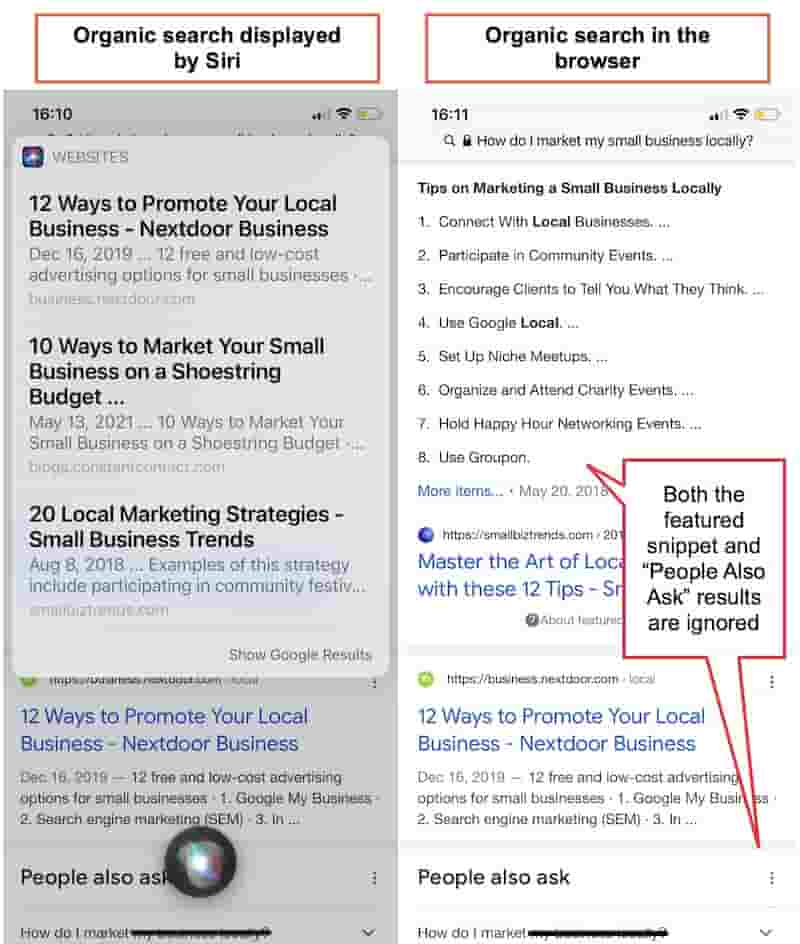
It also makes sense to review your web analytics to identify which devices your current audience uses most. Finteza allows a close look at how your audience’s devices interact with your sales funnel:

Interacting With Voice Search Results
How users interact with voice search results depends on the device they are using. In most cases, two scenarios apply:
- A device reads back a direct answer to a question.
- A device presents a list of results that users can tap or click through.

AI-powered search experiences are accelerating two meaningful shifts in the SEO industry. Tools like Google’s AI Overviews and ChatGPT’s voice mode have introduced additional zero-click scenarios and changed what “top results” means in a voice context:
- Some searches result in zero clicks — the answer is delivered directly by the device.
- Instead of ten results, voice search increasingly surfaces only one to three.
Voice search also happens across a much wider range of surfaces than it once did. A significant share of voice searches now occur on smart speakers (Amazon Echo, Google Nest, Apple HomePod) and in-car systems — neither of which results in traditional web browsing. Consider how your content performs in audio-only environments as well as on mobile.
New Types of Voice Search Queries
One of the biggest challenges voice search introduces is new searching behavior. People talk differently than they write — spoken language is spontaneous and conversational. According to Google, people tend to talk to their voice-activated devices the same way they talk to friends.

Voice search has introduced two distinct query types that marketers need to account for:
- Spontaneous voice search queries: The user wants to take immediate action — go somewhere, buy something, find directions. These often happen on the go.
- Conversational interactions: The user asks their device a question and expects a direct answer.
Here is a brief overview of how to optimize for both query types:
| Search Intent | What Is It? | Search Results | Optimization | |
| Voice search directions | High (commercial intent) | Searching for local businesses, products, directions, etc. | A list of options for consumers to act immediately (buy, go to, etc.) | Submit your products to Google Shopping, verify your business on local platforms like Yelp and Google Business Profile, and mind your SEO when submitting to Google Business Profile. |
| Conversational queries | Informational intent | Searching for quick answers | Results to tap, or the answer is read aloud by the device | Optimize for niche questions (more on this below) |
Keyword Research: Focus on Questions
You cannot capture every way people speak their search queries. But you can research popular questions to understand what your target audience wants to know. Questions are full-sentence queries — the closest thing to natural speech — which makes them essential for voice search optimization.
Three tools stand out for question research:
1. Answer the Public
Answer the Public uses Google’s autocomplete suggestions to surface questions people type into search. Since being acquired by NP Digital, the tool operates on a freemium model with more limited free searches — worth keeping in mind for regular use. Results are displayed in a visual mindmap format that makes patterns easy to spot:

2. Text Optimizer
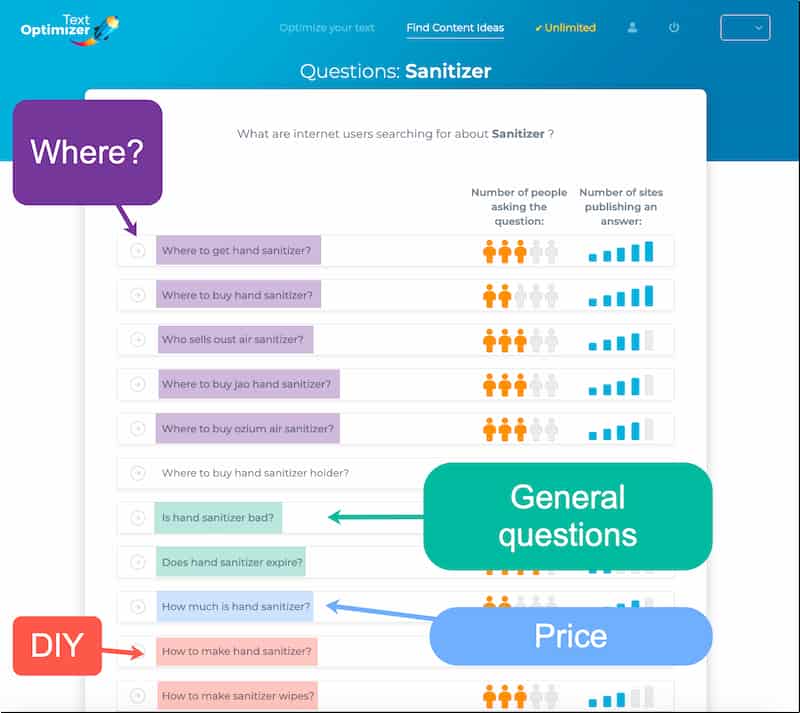
Text Optimizer is a semantic analysis tool that identifies related concepts and questions for any search query. It is a practical way to understand the search patterns your target customers use:
3. Buzzsumo Questions
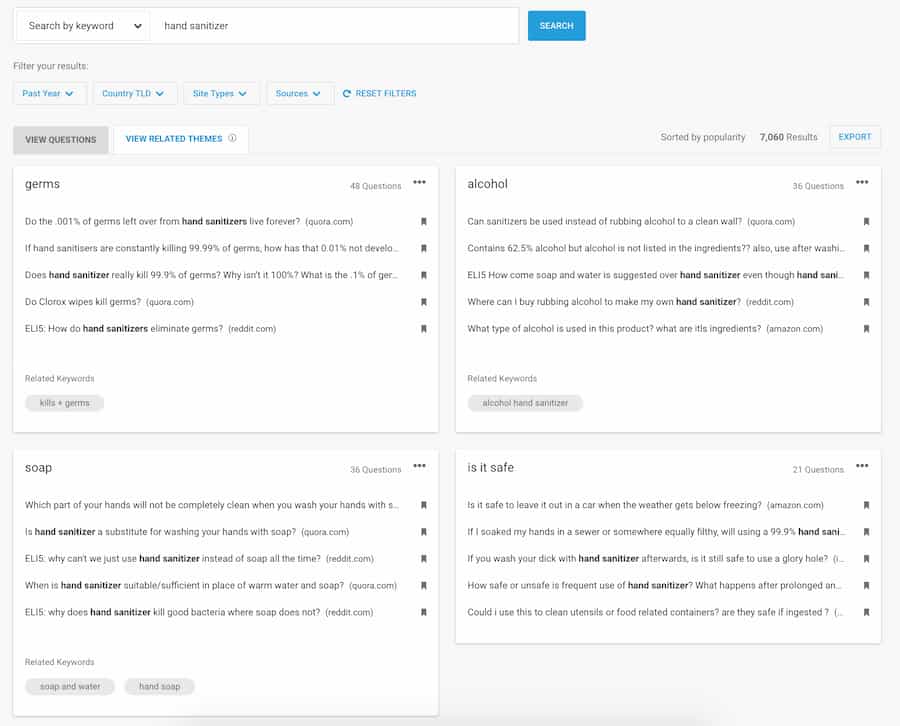
Buzzsumo collects questions from across the web — including Quora and Amazon — and presents them in a well-organized format. It surfaces related keywords and questions, giving you a broader view of how people phrase niche queries. It pairs well with Also Asked, Google’s People Also Ask analysis features, and the AI-powered keyword research tools now built into platforms like Semrush and Ahrefs.
Is Your Brand Showing Up in Voice Search?
Voice search optimization is just one piece of a strong online presence. Our team can audit your current search visibility and build a strategy that gets you found — on every device and platform.
Give Concise Answers
Studies exploring voice search results — including research by SEMrush — have found that top results give clear, concise answers. Research has historically pointed to roughly 41 words as the sweet spot. With the rise of AI Overviews and generative search, optimal answer length continues to evolve, but the principle of brevity and clarity remains as relevant as ever.
Fast-loading pages have consistently outperformed slower ones in voice search results — and with Core Web Vitals now a ranking factor, page speed has never mattered more.
The SEMrush study also found that top voice search results were typically the fastest-loading pages among all results on a given page.
When you identify a relevant question to include in your content, structure it this way:
- Place the question in an H2 or H3 subheading.
- Follow immediately with a concise direct answer.
- Elaborate further if the topic warrants more depth.
This content optimization strategy serves two purposes:
- It satisfies voice search algorithms that look for clear, direct answers.
- It satisfies traditional search algorithms that reward in-depth, authoritative content.
Setting up a standalone knowledge base section is also worth considering. Curating niche questions in one place is an effective way to rank for conversational queries:

Providing answers in alternative formats — like audio and video — can extend your reach further. Creating a video version of your content has become more accessible thanks to AI-powered tools like InVideo, which now includes AI-driven video generation alongside its standard editor.
Understanding how People Also Search For behavior works can also help you anticipate the conversational follow-up questions your audience is likely to ask via voice.
Improve Page Loading Speed
Research by Backlinko and others established that page speed plays a major role in voice search optimization. That foundational finding has only been reinforced by Google’s Core Web Vitals framework, which sets clear performance benchmarks that directly influence search rankings.
A fast site matters for voice search rankings and for overall usability. Measure, test, and improve your page loading speed on an ongoing basis.
Finteza can help you identify what is slowing your page down, with the ability to filter that report by mobile users specifically:

Several WordPress plugins can also help improve site speed. This detailed guide on speeding up your WordPress site from WPBeginner is a practical starting point.
Page speed is also a key factor in broader SEO reputation management. A slow site does not just hurt voice search rankings — it undermines your overall search presence and user trust.
Choose an Easy Brand Name
One major reason people use voice search on mobile is to navigate directly to a website. This makes the question of how easy your domain name is to speak and spell more important than ever.
If you are still choosing a brand name, use Namify to find a short domain that is easy to say and unlikely to cause misspellings. Before buying a domain, test it using your device’s voice input — through Google Search on mobile, Google Assistant, or Siri — to see how easily a machine recognizes it:

Ask friends and followers to do the same and share their feedback. You need a domain name that is easy to navigate to by voice. A strong, recognizable brand name also contributes to brand equity — the intangible value that makes consumers choose you over a competitor they have never heard of.
Voice search is not going to upend everything you know about SEO — but the landscape has shifted meaningfully. The rise of AI-powered search experiences like Google’s AI Overviews and ChatGPT’s voice capabilities has introduced new optimization considerations that go beyond traditional best practices. The fundamentals remain: provide useful, concise answers to niche questions, and ensure your site is fast and easy to use.
Keep a close eye on the devices your site visitors use and make sure your business is findable on all of them. If you want to go deeper on how search results are constructed and why they vary, our guide on how search engines work is a useful next step.
Frequently Asked Questions








Protect Your Online Reputation
Every day you wait, negative content gets stronger. Talk to our experts about a custom strategy for your situation.
Get Your Free Analysis