
A Quick and Simple Online Content Marketing Plan
Follow this practical, beginner-friendly content marketing framework to take control of what people find when they search for your name or brand.

This content marketing plan should make it easier for you. We’ll assume the example company has the following common web and social media to work with: In a normal online reputation protection project, we would first make sure the web properties were in line with organic search results by searching similar entities.
How to Build a Simple Online Content Marketing Plan
-
1
Define your content plan objective
Identify your primary theme (such as the person's or company's name), secondary theme (their industry or services), target location, and language. For example, a wealth manager named John Smith in Palm Beach, Florida would have 'John Smith' as the primary theme and 'Wealth Management Services' as the secondary theme. This objective guides every content decision that follows and ensures your plan stays focused on relevant search phrases.
-
2
Audit your current search results
Before building your content plan, run a reputation audit to understand what currently appears in search results for your target name or brand. Search for the primary theme and note which results appear, what types of content are represented, and whether any negative or irrelevant content is present. This baseline shapes every content decision that follows.
-
3
Set up your planning spreadsheet
Create a spreadsheet in Google Docs with four columns: Search Phrase, Headline, Promotion, and Content Type. You can optionally add columns for publishing dates or word count targets, but keeping it simple is recommended for a basic plan. This spreadsheet will serve as your central organizational tool throughout the entire content planning process.
-
4
Research Google related searches
Go to Google and search for your secondary theme, such as 'wealth management,' then review the related search suggestions on the results page. Google surfaces these through features like 'People also search for' and AI Overviews, both of which reveal the language real searchers use. Record all relevant related phrases to begin building your target search phrase list.
-
5
Analyze similar people or entities
Find five to ten people or entities similar to your client by using Google's related search suggestions to research individuals in the same field. Examine what kinds of content and placements appear for those people to understand what audiences want to know about professionals like your client. Add any newly discovered search phrases that are relevant to your growing list.
-
6
Expand your search phrases with keyword tools
Use tools like Ubersuggest, Google Keyword Planner, Semrush, or Ahrefs to input a search phrase and discover often-searched variations. For example, searching 'wealth management' in Ubersuggest may surface phrases ranging from 'wealth management adviser salary' to 'wealth management Zurich.' Focus only on phrases that are relevant to your client rather than collecting every possible variation.
-
7
Compile your final search phrase list
Gather all the search phrases discovered from Google related searches, similar entity research, and keyword tools into the Search Phrase column of your spreadsheet. Review the list and remove any phrases that are not relevant to your client's name, services, or location. The goal is a focused, high-quality list that reflects the content real searchers are looking for.
-
8
Create headlines for each content piece
Using your finalized search phrase list, develop a compelling headline for each piece of content you plan to create and enter it in the Headline column of your spreadsheet. Each headline should naturally incorporate the target search phrase while remaining engaging and readable. This step transforms your keyword research into a concrete, actionable content production queue.
Content marketing can be hard. This content marketing plan should make it easier for you. This simple content marketing plan represents a fictitious small company or individual that already has basic online reputation web properties like Facebook, LinkedIn, and others in place. This plan uses relevant, organic search results as a basis for an online reputation content plan.
Overview
We’ll assume the example company has the following common web and social media properties to work with:
- X (formerly Twitter)
- YouTube
- Website
In a normal online reputation protection project, we would first make sure the web properties were in line with organic search results by searching similar entities. In this example, let’s take a look at a “wealth management professional.”
This is not intended to reflect any real-world company or person. We just pulled the name “John Smith” out of the air.
Understanding the Objective of Your Content Plan
We’ll assume we are developing a content plan for an individual named John Smith, a single-person organization. This imaginary person operates a specialized financial services firm focusing on wealth management in Palm Beach, Florida.
To see a case study summarizing a campaign for a financial services firm click here.
The objective of the content planning and development project is to serve content via search engines to people performing searches for the name of the owner. Because the owner is involved in very specific services, we will target not only his name but associated content themes as well. Here is how this might look:
- Primary Theme: John Smith (Owner’s Name)
- Secondary Theme: Wealth Management Services
- Location(s): Palm Beach, Florida
- Language(s): English (US)
The objective of the content plan is to enhance search results for the name of the firm’s owner by developing online content about both him and the sector he works in. It may also contain information about his location. For example, people may look up the owner before doing business with him, using search phrases similar to:
- John Smith Miami Florida
- John Smith Wealth Management
- John Smith Financial Services
In a later step, we’ll use these kinds of search phrases to find other similar phrases that indicate the kinds of content people are looking for. We know that when a search phrase is used, associated content for similar search phrases is also returned in results.
Preparing Your Tools
You will need a few tools to stay organized and execute the process. All of these tools are browser-based and free to some extent. We use the Google Chrome browser, but any popular browser will work.
Spreadsheet
You’ll be creating a spreadsheet in Google Docs. The spreadsheet will have the following columns:
- Search Phrase
- Headline
- Promotion
- Content Type
You could get more detailed by adding publishing dates, word or character length targets, and more. But this is a simple content plan, so we’re keeping it short and sweet.
Keyword Research Tools
There are several solid keyword research tools worth having in your arsenal. Ubersuggest remains a popular starting point, though its free tier limits the number of daily searches. For more robust data, Google Keyword Planner is a reliable free option. Tools like Semrush and Ahrefs offer deeper insights on paid plans.
Developing Your Search Phrases
Google Related Searches
An online content plan theme usually involves search phrases. This is a simple plan, so we’ll skip more exotic content types and stay with text-based content only. Our project is designed to help a financial services professional manage their online reputation, so we’re going to identify similar searches.
Start by heading to Google and searching for “wealth management,” then look for related search suggestions on the results page. Google surfaces these through features like “People also search for” and AI Overviews that highlight related topics — both help you uncover the language real searchers use. When we do this, we get a list of related searches that might look something like this:
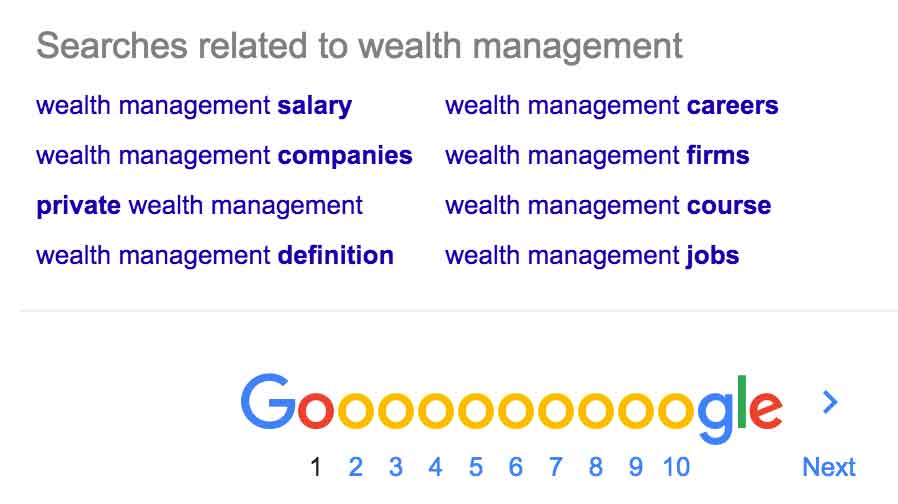
This is a very good place to start. Google has already told us about similar search phrases people really use, so we can begin building a list of phrases our content plan will target.
The above example shows similar search terms people use when looking for wealth management services. But we also need search terms for people who are wealth managers. To find those, we research similar people. We found a few random wealth managers; the results for one of them appear below.
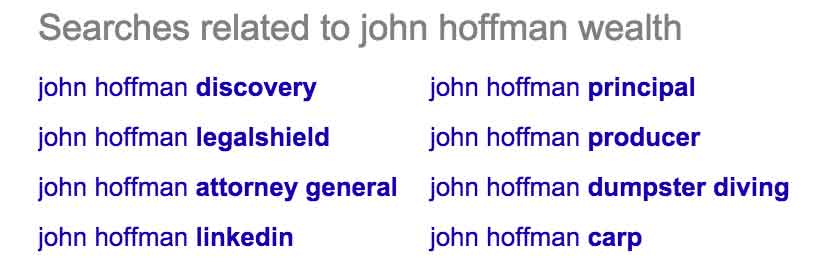
We normally find five to ten similar people or entities using related search suggestions, then examine the various searches to identify those that make sense for our client. Essentially, we want to know what kind of content and placements show up for people similar to our client, which gives us a good idea of what people want to know.
Getting Even More Content Ideas
You don’t need to stop with Google-related searches. You can find even more ideas using the following search term suggestion tools:
Ubersuggest
Ubersuggest takes a search phrase you input and appends a number of often-searched variations. Note that the free version limits daily searches, so use it strategically or consider a paid plan for larger projects.
For example, an Ubersuggest search for “wealth management” may start with “wealth management adviser salary” and work its way down to “wealth management Zurich” (A to Z). It provides many options, but keep in mind that we are not trying to flood the internet with unrelated content. We are looking for relevant content to add to our list of ideas. Our content goal should be to make search results better than they are.
Keyword.io
Another useful tool is Keyword.io. Its free feature gives you an idea of similar search phrases, though search volume data is reserved for the pro version. The free version works fine for getting directional ideas. Alternatives like Google Keyword Planner or AnswerThePublic can fill in the gaps if you need more detail.
These keyword tools will return quite a number of suggestions. For this simple plan, choose about ten search phrases to start and add them to your Google Docs spreadsheet. More sophisticated plans use many more — ranging into the hundreds or thousands.
Need Help Building Your Content Strategy?
Our team creates and executes content plans designed to improve search results and protect your online reputation.
Building the Search Phrase List and Headlines
Once we’ve completed research on similar people and entities and examined the kinds of related searches people perform for them, we can begin putting together the basics of our simple reputation management content plan. From the many ideas we’ve discovered, we have narrowed our list to the following search phrases:
- John Smith Florida
- John Smith Charities
- John Smith
- John Smith Wealth Management
- John Smith Financial Services
- John Smith Miami Florida
- John Smith Biography
- Wealth Management Adviser John Smith
- John Smith’s Wealth Management Blog
These search phrases were chosen because we presumably know our client — what they are interested in, what positive affiliations they have, and more.
Writing Headlines for the Content Plan
Since we have an idea of what to write about, the next step is to create headlines. Headlines are critically important. If you spend at least half your time writing the headline and less than half writing the content, you’ll probably have more success. Without a compelling headline, the rest of the article will never be read.
This applies to social posts too. A compelling post on X or LinkedIn guides people to an article, but if the hook falls flat the article will remain unread. There are excellent resources online about how to write great headlines — take a few minutes to find one you trust and read it carefully.
One of the secrets to clickbait headlines is disequilibrium — a compelling headline that leaves a reader curious and unfulfilled until they click. But headlines for online reputation management purposes tend to be different. A clickbait-style headline like “You’ll Never Believe What John Smith Does Next” might get clicks, but it doesn’t serve the client and would be untrue.
One of the secrets to “clickbait” headlines is disequilibrium.
For financial companies and any other self-respecting real-world entity, headlines need to be handled more carefully. The example below shows what our simple content plan looks like with all columns complete for ten search phrases.
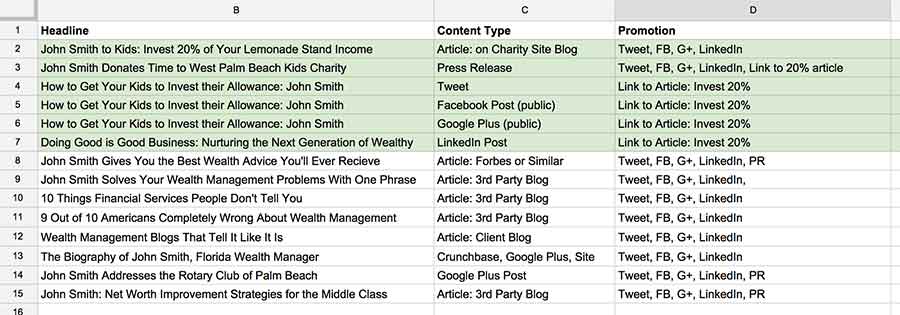
Notice that not every headline contains the exact search phrase. The point is to get at least part of the search phrase into the headline, while the content itself contains the phrase a few times — enough for search engines to understand what the article is about, but not so many that it becomes spammy.
Content Types, Promotion, and Thematic Development
Search engines display different kinds of content in a search result. For example:
- Articles
- Blog Posts
- Video
- Posts on X (formerly Twitter)
- Images
- Press Releases
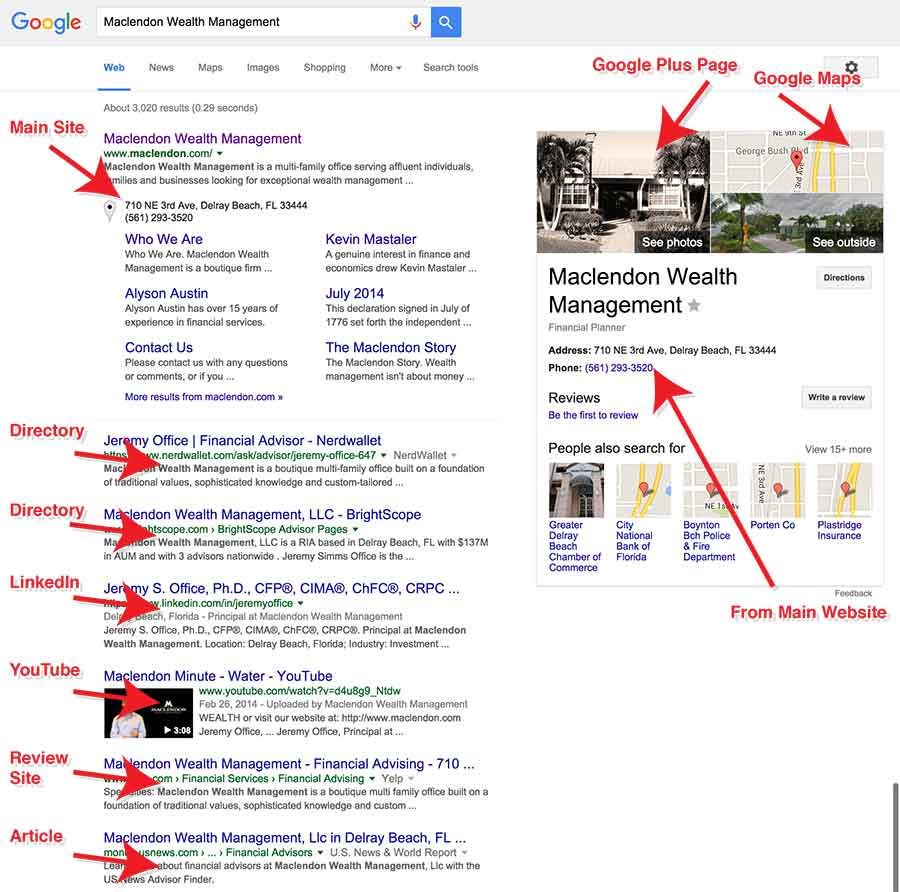
Google surfaces a wide range of content types today — including posts from X, short-form video from platforms like YouTube Shorts, Google Business Profile updates, and AI-generated overviews that pull from multiple sources. This article is focused on simple content planning, so we are sticking to text-based planning. You can add other content types as you become more comfortable with them. Here is an example of how different types of content can appear in search results:
Thematic Content Development
The Google Docs spreadsheet shown above has an area shaded green. This is an area of “themed content” — specifically about “charity.” All of the content pieces shaded green are either articles, posts on X, or blog entries relating to John Smith’s charitable giving. This assumes Mr. Smith donates time to a local charity and then gets the charity to write about it on their blog with his name in the headline.
As a reputation management company, we often ask our clients to take positive real-world steps toward improving their online reputation. This is a core part of any effective online reputation strategy. Once Mr. Smith makes his speech, our content manager can go to work.
Promoting Your Content
When content is placed, it needs to be promoted. Facebook, X (formerly Twitter), and LinkedIn should all be used as a baseline. There are also some special cases. For example, when content about charity is placed on the charity’s own website, a press release is also written with a link to the article discussing the charitable act. It’s good news — spread it.
You can also use tools like Hunter.io to find the email addresses of webmasters for outreach — for example, to flag an unlinked brand mention and request that it be turned into a proper link. This kind of editorial outreach aligns with current best practices and is a legitimate way to build authority around your content.
Ultimate Content Structure
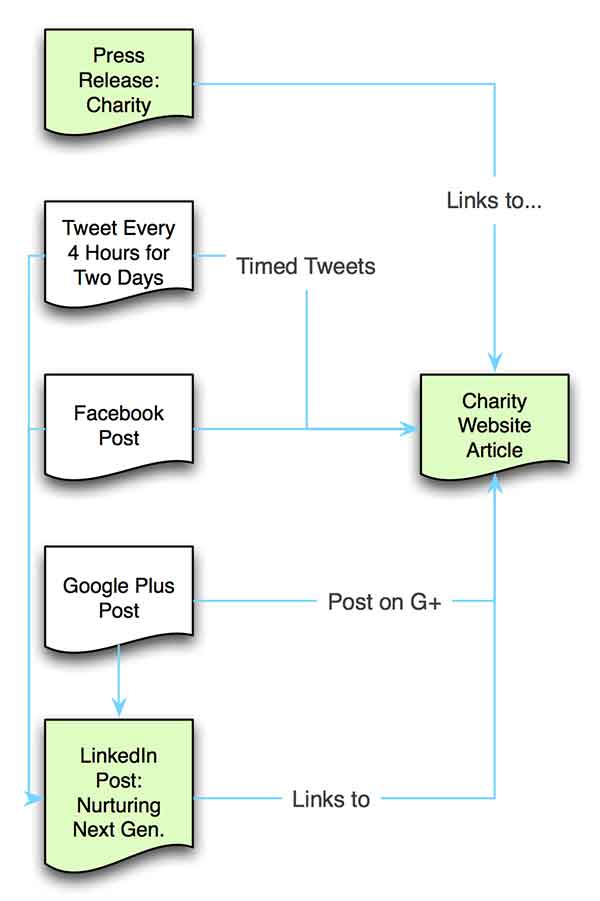
Once content has been placed, it links to or refers to other content within the same theme. This drives interested parties to read more. If the content is good enough, they will share it. The diagram here reflects just the green portion of the Google Docs spreadsheet — the content related to “John Smith charity.” Green boxes denote content that will most likely show up in search results. White boxes represent content placed to support the visible content, even if it doesn’t surface directly in search results.
Summary
Our job as a reputation management company is to improve Google and Bing search results. We create compelling, true, relevant content of different types based on real-world research. We then develop comprehensive SEO reputation management strategies and execute content plans much like the one described above.
Want help? Call us.
Frequently Asked Questions








Protect Your Online Reputation
Every day you wait, negative content gets stronger. Talk to our experts about a custom strategy for your situation.
Get Your Free Analysis