
How to Improve Your Facebook Reels Campaign for More Success
Master the Facebook Reels algorithm with actionable tips that help your videos reach the right audience and turn views into real business growth.


- Facebook Reels use machine learning to promote content that drives meaningful user engagement.
- Reels can be 15, 30, or 60 seconds long and are only available on mobile devices in vertical format.
- You can cross-post Reels to Instagram if your Facebook and Instagram accounts are linked.
- Sharing Reels in Facebook Groups helps target niche audiences and increases content visibility.
- Optimizing Reels for the algorithm requires understanding what Facebook considers high-value content.
Facebook Reels are short vertical videos that help businesses reach new audiences and drive engagement through the platform's algorithm. The algorithm uses machine learning to surface content that drives meaningful interactions, making it essential to optimize your Reels strategy. This article explains how the Facebook Reels algorithm works and provides actionable steps to create and share Reels that grow your brand.
How to Improve Your Facebook Reels Campaign for More Success
-
1
Understand what Facebook Reels are
Facebook Reels are short vertical video clips optimized for Facebook and Instagram that feature a quick introduction, a call to action, and a link to your website. They can be used to promote products or services, build brand awareness, and drive traffic to your website. The feature is only available on mobile devices and supports videos in vertical orientation to encourage scrolling.
-
2
Record your Reel in the Facebook app
Open your Facebook app, tap the Reels icon, and then tap 'Create' to enter the recording section. Select your preferred video length — 15, 30, or 60 seconds — by tapping 'Length' on the right side of your screen. Tap the record button to capture your clip, and tap again to stop, repeating as needed for multiple clips.
-
3
Edit and enhance your clips
Once recorded, tap individual clips to trim them using the scissors icon, dragging the bars at the beginning and end to set the visible portion. Use the bin icon to delete unwanted clips or the reshoot button to re-record a clip. Add text, filters, and music from the options that appear on your screen, placing text wherever you like by dragging it into position.
-
4
Share your Reel to the right audience
After tapping 'Next,' add a description and select your audience from 'Public,' 'Friends,' or 'Friends except...' before tapping 'Share Reel.' You can simultaneously share your Reel to Instagram if your Facebook account is linked to your Instagram account. Posting in relevant Facebook Groups is also recommended, as it puts your content in front of people with specific shared interests.
-
5
Use the correct Reels dimensions and file settings
Always record and upload Reels in a 9:16 aspect ratio with vertical orientation to ensure proper display on mobile devices. Your video file should not exceed 4GB and must have at least 500 x 888 pixel resolution, saved as a MOV or MP4 file type. Good lighting, clear sound, and high-quality shooting techniques are essential for meeting Facebook's quality standards.
-
6
Optimize audio and creative elements
Choose music from the Facebook library or use original audio you have created to enhance your Reel. While sound is not mandatory, it is strongly recommended for boosting engagement. Incorporate text overlays, filters, and augmented reality effects to make your video visually compelling, but avoid covering the majority of your video image with text.
-
7
Post consistently and vary your content types
Aim to post at least one Reel per day, though you can post two without overwhelming your audience as long as you avoid flooding them with excessive content. Experiment with different formats such as how-to videos, behind-the-scenes clips, holiday recaps, slideshow photo Reels, or mini day-in-the-life videos. Testing a variety of content types helps you identify what resonates best with your audience and signals value to the algorithm.
-
8
Avoid common mistakes that hurt algorithm ranking
Do not recycle videos that were clearly filmed for other social platforms or that were shot in horizontal orientation, as Facebook Reels are designed specifically for vertical viewing. Avoid adding excessive text in your caption or covering most of the video with on-screen text. Keeping your content original, properly formatted, and visually clean gives it the best chance of being discovered and ranked by the Facebook Reels algorithm.
Like all other social platforms, Facebook prioritizes the types of content that drive engagement. It promotes pages that encourage meaningful interactions between people.
The Facebook Reels algorithm works in much the same way. It uses machine learning to calculate users’ interaction with Reels and predict what they want to see more of. It then shows more of this kind of content to that user.
Below, we break down the specific ranking factors the Facebook Reels algorithm uses to decide which content gets shown — and which gets buried. The aim is to help you optimize your content to suit your customers’ needs and scale your business. But first:
What are Facebook Reels, and why are they important?
Facebook Reels are short video clips optimized for Facebook and Instagram. They feature a quick introduction, a call to action, and a link to your website. They can be used to promote products or services, build brand awareness and drive traffic to your website.
Similar to TikTok, Facebook allows you to create short, engaging videos through the Reels feature. A Facebook Reel helps you get discovered by new audiences interested in what you offer. It also allows you to add creative effects and background music to your video. This brings your ideas to life and boosts audience engagement.
Facebook Reels are only available for mobile device users. The videos are made and presented in a vertical orientation to encourage scrolling on mobile. Though released to a handful of users when launched, Facebook expanded Reels to more than 150 countries in 2022, according to Meta Newsroom.
Get a Free Reputation Assessment
Find out what people see when they search for you online. No obligation — results in 24 hours.
Here’s an example of how they appear:
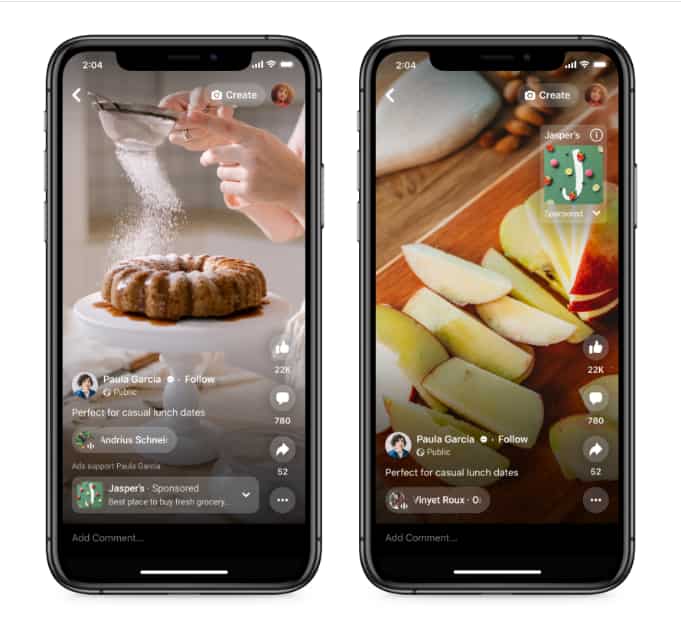
Reels also opened up another revenue stream for influencers. Brands pay creators to feature products in short-form videos, which tend to get higher engagement than static posts — making sponsored Reels a lucrative format for both parties. Brands work with influencers to reach their avid followers and advertise their products to them.
Whether you’re just starting a business or are already an established one, Facebook Reels make for a great marketing tool. It’s an extra channel to reach potential customers and re-engage existing ones.
How to make Facebook Reels
Facebook Reels aren’t as difficult to make either. Here are steps you should follow to make your first Reel on Facebook:
To record your Reel, just follow these steps:
- Go to your Facebook app and tap on the Reels icon.
- Tap “Create” to go to the recording section.
- Tap “Length” on the right side of your screen and choose between 15, 30, or 60-second video lengths.
- Tap the record button to start recording your first clip. Tap it again to stop recording, and repeat this for as many clips as you would like to record.
To edit your clips:
- On the Reels camera, tap the clips you’d like to edit.
- Tap the scissors icon to trim the clips.
- Tap and drag the bars at the beginning and end of each clip to set what part of each clip shows.
- Tap the bin icon to delete a clip from the timeline.
- Tap the reshoot button to re-record a clip.
- Add text, filters and music to your Reel. The options will appear on your screen. You can drag text and place it wherever you’d like on the video.
- Tap “Done” on the top right corner of your screen to stop editing a clip. Tap the “Done” button again to stop editing all clips.
Finishing and sharing your Reels:
- Tap “Next” to finish your Reel.
- Type in a description for your Reel if you’d like.
- Select an audience for your Reel. You can choose between “Public,” “Friends” or “Friends except…”.
- Tap “Share Reel” to share your Reel.
You can share your Reels to Instagram at the time of posting. However, this option is only available if you have linked your Facebook account to your Instagram account.
You can also share Reels in your Facebook Groups too. Since groups are places where people with similar interests congregate, it is a great place to post niche-specific Reels. This will get more eyeballs on your content and drive more traffic to your page. Next, let us discuss the key factors for you to hack the Facebook Reels algorithm.
Key factors involved in Facebook Reels algorithm
The Facebook Reels algorithm considers several things when ranking content. These algorithm updates are provided by Facebook in their “Best Practices Guide” to help first-time users understand how ranking works. Do the following to increase your chances of getting your Reels discovered and generating algorithm ranking signals:
- Facebook Reels dimensions: Use 9:16 aspect ratio for your Reels. Make sure they don’t exceed the 4GB file size for successful uploading of your Reels.
- Length of Reels: Your Reels should be anything from 3-second videos to 30-second videos.
- Sound features for Reels: Choose music from the Facebook library to enhance your video or use any original audio you created. It is not mandatory to have sound on Reels, but it is highly recommended.
- Creative tools: Add text and filters, and use augmented reality to make your video eye-catching.
- Reels Video Orientation: Record your Reels in a vertical orientation. This makes your content easier to consume on mobile devices.
- Video quality: Your videos must have at least 500 x 888 pixel resolution and should be saved as MOV or MP4 file types. Use good lighting and shooting techniques, and make sure your sound is crisp and clear.
- Frequency of posting Reels: The general recommendation is to post one per day. However, you can post two Reels in a day but bombard your audience with too much content at a go.
- Type of content to post on Reels: Anything engaging and entertaining will be appreciated by the Facebook Reels algorithm. Post how-to Reels, epic fails, holiday recaps, slideshow photo Reels, behind-the-scenes Reels, or mini day-in-the-life Reels and much more.
- Be experimental: Try different approaches and content types to see what works best for you.
Additionally, steer clear of videos that have clearly been recycled from other social apps or that have been shot horizontally. Facebook Reels are meant for vertical orientation, as shown below.
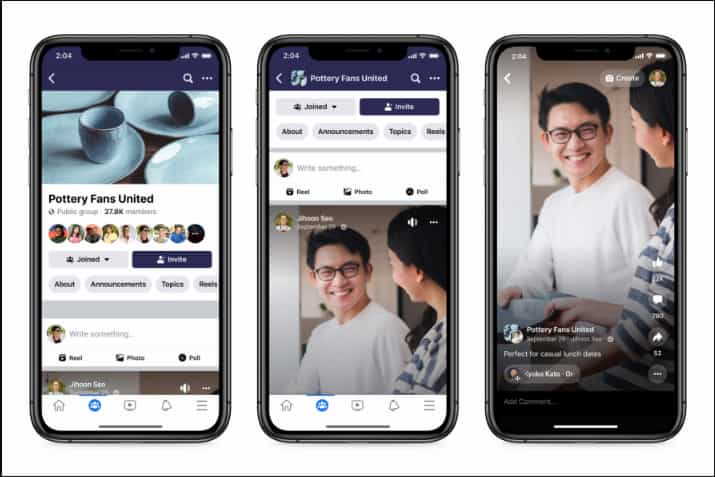
Don’t add too much text in the caption or have the majority of the video image covered by text. Avoid confusing your audience with ambiguous words. To ensure brand consistency, look at your terminology management document and use only the terms specified there in your captions.
When you incorporate these Facebook Reels’ best practices, your content will reach a broader audience. You’ll be ranked higher by the Facebook Reels algorithm, boosting your social media brand-building efforts.
Facebook Reels was launched with a few features to begin with. The majority of these features are similar to TikTok’s. They include:
- Audio: You can search for songs and sounds from a music library to incorporate into your video.
- AR effects: A library of several augmented reality overlays are available for you to use as you make Reels.
- Timer and countdown: These features enable you to record yourself hands-free without pressing the shutter button.
- Speed: This allows you to make slow-motion videos. You can also speed up or slow videos down to fit into the beat of the song you choose.
- Multi-clip: You can stitch several clips together into one reel. Do this either by recording them together or selecting them from your gallery.
A number of additional features that Facebook incorporated when taking Reels global are:
- Remix: Similar to TikTok’s Duet feature, Remix allows you to create your video alongside a Reel created by another person. You can include part of or the whole video from someone else.
- 60-second Reels: The reel length was extended by 30 seconds to reach the 60-second mark.
- Drafts: This allows you to create a reel and save it as a draft for use later.
- Video clipping: This will allow you to trim long-form videos, live videos or recorded interviews for publishing on Reels.
Everyone can view your Reels on Facebook, provided they are over 18 years old. Yes, this includes people who you don’t follow and who don’t follow you either. They can communicate directly with your brand using the comment and direct message tabs, which are provided on each reel.
Conclusion
The Facebook Reels algorithm is relatively new. Like any other algorithm, its main job is to show users the most relevant content. Facebook Reels are an attempt by Facebook to cater to the growing demand for short-form video content. To get your Reels to rank higher on Facebook, be sure to use Facebook’s best practices for Reels.
Shoot your videos in a vertical orientation to be mobile-friendly. Post high-quality videos with clear audio to engage your audience better. Don’t add too much text to your Reels. Add music and sound to your video to bring them to life.
As a final tip, use tools to scale your Facebook Reels efforts. Social media management tools, for instance, can help you schedule your Reels, post content in a timely manner, and boost posts with a few clicks. The tools can also give you comprehensive reports on how your campaigns are doing.
With this new knowledge on Facebook Reels, it’s now time to go all out and incorporate it into your content strategy.
Frequently Asked Questions








Protect Your Online Reputation
Every day you wait, negative content gets stronger. Talk to our experts about a custom strategy for your situation.
Get Your Free Analysis