
How to Locate Aggressors and Nefarious People Online
We created a fictitious company, a fake CEO, and a honeypot website to expose anonymous scammers impersonating a foreign government's Ministry of Finance.

- Use reverse email lookup tools like Spokeo to link an unknown email to a real identity.
- Modern email headers no longer reveal sender IPs — you must lure targets to a controlled webpage.
- Tracked email tools like ReadNotify can capture IP and location data, but are less reliable post-2021.
- Apple's Mail Privacy Protection pre-fetches tracking pixels, masking recipients' true IP addresses.
- Building a believable honeytrap — fake company, CEO, and social media — is key to drawing out bad actors.
When a scammer impersonated a country's Ministry of Finance to defraud startups, our team used reverse email lookup, tracked emails, and a honeytrap operation to identify and locate the perpetrators. Modern email platforms no longer expose sender IP addresses in headers, so capturing a real IP requires getting the target to visit a controlled webpage. This article details the specific tools and techniques used to unmask anonymous bad actors online.
How to Locate Aggressors and Nefarious People Online
-
1
Start with a reverse email lookup
If you have the perpetrator's email address, use a reverse email lookup tool like Spokeo to search online databases and social media profiles for identity clues. Be aware that domain registration records are far less useful since GDPR-compliant WHOIS redaction policies were implemented in 2018, which now hide personal registrant data for most domains. If the email is a one-time address with no linked accounts, you will need to move to other methods.
-
2
Send a tracked email to capture location data
Use a tracked email service like ReadNotify to capture the recipient's approximate geography and IP address when they open your message. Keep in mind that Apple's Mail Privacy Protection, introduced in 2021, causes many email clients to pre-fetch content including tracking pixels, which can mask the recipient's true IP. Deploy this method as one layer of your investigation rather than relying on it exclusively.
-
3
Build a convincing honeytrap identity
Create a fictitious company complete with a logo, an imaginary CEO with a full biography, and the appearance of legitimate financial backers supported by blog articles and bio pages. Translate all materials into the target's local language if needed to maximize credibility. Use a scheduling tool like Hootsuite to bulk-load social media posts in advance so accounts appear organically active rather than dormant.
-
4
Set up a honeytrap website
Build a convincing honeytrap site using a hosting service such as GoDaddy, HostGator, Squarespace, or Wix with a WordPress installation. The site should present your fake company, its CEO, and its backers in a way that passes a cursory inspection by the perpetrators. The goal is to create a controlled web property where you can log the IP address of any visitor.
-
5
Lure the perpetrator to your controlled page
Add a comment to any negative or fraudulent post online that includes a link leading to your honeytrap page, framed as an apology or an expression of interest. If the platform supports direct messaging, contact the offending poster that way, or use any email address they have provided. The objective is to get that specific individual — and ideally only that individual — to visit your controlled page so their IP address is logged.
-
6
Install IP tracking on a hidden page
Embed an IP-logging tool such as StatCounter on a specific hidden page of your honeytrap site so that visits are recorded without alerting the target. You can make only that single page invisible to general navigation while keeping the rest of the site publicly accessible and convincing. This isolates the tracking to the page your lure directs the perpetrator toward, reducing noise from unrelated visitors.
-
7
Filter results to identify the right visitor
Once visitors begin arriving at your honeytrap page, review the logged IP addresses and filter out traffic that does not match the expected profile of your target, such as wrong geographies or known bot activity. Cross-reference the remaining IPs against the context clues you have gathered, such as the country or city associated with the perpetrator's activity. A confirmed IP address can often be pinpointed to the city level or more precisely, giving you actionable information to hand over to the appropriate authorities.
How do you find out who anonymously posts information about you, your company, or your country online? We set up a fake company, imaginary CEO, social media, and fictitious backers to trap anonymous perpetrators posing as our clients’ Ministry of Finance. This is how we did it.
Our client, a country, had a problem with someone claiming to be a representative of their Ministry of Finance. This impersonator was offering financial incentives for startups willing to relocate — for a “small administrative fee” paid in advance. The scam damaged the country’s online reputation, so we sprang into action.
We led the perpetrators to believe we were interested parties located in a foreign country, helped locate the thieves, and turned the information over to our client. The problem was then resolved. We like to think black stealth helicopters were involved at some point.
How We Found the Bad Guys
The perpetrators used a Microsoft Outlook email address, so we had a starting point. Outlook and similar webmail services route through shared servers that are rarely near the sender’s actual location.
The key to identifying anonymous users is the IP address — the unique numerical identifier that shows where someone is accessing the internet from. An IP address can often pinpoint a user to the city level, and sometimes to within a few feet.
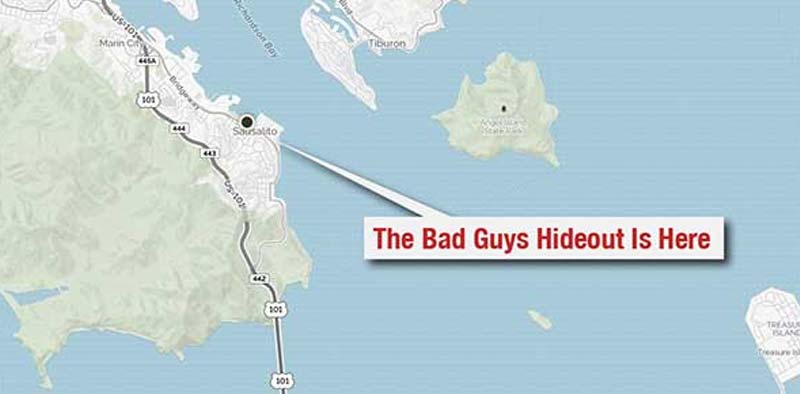
For example, the IP address shown on the map above identified my exact location outside a coffee shop in Sausalito, California, where I wrote this article.
Modern email platforms like Gmail and Outlook no longer include the sender’s true IP address in email headers. Gmail stripped sender IPs for all users in 2021, and Microsoft followed similar privacy practices. To capture a real IP address, you need the perpetrator to visit a website — ideally without knowing they’re doing it.
Get a Free Reputation Assessment
Find out what people see when they search for you online. No obligation — results in 24 hours.
Identifying Anonymous Senders
Find Who Owns an Email Address Using Reverse Email Lookup
If you only have an email address, a reverse email lookup may reveal the sender’s identity. We sometimes use Spokeo’s reverse email identification tool, which searches online databases including social media profiles.
It’s worth noting that domain registration records — once a useful data source — have become far less informative since ICANN implemented GDPR-compliant WHOIS redaction policies in 2018, which now hide personal registrant data for most domains. In our case, the bad guys were using a one-time email address with no connections to other accounts, leaving us no additional clues at that stage.
How to Get an IP Address Even If the Email Is Unlisted
If a reverse lookup yields nothing, consider sending a tracked email using a service like ReadNotify. It can capture approximate geography, IP address, and other details when the recipient opens the message.
This is one of the methods we used — though its reliability has declined. Since Apple introduced Mail Privacy Protection (MPP) in 2021, many email clients pre-fetch message content, including tracking pixels, masking the recipient’s true IP. These tools are still worth deploying, but they are no longer as dependable for IP identification as they once were.
For a broader look at how anonymous attackers operate, see our guide on how to identify someone who is attacking you online.
Is Someone Damaging Your Reputation Online?
Whether it's an anonymous attacker, fake reviews, or impersonation, RepX has the tools and expertise to identify the source and protect your brand.
Building the Honeytrap
Building a Juicy Target

We developed a false company name, a logo, and an imaginary CEO with a complete biography — including fictitious children. We also created the appearance of financial backers, complete with blog articles, bio pages, and more, to convince the perpetrators we were a real target.
We made the backstory convincing enough that authors wrote glowing stories about our fake company. Because the fake company was set in a foreign country, we translated everything into the local language. We even kept the social media profiles active using Hootsuite to bulk-schedule posts in advance, so the accounts appeared organically active without constant attention.
Inviting Bad People Over for Tea
If tracked emails don’t yield results, you may be able to get perpetrators to visit a honeytrap website that reveals their IP address. One approach is to add a comment to a negative post online, including a link to an “apology” or other lure that leads to your honeytrap page.
If the platform allows direct messaging, contact the offending poster that way. If they provided an email address, use it. The goal is to get that specific person — and ideally only that person — to visit a controlled page where you can log their IP.
Building an Electronic Mousetrap
To trap our thieves, we set up a website for the fake company in yet another foreign country, along with accounts on X (formerly Twitter), Facebook, and LinkedIn. A cursory look by the bad guys revealed a CEO, a technology startup, and apparent financial backers — all in both English and the local language.
You can build your own honeytrap site using a hosting service like GoDaddy with a WordPress installation, or through platforms like HostGator, Squarespace, or Wix. Each offers a quick path to a convincing-looking site without deep technical expertise.
Anyone who visits the blog will arrive from an IP address — and unless they are hiding it with a VPN, you may be able to determine their general location. That caveat matters: VPN usage has grown dramatically, with an estimated 31–35% of internet users globally using one regularly as of 2024, according to GWI. IP-based identification is a useful signal, but it is not foolproof.
of internet users globally use a VPN regularly, making IP-based identification less reliable than it once was
GWI
Track IP addresses with a tool like StatCounter, which logs the IP of each visitor. Note that Google Analytics 4 anonymizes IP addresses by default, so it won’t surface individual visitor IPs. For honeytrap purposes, a dedicated visitor-logging tool like StatCounter is the more practical choice.
Making Your Honeytrap Site Invisible
Making the Entire Site Invisible
NoIndex tags prevent search engines from displaying a site in results, but there are nuances worth understanding. A noindex tag stops a page from appearing in search results, but it does not prevent crawlers from visiting — for that, you also need a robots.txt disallow rule.
Be aware that if Google is blocked from crawling a page via robots.txt, it may not be able to read the noindex tag at all. Using both in combination is the safest approach. Also ensure your WordPress site does not automatically add new pages to its XML sitemap, which would signal their existence to search engines.
Making a Single Page Invisible
Alternatively, make only a single hidden page invisible and place the StatCounter code there. Build that page with plain HTML rather than WordPress to ensure it isn’t linked to anything else. This gives you a standalone page — your “apology” or other lure — that exists in a vacuum and is visited only by your target.
How We Filtered Out the Wrong Users
In our Ministry of Finance case, we made the site look real while invisibly turning search engine robots away. That narrowed visitors down to a handful we had lured through online comments and email responses.
The website alone wasn’t what identified the perpetrators — that came from the email tracking described above. The site served to verify us as convincing targets. But the IP addresses logged on the site matched those from the tracked emails, giving us two independent data points to confirm the identity.
This kind of reputational attack — where bad actors impersonate a legitimate organization — is one of the more damaging scenarios covered in our ultimate guide to crisis management and reputation repair. You may also want to review our overview of reputational risk management to build defenses before an incident occurs.
In the End, We Found Them
We identified the perpetrators’ email address, IP address, location, language, mailing information, and more. We turned everything over to the government that hired us, and the problem was resolved. For a worked example, see our case study on reputation management across five European countries.
This project was an example of international online reputation management at its most creative — combining content strategy, web development, SEO, email tracking, social media, foreign language translation, and some luck. All working together to make the world a better place.
If you’re dealing with a damaged reputation as a result of impersonation or online attacks, our guide on how to rebuild your reputation after a crisis offers practical next steps. For ongoing protection, see our overview of how to protect your online reputation.
Read This: Changing Google’s Knowledge Graph
Frequently Asked Questions








Protect Your Online Reputation
Every day you wait, negative content gets stronger. Talk to our experts about a custom strategy for your situation.
Get Your Free Analysis