
How to Access and Use Results About You: Step By Step With Pictures
Google's Results About You tool lets you monitor and request removal of sensitive personal information appearing in search results — here's exactly how to use it.

- Access Results About You at myaccount.google.com while logged into your Google account
- Google can remove SSNs, bank account numbers, medical records, and personal contact info from Search
- Google will not always remove results it determines serve the public interest
- Removing a result from Google Search does not delete the content from the original website
- Contact the website owner directly if you need the information fully removed from the internet
Results About You is a free Google tool that lets you request removal of sensitive personal information from Google Search results. It can remove data like Social Security numbers, bank account details, medical records, and personal contact information. However, it does not delete content from the internet entirely, and removals are not guaranteed if Google determines the information is in the public interest.
How to Access and Use Google's Results About You Tool
-
1
Understand what content can be removed
Results About You is a free Google tool that lets you manage personal information appearing in Google Search results. It can help remove sensitive data such as Social Security numbers, bank account numbers, credit card numbers, ID document images, medical records, and personal contact information. Google evaluates each request individually and may preserve access to information it determines to be in the public interest.
-
2
Access the Results About You tool
Visit the Results About You page through your Google Account settings and make sure you are logged into your Google account before proceeding. Click the blue Get Started button, then click Next a couple of times to move through the initial setup screens.
-
3
Enter your personal information for Google to search
Add your name and any other relevant personal details so Google can search for your existing information in its search results. Google will not add this input to search results or use it to personalize your future searches — it is used solely to locate your existing personal information.
-
4
Set up removal notifications
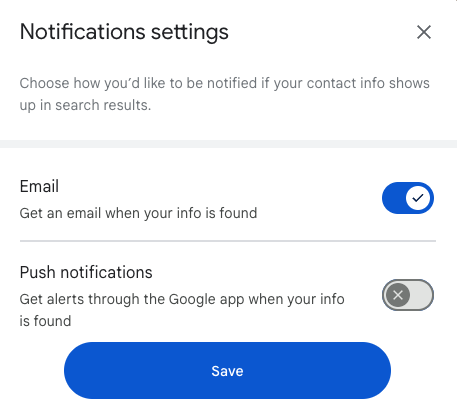
Choose how you would like to be contacted when information about you is found in Google Search results. Google will then begin scanning its search results, which typically takes a few hours, and will notify you when the results are ready.
-
5
Review the results Google finds
Once the search is complete, your results will appear on screen under 'Results found.' Review each result to identify which ones contain personal information you want removed.
-
6
Request removal of results
For any result containing your personal information, submit a removal request directly through the tool. You can monitor the status of each request under the 'Removal Requests' section of the tool.
-
7
Contact website owners for complete removal
Removing a result from Google Search does not delete the content from the internet — it will likely still be accessible on the original website or through other search engines. To ensure complete removal, contact the website owner directly and request that they remove your personal information from their site.
-
8
Remove any remaining Google search results
After using Results About You, there may still be unwanted search results about you that the tool did not address. Research additional methods for removing search results from Google to address any remaining content that concerns you.
Results About You is a free tool provided by Google that allows you to manage and control the information about yourself that appears in Google Search results. You cannot use Results About You to completely remove yourself from Google search. But you can use it to remove certain kinds of information.
Related: learn how to check your digital footprint step by step.
Get a Free Reputation Assessment
Find out what people see when they search for you online. No obligation — results in 24 hours.
Types of Content Google Results About You May Remove
- Confidential government-issued ID numbers:
- US Social Security Numbers
- Argentine Single Tax Identification Numbers
- Brazil Cadastro de pessoas Físicas
- Korea Resident Registration Number
- China Resident Identity Card
- Bank account numbers:
- Exposed bank account numbers can be requested for removal.
- Credit card numbers:
- Publicly available credit card numbers can be requested for removal.
- Images of handwritten signatures:
- Accessible images of handwritten signatures can be requested for removal.
- Images of ID docs:
- Driver’s licenses or passport images can be requested for removal.
- Highly personal, restricted, and official records:
- Medical records, legal documents, or highly personal official information can be requested for removal.
- Personal contact info:
- Physical addresses, phone numbers, and email addresses can be requested for removal.
- Confidential login credentials:
- Publicly accessible login credentials can be requested for removal.
Google considers a number of factors when evaluating personal content removal requests. They may remove personal information that can create risks, like identity theft or financial fraud. But Google will generally try to preserve access to information if it is determined to be of public interest.
How to Access and Use Results About You
Accessing Google’s Results About You tool is straightforward and can be done through a web browser.
- Go to your Google Account settings by visiting this link: Results About You. Make sure you are logged into Google when you do this. Here is what the screen looks like (in English):

- Click the blue Get Started button, then click Next a couple of times.

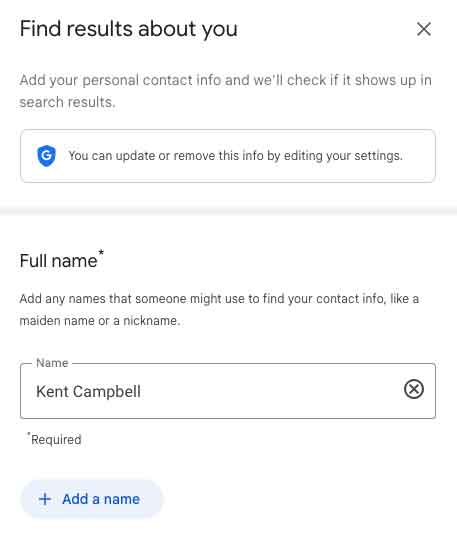
- Next, you will add your name and other information for Google to search. Note: Google will not add the information you input to search results; it’s just searching for your existing information in search results (Google only). Google will not use the information you put in for personalized search results either.

- Google will then ask how you would like to be contacted when information about you is found. The screen looks like this:

- Google will then “take a look” to see what information is shown about you in Google search results. It will take a few hours to do the search. They’ll notify you when it’s ready.
- Once Google has performed the search for your personal information, the results will populate on the next screen under “Results found.”
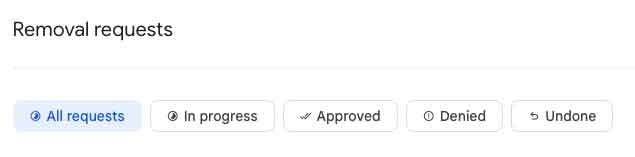
- The process: If Google finds results that have your personal information, you can request removal. Google will review your request. You can see how the process of removal is going under “Removal Requests.”

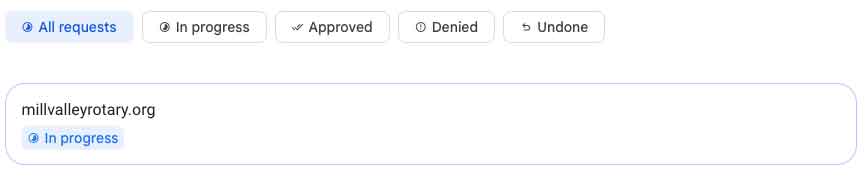
- Google will look for results that include your personal information, and after a few hours, a list will be presented to you. At that point, you can ask for a result to be removed. Once you do, Google will show you which results are in the process of being removed. It looks like this:


Partial Deletion of Google’s Information About You
It’s important to note that removing a search result from Google Search results using Results About You does not delete the content from the internet entirely. The content will almost certainly still be accessible on the original website or through other search engines.
If you want to ensure complete removal, you should contact the website owner directly to request the removal of your information.
Final Step
Once you have removed what personal information you can, your next step is to work to remove any remaining search results from Google. For that, read this detailed article about the fastest ways to remove something from Google: Removing Search Results from Google
Sources
- Google’s Results About You: Manage Your Personal Information
- How to Remove Information You Don’t Want on Google
- Google’s Personal Content Removal Policies
- Google Search Console: Remove Outdated Conten
About the author
Kent Campbell is the chief strategist for Reputation X, an award-winning reputation management agency based in California. Kent has over 15 years of experience with SEO reputation management, Wikipedia editing, review management, and strategy. Kent has helped celebrities, leaders, executives, and marketing professionals improve the way they are seen online. Kent writes about reputation, SEO, Wikipedia, and PR-related topics, and is an expert witness for reputation-related legal matters. You can find Kent’s biography here.
Frequently Asked Questions








Protect Your Online Reputation
Every day you wait, negative content gets stronger. Talk to our experts about a custom strategy for your situation.
Get Your Free Analysis