
IA_Archiver: How to Block Archive.Org and Erase Web History
Discover how ia_archiver works, why millions of websites block it, and exactly what steps you can take to control your site's archived history online.

- The method that works today: email info@archive.org with the exact URLs you want removed from the Wayback Machine
- The old robots.txt directive 'User-agent: ia_archiver / Disallow: /' is no longer dependable
- Alexa Internet, which operated the ia_archiver crawler, was shut down by Amazon on May 1, 2022, so that directive names a crawler that no longer runs
- ia_archiver was Alexa's crawler, not the Internet Archive's — Alexa's early crawls seeded the archive, but the two are distinct
- Archived pages increasingly feed AI models and answer engines, which raises the stakes for getting material removed
To remove pages from the Wayback Machine, email info@archive.org with the exact URLs — that is the route we have confirmed works. The old robots.txt directive naming ia_archiver is no longer dependable: Alexa Internet, which operated that crawler, was shut down by Amazon on May 1, 2022. ia_archiver was Alexa's crawler rather than the Internet Archive's, though Alexa's early web crawls seeded the archive. Other commonly suggested methods — an archive.org_bot directive, .htaccess blocking, and DMCA notices — remain unverified.
To remove or block your material from the Wayback Machine today, the reliable route is to email a removal request to info@archive.org with the exact URLs you want taken down. The old robots.txt trick that names ia_archiver is no longer dependable, because the crawler it points at has not run since 2022.
That leaves a lot of site owners following advice that quietly stopped being true. Below is what still works, what probably doesn’t, why the original method broke, and what web archiving now means for your privacy as archived pages increasingly feed AI systems.
What is ia_archiver?
The ia_archiver, often misunderstood as part of the Internet Archive, is actually a user agent operated by Alexa Internet. Originally developed by the same creators of the Internet Archive, this tool has since evolved to serve Alexa’s specific needs, primarily focusing on gathering data for website SEO analysis and supporting Alexa’s web traffic reporting services.
Websites may choose to block ia_archiver, which is a fairly straightforward process that we will go over later in the article. In fact, In some large‑site robots.txt analyses, ia_archiver ranks among the top ten most‑blocked bots, and one 2025 report cites it as the 7th most blocked.”.
Overview
Ia_archiver is a web crawler that navigates the internet to collect and index web page information. It plays a large role in helping Alexa Internet analyze and report on website popularity and traffic. This bot identifies itself via a user-agent string and adheres to the robots.txt exclusion standard, allowing website administrators to control its access.
Purpose
The primary purpose of ia_archiver is to assist in compiling data that enhances Alexa’s internet traffic reports and SEO analyses. Websites can manage its crawling activity through the robots.txt file, specifying whether to allow or block this bot, depending on their preference to contribute to or opt-out from Alexa’s data aggregation efforts. This selective accessibility helps websites manage bandwidth usage and maintain control over their content’s online visibility.
How ia_archiver Works
Data Collection
ia_archiver was the crawler associated with Alexa Internet, whose early web crawls seeded the Internet Archive — the two are historically linked but distinct. The crawler is not known to be AI-related, but it functions effectively in data collection. It navigates the web, visiting websites to collect and index information.
Get a Free Reputation Assessment
Find out what people see when they search for you online. No obligation — results in 24 hours.
This data is used to create snapshots of websites, which are archived and can be accessed later via the Wayback Machine. The archiver adheres to the robots.txt standard, allowing website owners to manage its access by either permitting or blocking its crawls. For instance, adding “User-agent: ia_archiver\nDisallow: /” to a site’s robots.txt will instruct ia_archiver to avoid archiving that site.
Frequency of Visits
The frequency with which ia_archiver visits websites varies. Popular sites are often visited more frequently due to their higher likelihood of being queried in the historical database. The snapshots taken during these visits are spaced out to ensure usefulness, with intervals that can range from several weeks to years, depending on the site’s popularity and changes. This keeps the archive reasonably current without overloading any single site with requests.
Removing ia_archiver From Your Website
|
The Internet Archive is not interested in offering access to websites or other Internet documents whose authors do not want their materials in the collection. To remove your site from the Wayback Machine, place a robots.txt file at the top level of your site (e.g. www.yourdomain.com/robots.txt). The robots.txt file will do two things:
To exclude the Internet Archive’s crawler (and remove documents from the Wayback Machine) while allowing all other robots to crawl your site, your robots.txt file should say:
|
Ironically, you can still see the defunct exclusion page on Wayback machine.
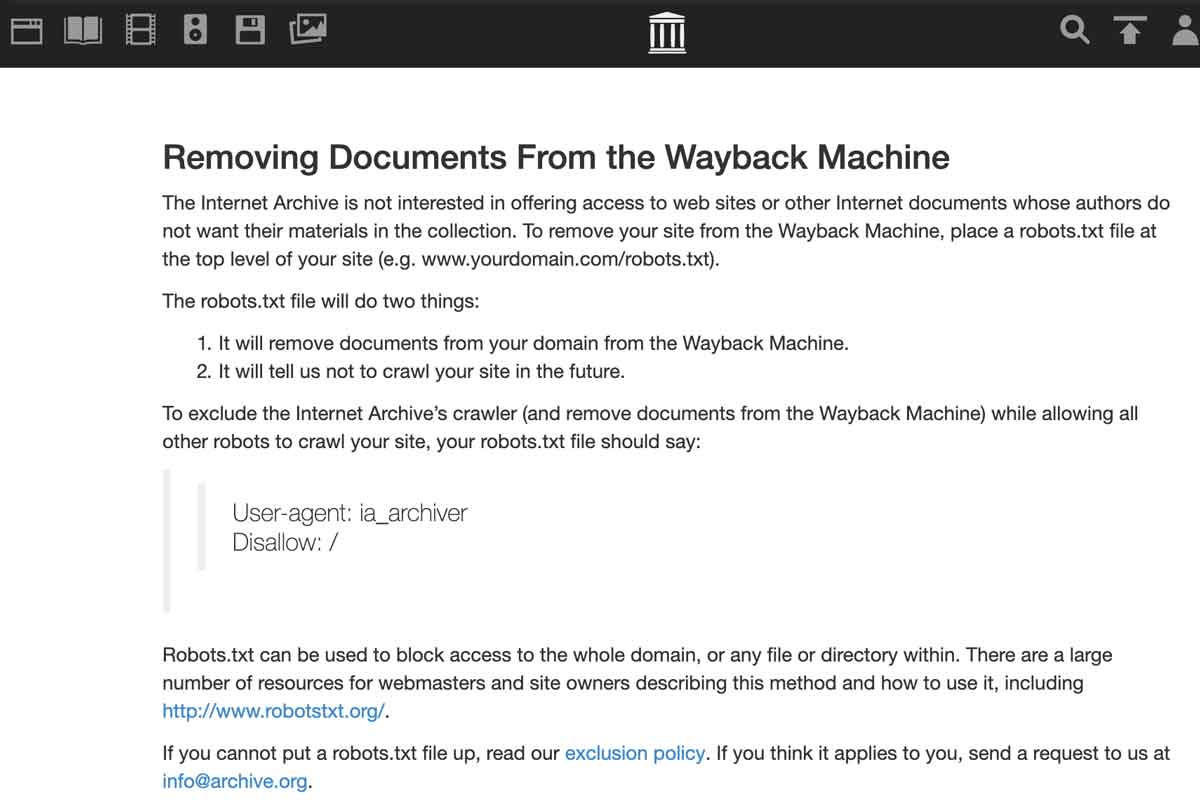
Ia_archiver method used to work
So you see, the correct way to stop archive.org from copying your site was to add ia_archiver to the robots.txt disallow file, and it no longer is. Since only Webmasters are supposed to have editing access to a site’s robots.txt file, this seemed like a pretty good way to do it. But then archive.org quietly changed things, and everyone’s content started to be scraped again. Bummer.
There is a second reason the old directive no longer helps. Alexa Internet, which operated the ia_archiver user agent, was shut down by Amazon on May 1, 2022 (“Alexa Internet,” Wikipedia). A robots.txt line naming ia_archiver now addresses a crawler that no longer operates, which is why adding it changes nothing.
If ia_archiver no longer works, what does?
According to archive.org, the best way to remove a site is to send an email to info@archive.org and request they remove it. The exact language they use is:
How can I exclude or remove my site’s pages from the Wayback Machine? You can send an email request for us to review to info@archive.org with the URL (web address) in the text of your message.
But when you send them an email with the requested information, there is no reply, at least not immediately. We tested it and found that there is, in fact no auto-reply, so it seems a bit like shouting into a hole in the ground.
Why archive.org would want to deal with this manually instead of just letting Webmasters make their own decisions about copying their content using a robots.txt file is a mystery. It seems a rather tedious solution if it even works. Some say it works like a charm; others say they’ve sent multiple messages to the email address and have gotten no response weeks or months later.
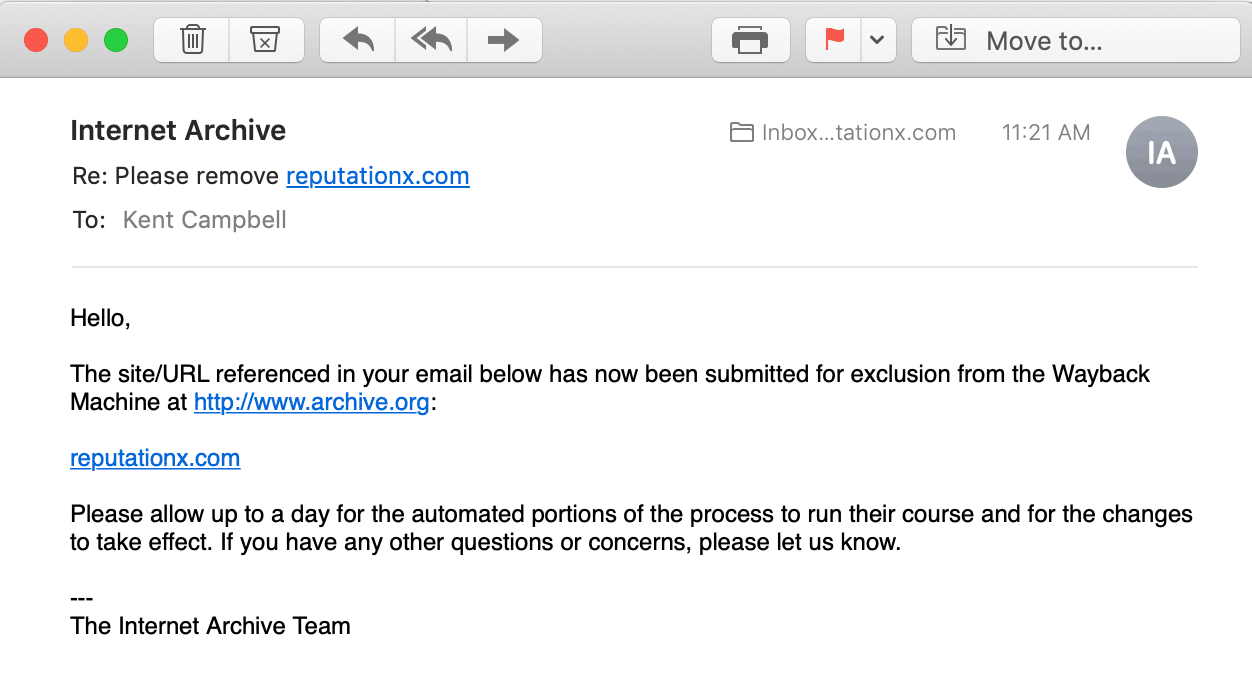
An email to Internet Archive *does* work
We emailed the Internet Archive. They responded to us about a week later. Below is the email they sent.
Why removal matters more now
Archived pages are increasingly scraped as training and reference material for AI models and answer engines, which means a page you believed was gone can resurface inside an AI-generated answer long after you took it down. That shifts the stakes: removing material from a public archive is no longer housekeeping for your search results, it limits what future systems can repeat about you. If a page is worth removing from the live web, it is worth requesting its removal from the archive too.
Methods that may or may not work
Send the email request first — it is the only route here we have confirmed. The approaches below are widely repeated, but we have not been able to verify that any of them work, so treat them as possibilities rather than instructions.
Some say that archive.org_bot may work
Some users suggest switching out the old ia_archiver disallow for a new archive.org_bot disallow. We haven’t been able to verify if this works yet. Many say it doesn’t. If you want to try it, here is the robots.txt info you’ll need:
User-agent: archive.org_botDisallow: /
You may be able to use your .htaccess file to block archive.org
The Apache web server can use an .htaccess file to store directives. You can find instructions on how to do it here. You’ll need the IP addresses of the archiver bot. You can find the IP addresses of the Archive.org bots here.
We haven’t tried this method, and you’ll need to be a little bit technical to do it. As with anything at the server level, we counsel people to be aware of their limits and to hire a pro if you can’t comfortably manipulate things at the server level.
Is it illegal for archive.org to scrape without permission?
According to the Electronic Frontier Foundation it is perfectly legal to scrape publicly available content. They cite a Washington DC case and say:
automated tools to access publicly available information on the open web is not a computer crime—even when a website bans automated access in its terms of service.
This even applies if the Terms of Service say explicitly that a user cannot scrape the site. LinkedIn once brought a lawsuit against people scraping their site in violation of their terms of service – and lost. You can find an article about the case here. It says:
[The ruling] holds that federal anti-hacking law isn’t triggered by scraping a website, even if the website owner—LinkedIn in this case—explicitly asks for the scraping to stop.
Using a DMCA notice to remove archive.org
You may be able to create a DMCA takedown notice using a generator like this one. And then email the notice to the nice folks at info@archive.org.
We haven’t finished verifying whether this works or not, but we will update this blog post when we do.
Thanks for reading, and good luck!
Legal Implications
Blocking ia_archiver, or any web crawler, raises certain legal considerations. While it’s within a website owner’s rights to control access to their site, it’s essential to understand the broader implications. The use of robots.txt for controlling access is widely recognized and respected by most legitimate web crawlers.
However, some archival services may not honor these directives, as seen with the Internet Archive’s approach to certain government and military sites. Thus, while blocking via robots.txt and .htaccess is generally effective, it may not guarantee complete exclusion from all web archivers. For absolute assurance, directly contacting the service provider, like sending an email to info@archive.org, is recommended to request removal from their records.
Frequently Asked Questions









Protect Your Online Reputation
Every day you wait, negative content gets stronger. Talk to our experts about a custom strategy for your situation.
Get Your Free Analysis