
How to Get Started as a Wikipedia Editor
Building a Wikipedia editor account takes patience, but the influence you gain over one of the web's most-visited sites makes every edit worth it.


- Read Wikipedia's Five Pillars and Getting Started guide before creating your account.
- Choose your username carefully — it's public, permanent, and tied to every edit you make.
- Autoconfirmed status requires 4 days and 10 edits; use that time to edit topics you know well.
- Extended confirmed status (30 days, 500 edits) unlocks editing of the most protected articles.
- Joining a WikiProject connects you with editors in your niche and surfaces articles that need work.
Building a credible Wikipedia editor account takes time and deliberate effort, but the payoff is meaningful influence over one of the web's most-visited sites. This guide walks through seven steps—from reading Wikipedia's core policies to finding your editing niche—that set you up to make edits that stick. Because Wikipedia consistently ranks at the top of search results, a well-established editor account is a practical asset for reputation and marketing goals.
How to Get Started as a Wikipedia Editor
-
1
Learn Wikipedia's contribution guidelines
Before creating an account, read Wikipedia's Contributing to Wikipedia guide, Getting Started article, and Five Pillars. These resources explain the platform's format, protocols, and community expectations. Understanding these foundations will help ensure your edits are accepted and your account remains in good standing.
-
2
Choose a username and create your account
Select a username that reflects your identity and the topics you plan to edit, since it will appear on every article you contribute to. Keep in mind that all usernames are public and cannot be changed once set. Create your account through Wikipedia's registration page to get started.
-
3
Find your editing niche
Identify topics you are already knowledgeable about, as these are the areas where your contributions will be most credible and useful. Explore WikiProjects and Portals related to those topics to see where editors collaborate on articles that need work. Joining a relevant project allows you to engage with a community of editors who share your interests.
-
4
Complete the Wikipedia Adventure
Wikipedia offers a fun, interactive training game that walks new editors through the entire editing process, covering skills, tips, advice, and support. In about an hour, you can build foundational editing skills and earn badges to display on your user page. For a more structured introduction, Wikipedia also provides a formal training library.
-
5
Set up your user page
Your user page acts as your personal About page on Wikipedia. Include a brief bio, any relevant background or expertise, and your editing goals. A well-crafted user page helps other editors understand who you are and builds credibility within the community.
-
6
Make your first edit
Rather than immediately creating new articles, start with smaller, lower-risk edits to build your editing history. Good starting points include fixing spelling or grammar mistakes, adding references from reliable sources, inserting relevant links, or improving infoboxes with accurate facts and statistics. Building a track record with quality small edits increases the likelihood that your future contributions will stick.
-
7
Connect with the editor community
Wikipedia's Teahouse is a welcoming message board where new editors can ask questions and get guidance from experienced contributors. You can also engage with other editors through Talk pages associated with individual articles. Building relationships within the community helps you learn faster and increases your credibility as an editor.
An established Wikipedia editor holds a lot of power on the platform.
Wikipedia editors in good standing enjoy a more significant influence because they can make changes that are way more likely to stick. Since Wikipedia routinely ranks in the top positions in SERPS, creating and maintaining an editor account is a valuable addition to your marketing initiatives.
We’re going to show you how to establish a Wikipedia editor account, which will open up your ability to edit Wikipedia entries for most companies, brands, and people.
Caveats: The method outlined in this post is long, tedious, and highly manual. The success of this process is tied to the amount of time and effort you dedicate to building your Wikipedia account.
Why Create a Wikipedia Editing Account?
Creating a Wikipedia editor account is the first step to establishing your reputation on the platform.
Once you’ve created an account, your contributions will be associated with your username, allowing others to trace your goodwill (and bad faith) edits.
Benefits of creating a Wikipedia account
- Hide your computer’s IP address from the general public when editing
- Establish an online identity that will be recognized among other editors
- A running log of all your contributions made on Wikipedia
- The ability to track articles of interest via your watchlist
- The ability to communicate with other Wikipedia editors
- Get automatic notifications when someone pings you or wikilinks your user ID
After about four days and after making at least 10 edits, you will be allowed to:
- Gain permissions
- Edit semi-protected articles
- Start new articles, rename articles, or upload images.
And once you have had an account for 30 days and have made at least 500 edits, you will be able to edit extended protected articles.
Does Your Company Qualify for a Wikipedia Page?
Run a free notability check. Our analysis engine reviews real press coverage against Wikipedia's actual notability standards and emails you a detailed report — no sales call required.
Your notability check is running
We're analyzing coverage of right now — it usually takes 10–15 minutes. Your report link will arrive from noreply@reputationx.com; check spam if you don't see it. Keep reading — nothing else to do here.
7 Steps to Create a Wikipedia Editor Account
Anyone can edit Wikipedia. But not everyone can make edits that stick. Make sure you’re setting yourself up to make edits that stick by creating a strong editor account.
We’re here to help you seamlessly integrate into the world of Wikipedia.
We’ve put together a seven-step program to get you on your way to shaping the online encyclopedia known as Wikipedia:
Step 1: Acquaint yourself with Wikipedia’s contribution processes
This article contains everything you need to know about Wikipedia’s format, contribution guidelines, and protocols. Give it a read before getting started to ensure this is something you really want to do.
Here are two more articles worth reading before creating your account:
Step 2: Choose your user name and create your account
You will need a user name, which will be how people know you on Wikipedia. Choose a user name that best reflects you and your niche, as it will appear on all articles that you edit and will serve as your identity on Wikipedia. All user names are public and cannot be changed later.
Step 3: Find your editing niche or niches
Think about a topic you’re already knowledgeable about. This is where you’ll want to spend the most time on Wikipedia.
There are Wikiprojects and Portals that contain information on all the various topics you can contribute to. Editors use these projects to discuss articles that need work, new articles to add, and more.
Once you’ve found a project that resonates with you, you can join the project and start collaborating with other editors.
Step 4: Take the Wikipedia Adventure
Wikipedia has a fun, interactive game that walks new editors through the entire editing process, including:
- Skills
- Tips
- Advice
- Support
In about an hour, you can jump-start your editing skills and be on your way to making real edits on articles. You’ll also collect a few badges for your user article, and later in your Wikipedia editing career, you can earn Barnstars (which are cool).
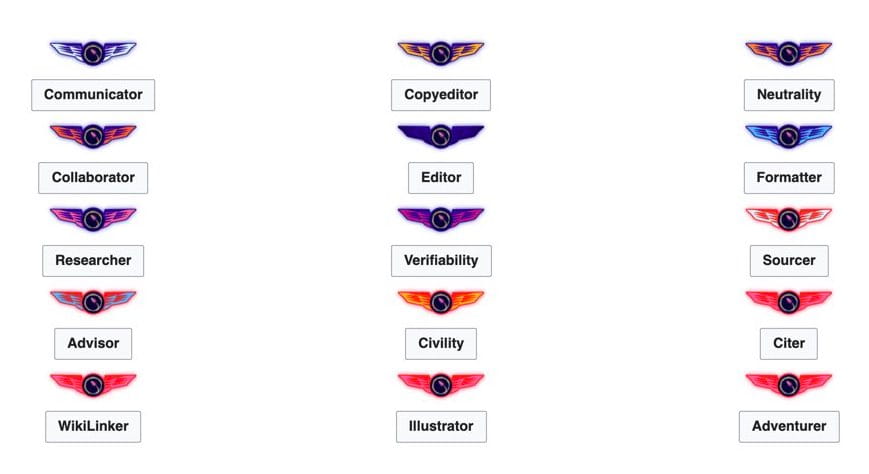
If you’re looking for a more formal introduction to Wikipedia, check out this training library.
Step 5: Introduce yourself
Set up your user article. This is essentially your About article on Wikipedia.
Include things like a brief bio, any background or expertise you’d like to highlight, and your editing goals.
Step 6: Make your first edit
Once you’ve researched the platform and set up your account, it’s time to make your first edit!
Although it may be tempting to dive right in and create a new Wikipedia article, we recommend starting small first.
Established editors vet new Wikipedia articles, often making it difficult to publish them. Read this before submitting a new Wikipedia article.
Instead, consider starting with the following types of edits:
- Copyedits: Look for spelling or grammar mistakes. Tools like Grammarly can help with this.
- Add references: Wikipedia requires references from reliable sources. If you add any information to an article, make sure to include a reference to increase the chances of your edit sticking. There are also plenty of articles that could benefit from additional references. Add links as necessary.
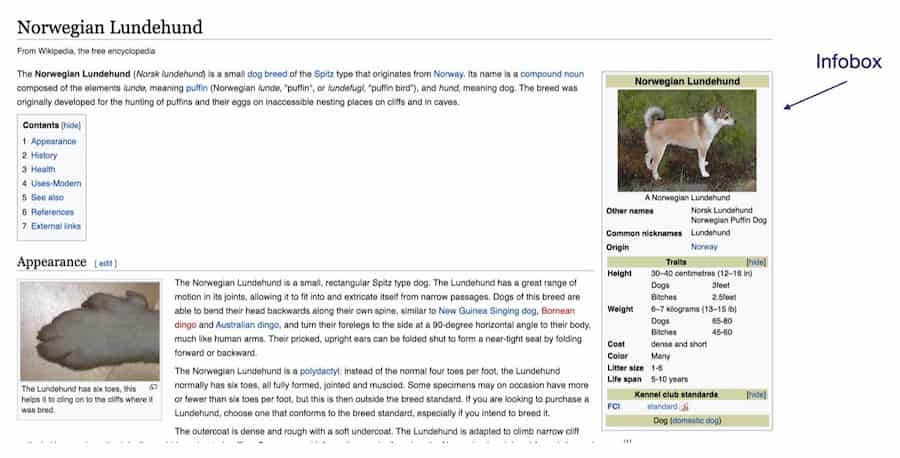
- Add infoboxes: Infoboxes contain important facts and statistics about the article. They provide summary information at a glance. Adding or improving infoboxes is an easy way to update articles.
Step 7: Connect with editors on Talk or Teahouse
Wikipedia editing may seem intimidating, but there are plenty of resources to connect with your community of editors. The Wikipedia Teahouse is a message board where you can ask questions to get help with using and editing Wikipedia.
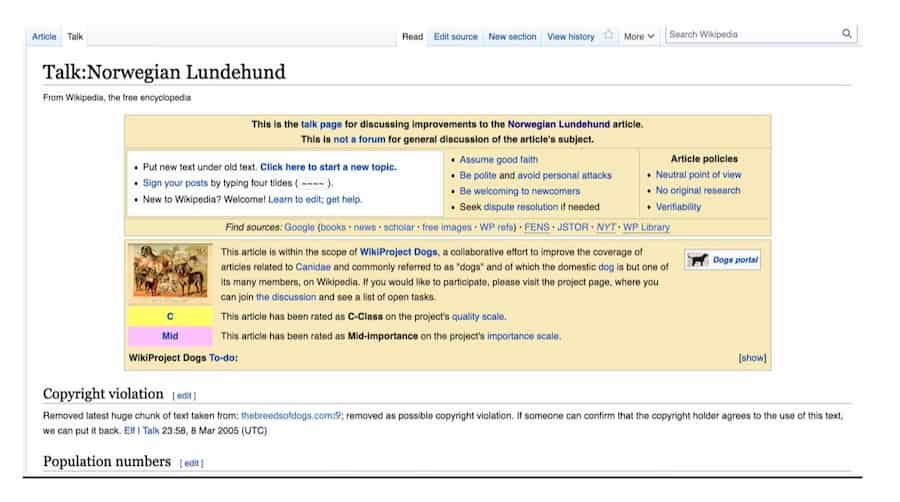
You can also communicate with other editors directly on any article’s Talk article. The Talk article is a place to ask questions about any content gaps for a particular article.
Types of Wikipedia Editors
As you move up the editor ranks, you gain more power to make bigger changes. Most editors use this power for good, but some have agendas. There are currently more than 127 million Wikipedia accounts across all of the language editions, about 600,000 of them are active in an average month, so some bias will seep in.
Here are the types of Wikipedia editors and their permissions:
- Unregistered (IP or not logged in) users: Can edit any articles that are not protected. Cannot upload files or images, and must answer a CAPTCHA when adding external links to an article.
- Registered (new) users: This is the entry-level for editors who created an account. Registered users benefit from tracking their contributions, adding articles to their watchlist, creating a user article, and emailing other users.
- Autoconfirmed and confirmed users: This next level of editors includes anyone who has an account at least four days old and has made at least 10 edits to Wikipedia. Autoconfirmed users can (in most cases) create articles, move articles, edit semi-protected articles, and upload files.
- Extended confirmed users: An editor becomes extended confirmed automatically when the account is both at least 30 days old and has made at least 500 edits. These editors may edit and create articles that are under extended confirmed protection. The English Wikipedia also enables editors to use the Content Translation tool. There are currently well over 100,000 extended confirmed users on Wikipedia (a number that continues to grow).
- Administrators: “Admins” are editors who enjoy special capabilities. They must apply for the role and are voted by the community of editors. Admins have exclusive access to a number of tools such as article deletion, article protection, blocking and unblocking users, and the ability to edit fully protected articles. There are about 810 English Wikipedia administrators — a number that has declined in recent years.
- Bureaucrats: Bureaucrats are especially trusted editors who can add users to the bureaucrat group, and add users to and remove users from the administrator, bot, and interface administrator user groups. At the time of this writing, there are just 19 bureaucrats.
Wrapping Up
Creating a Wikipedia account is a great step if you’re looking to increase your influence on Wikipedia and the online world. Since Wikipedia ranks for virtually all search queries and appears in Google’s featured snippets 10 times more than any other website, it has the potential to shape public opinion.
An editor account unlocks many opportunities, including the ability to:
- Establish an online identity
- Track your edits
- Communicate with other editors
You may use your account to:
- Correct factual inaccuracies
- Add valuable content
- Refine existing entries
Before you dive in, read Wikipedia’s core content policies — especially verifiability, neutral point of view, and no original research. These three rules come up constantly in editing disputes, and knowing them early will save you a lot of headaches.
Finally, do what we at Reputation X do: Never make an edit that doesn’t objectively improve Wikipedia.
About the author
Brianne Schaer is a Writer and Editor for Reputation X, an award-winning online reputation management services agency based in California. Brianne has more than seven years of experience creating powerful stories, how-to documentation, SEO articles, and Wikipedia content for brands and individuals. When she’s not battling AI content bots, she is cruising around town in her Karmann Ghia. You can see more of her articles here and here.
–
Frequently Asked Questions







Protect Your Online Reputation
Every day you wait, negative content gets stronger. Talk to our experts about a custom strategy for your situation.
Get Your Free Analysis