
Why and How to Remove Yourself from Online Data Aggregators
Your personal data is being bought and sold without your consent — here's exactly how to take it back from the biggest data brokers online.

- Use each platform's official opt-out page and confirm removal via the verification email or code they send.
- Intelius's suppression tool covers multiple PeopleConnect properties, including TruthFinder and Instant Checkmate, in one request.
- Ancestry.com requires a formal privacy center request for CCPA/GDPR-compliant data deletion.
- Data aggregators can re-list your information after removal, so schedule opt-out audits every 3-6 months.
- Removing your data from one aggregator does not remove it from others — each site requires a separate opt-out.
Data aggregators like Spokeo, Radaris, PeopleFinders, Intelius, and Ancestry.com collect and sell your personal information without your consent. This guide provides step-by-step opt-out instructions for each platform to help you reduce your digital footprint. Because these sites can re-list your data after removal, repeat checks every 3-6 months are essential for lasting privacy.
How to Remove Yourself from Online Data Aggregators
-
1
Understand what data aggregators collect
Data aggregators are companies that gather publicly available data from sources like social networks, public records, and online platforms. They consolidate this data into detailed personal profiles and offer them to the public, often for a fee. Knowing this helps you understand why proactive removal is essential to protecting your privacy.
-
2
Remove your data from Spokeo
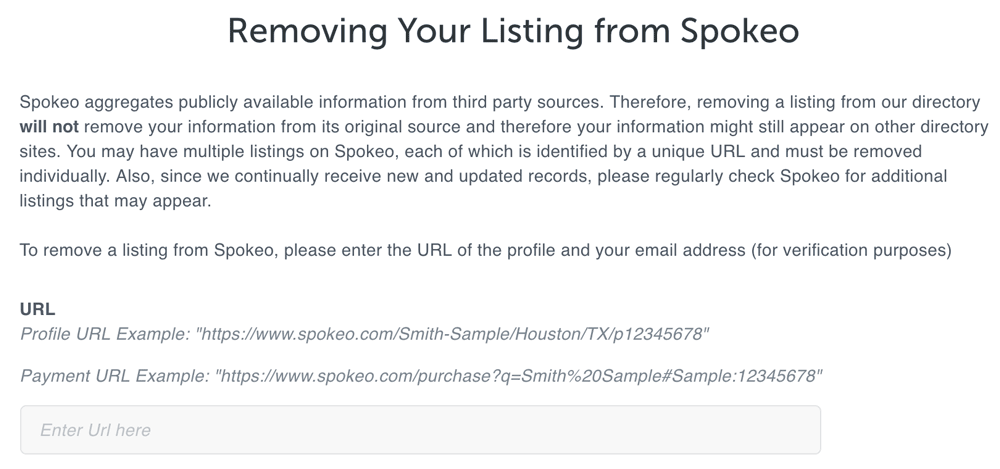
Go to the Spokeo opt-out page and search for your name. Once you locate your listing, copy the URL of the page containing your details and paste it into the opt-out form along with your email address. Check your email to confirm the removal request, and your information should be removed within a few days.
-
3
De-list yourself from Radaris
Navigate to the Radaris homepage, search for your listing, and click 'Full Profile' next to your name. Go to Radaris's privacy control page or use the direct opt-out form, then create an account to receive a verification code via text. After verifying, click 'View My Account' and select 'Delete Specific Records' to remove your profile.
-
4
Opt out from PeopleFinders
Visit the PeopleFinders opt-out page and search for your name. Select your profile from the results, then click 'opt out my info,' check the necessary boxes, and follow the on-screen prompts to complete the removal process.
-
5
Suppress your data on Intelius
Visit the Intelius suppression page, which is now managed through PeopleConnect, Intelius's parent company. Provide your email address, choose your listing from the search results, and verify the removal request via the link sent to your email. This single request also covers related platforms including Classmates.com, Instant Checkmate, and TruthFinder, and the process typically takes about 72 hours.
-
6
Delete your information from Ancestry.com
Log in to your Ancestry account, navigate to 'Account Settings,' and follow the prompts to delete your personal information. For a more formal data deletion request — particularly recommended for CCPA and GDPR compliance — use Ancestry's Privacy Center or contact them directly at customersolutions@ancestry.com.
-
7
Set reminders to re-check all platforms regularly
Data aggregators can re-list your information after you've requested removal, so it's important to revisit each platform every 3 to 6 months. Set a recurring calendar reminder to re-check your listings and resubmit opt-out requests if your data has reappeared. Running periodic online reputation audits can also help surface new listings or unexpected data exposures beyond the major broker sites.
-
8
Adopt broader privacy habits to limit future exposure
Be cautious about what personal information you share online, especially on social media, to reduce the amount of data available for aggregators to collect. Consider using a VPN for secure browsing, encrypted messaging apps, and privacy-focused browsers like Brave or Firefox with uBlock Origin. Data broker removal services such as DeleteMe, Kanary, and Privacy Bee can also help automate ongoing removal as part of a layered privacy strategy.
Step by step directions on how to remove your data from data aggregators like Radaris, Spokeo, MyLife, PeopleFinders and Intelius.
Your personal data is more accessible than ever. Data aggregators such as Radaris, Spokeo, MyLife, PeopleFinders, Intelius, and even Ancestry.com have made it their mission to collect, categorize, and sell personal information.
If you’re concerned about your privacy and want to reduce your digital footprint, this guide provides step-by-step directions to remove your personal data from these platforms.
Understanding Data Aggregators
Data aggregators are companies that gather publicly available data from various sources, including social networks, public records, and other online platforms. They consolidate this data into detailed profiles, which they then offer to the public, often for a fee.
While these services can be useful for purposes like reconnecting with old friends or screening potential tenants, they pose a significant privacy risk. Understanding your full digital footprint is the first step toward taking back control of your personal information.
Removing Information from Spokeo and Radaris
Spokeo
Spokeo is a popular people search engine that displays personal details such as address, phone number, and email addresses.
Steps to Remove Data:
- Go to the Spokeo opt-out page.
- Search for your name.
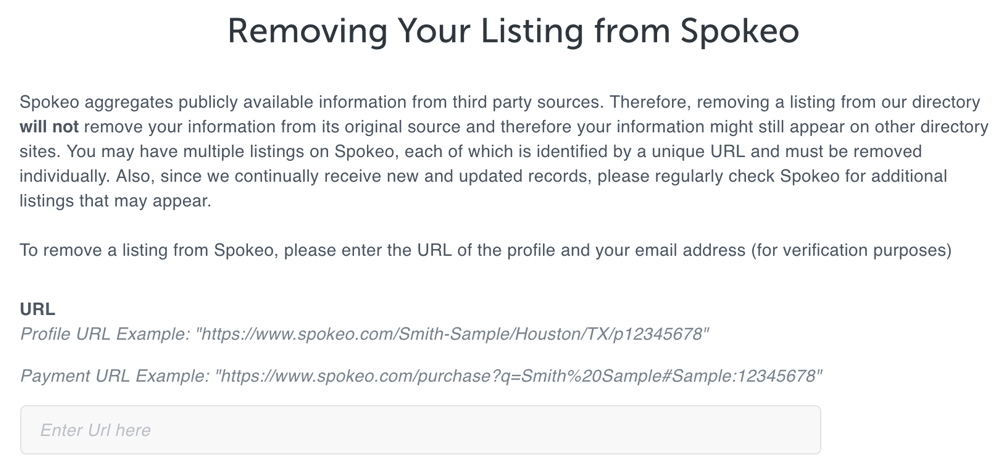
- Once located, copy the URL of the page containing your details.
- Paste this URL into the opt-out form and provide your email address for verification.
- Check your email and confirm your removal request.
- Your information should be removed within a few days.
Radaris
Radaris is another significant aggregator that offers detailed personal profiles.
Steps to Remove Data:
- Navigate to the Radaris homepage.
- Search for your listing.
- Click on ‘Full Profile’ next to your name.
- Navigate to Radaris’s privacy control page or use the direct opt-out form to request removal of your profile.
- Create an account with Radaris; they’ll send a verification code via text.
- After verifying, click ‘View My Account.’
- Choose ‘Delete Specific Records’ to remove your profile.
Opting Out from PeopleFinders

PeopleFinders is a comprehensive database that provides a multitude of personal information.
Steps to Remove Data:
- Visit the PeopleFinders opt-out page.
- Search for your name and select your profile.
- Click “opt out my info,” check the necessary boxes, and follow the prompts to complete the process.
Erasing Personal Details from Intelius
Intelius aggregates data from public records, making it one of the most detailed platforms.
Steps to Remove Data:
- Visit the Intelius suppression page, now managed through PeopleConnect, Intelius’s parent company. This suppression tool also covers related PeopleConnect properties, including Classmates.com, Instant Checkmate, and TruthFinder — so a single request can remove your data from multiple platforms at once.
- Provide your email address.
- Choose your listing from the search results.
- Verify the removal request by clicking on the link sent to your email.
- The removal process typically takes about 72 hours.
Want Professional Help Removing Your Personal Data?
Our team can audit your online presence and develop a strategy to remove or suppress unwanted personal information from search results and data broker sites.
Deleting Data from Ancestry.com
Ancestry.com, a genealogy platform, holds vast amounts of personal and family data.
Steps to Remove Data:
- Log in to your Ancestry account.
- Navigate to ‘Account Settings.’
- Follow the prompts to delete your personal information.
- For a formal data deletion request — the recommended method, particularly for CCPA and GDPR compliance — use Ancestry’s Privacy Center. You can also contact them directly at customersolutions@ancestry.com.
Protecting Your Online Privacy
Removing your data from these aggregators is a proactive step toward ensuring online privacy. Consider these additional measures for a more comprehensive approach:
- Regularly Monitor Data Aggregators: Set reminders to check these platforms periodically, as new data can emerge and be relisted.
- Limit Online Sharing: Be cautious about what you share online, especially on social media.
- Utilize Privacy Tools: Consider VPNs for secure browsing and encrypted messaging apps for communications. Data broker removal services such as DeleteMe, Kanary, and Privacy Bee, as well as privacy-focused browsers like Brave or Firefox with uBlock Origin, are also worth considering as part of a layered privacy strategy.
The Importance of Internet Privacy
In today’s hyper-connected world, internet privacy has never been more crucial. The information one casually uploads or shares can be used maliciously, underscoring the need for individuals of all ages to be vigilant about their digital footprint.
The Dangers Lurking Online
For younger individuals, the lure of social media and the desire for social validation can overshadow potential risks. Sharing photos, venting about an employer, or posting a current location can have serious consequences.
Cyberbullying, stalking, identity theft, doxing, and unwanted attention are only a few of the perils. A simple online photo can be manipulated using current AI tools, leading to public shaming, blackmail, or jeopardized career prospects. For a deeper look at how doxing works and how to defend against it, see our guide on preventing doxing attacks.
Older adults face different but equally serious risks. Many seniors are still becoming familiar with the digital world, making them prime targets for online scams, phishing attacks, and financial fraud. Personal details such as home address, family ties, and financial information, once leaked, can result in theft or physical harm.
Why Removing Public Information Matters
Beyond preventing specific harms, there is a broader concern about maintaining autonomy over your own data. Everyone should have the right to control their narrative and decide who accesses their personal story.
Eliminating personal data from public view, to the greatest extent feasible, helps in:
- Preventing Identity Theft: Personal details that are easy to find online make identity theft far more likely during data breaches and hacking attempts.
- Avoiding Manipulation: More personal details available online makes individuals more susceptible to manipulative advertisements, political propaganda, and social engineering attacks.
- Maintaining Personal Boundaries: Knowing that personal details — from home addresses to past relationships — are publicly accessible is a source of ongoing anxiety for many people. Learning how to remove personal information from search results more broadly is a natural next step after tackling data brokers.
The internet is a powerful tool for learning, communication, and entertainment, but it requires caution. By being discerning about what you share, regularly checking your online presence, and removing unnecessary public information, you can protect yourself from many of the digital age’s pitfalls.
Frequently Asked Questions









Protect Your Online Reputation
Every day you wait, negative content gets stronger. Talk to our experts about a custom strategy for your situation.
Get Your Free Analysis