
Step-by-Step Guide to Claiming Your Google Knowledge Panel
Claiming your Google Knowledge Panel takes just a few steps—here's exactly how to do it and why your online reputation depends on it.

- Your Knowledge Panel shapes first impressions — claim it before inaccurate info defines your brand
- Use the Google account tied to your business services to avoid verification delays
- Enable two-factor authentication to boost security and signal legitimacy to Google
- Ensure your name and details are consistent across all platforms before you apply
- Once claimed, you can update your panel as your brand or executive role evolves
Claiming your Google Knowledge Panel puts you in control of how your brand appears in search results, replacing inaccurate or incomplete information with a verified, professional presence. The process requires the right Google account, consistent online information, and supporting materials that prove your connection to the panel. This guide walks through each step so you can claim your panel efficiently and manage your digital reputation proactively.
How to Claim Your Google Knowledge Panel
-
1
Verify your Google account
Log into the Google account that best represents you or your organization, such as the one tied to your Google Business Profile or Google Analytics. Using a personal Gmail instead of your company's official address can complicate the verification stage. Visit your Google Account Settings, confirm all contact details are accurate, and enable two-factor authentication to strengthen your claim.
-
2
Gather supporting materials
Collect credible evidence that connects you or your company to the Knowledge Panel you are claiming, such as your official website, active social media profiles, and mentions in reputable publications. For a personal panel, ensure your LinkedIn job titles and affiliations match your identity across all other platforms. For a brand panel, direct Google to your official website or verified social accounts to clearly establish authority.
-
3
Organize your digital presence
Audit your online branding for consistency before submitting your claim, as Google flags discrepancies that can delay verification. Ensure your name or company name is identical across all platforms — avoid using variant spellings or abbreviated versions. Update the 'About' sections on LinkedIn, Twitter, and Google Business Profile so they share the same core language and align with your website.
-
4
Add structured data to your website
Implement structured data markup in your website's HTML to help Google better understand and populate your Knowledge Panel. This signals to Google's algorithms that your site is an authoritative source tied to the entity you are claiming. Consistent structured data reduces ambiguity and can speed up the recognition and verification process.
Have you ever Googled yourself or your company and felt a twinge of frustration at the cluttered search results that just don’t tell your story accurately? At the same time, you’ve likely noticed those clean, professional-looking boxes popping up for notable brands and people—with crisp images, accurate info, and direct social media links. Those polished boxes are Google Knowledge Panels, and securing yours is like having an impressive online business card front-and-center.
Think about it: your Knowledge Panel often shapes people’s first impression of you or your brand online. If you haven’t already claimed it, you’re leaving that impression completely to chance. Even worse, you risk letting outdated or inaccurate info drive the narrative. Whether you’re managing a corporate brand or building your executive presence, proactively owning your Knowledge Panel makes solid business sense.
In this step-by-step guide, we’ll clear away the confusion and get practical. If you’ve read our broader article on mastering Google Knowledge Panel management, this is where we get tactical, outlining exactly how you can claim yours. Let’s make sure that when someone searches your name or company, the results reflect all the effort you’ve invested in your identity and reputation.
Claiming your Google Knowledge Panel isn’t a flashy move; it’s a practical, straightforward way to manage your online reputation proactively. Ready to get the basics right? Here’s how to approach it.
Claiming a Google Knowledge Panel
Three things to prepare, then four steps and two detours
The claim itself is short. Almost everything that makes it succeed or stall happens beforehand, in how consistently you are described across the web.
Get a Free Reputation Assessment
Find out what people see when they search for you online. No obligation — results in 24 hours.
How to Claim Your Google Knowledge Panel: A Step-by-Step Guide
Claim it: Google’s actual steps
Per Google’s official documentation, claiming an eligible knowledge panel follows this flow:
- Search Google for your entity so your knowledge panel appears in the results.
- Click “Claim this knowledge panel” — at the bottom of the panel on desktop, or under the “About” section via the menu on mobile. Note that not every panel is claimable yet.
- Verify your identity by signing in to one of the official profiles Google lists: YouTube, Search Console, X (formerly Twitter), or Facebook.
- If the panel is already managed by someone else, Google starts an account-recovery process and gives the current manager 3 business days to respond before the panel becomes claimable again.
The preparation below isn’t the claim itself — it’s what makes that verification step go smoothly.
Verify Your Google Account
Before you begin, make sure you’re logged into the Google account that best represents you or your organization. Using the wrong account—like your personal Gmail instead of your company’s official address—can hold things up and complicate the verification stage.
Let’s say you’re the marketing director at your firm, and your company uses Google Business Profile or Google Analytics. Using the same account tied to these services can streamline the claim process. If there are multiple accounts active across your organization, now’s a good time to consolidate them so you don’t get tripped up later.
When verifying your Google account, remember to:
- Log into your Google Account Settings and double-check that all contact details are accurate. Google may reach out using those details.
- Enable two-factor authentication (2FA). It’s a small step, but it boosts security and shows Google you’re taking things seriously.
Handling this right the first time demonstrates professionalism and helps Google confirm you’re the authorized person or organization behind the Knowledge Panel.
Gather Supporting Materials
Google needs concrete evidence connecting you (or your company) to the Knowledge Panel you’re trying to claim—think of it like showing your ID at airport security. You’ll want clear, credible materials on hand to back up your request and establish your authority:
- Official websites that clearly display your name and title, or your company’s branding.
- Consistent, active social media profiles such as LinkedIn, X (formerly Twitter), or Instagram.
- Credible public sources mentioning you or your brand, such as articles from reputable publishers.
For example, if you’re an executive claiming your personal Knowledge Panel, check your LinkedIn profile first—making sure your job titles and affiliations align perfectly with your online identity elsewhere. If you manage a company brand, direct Google to your official website or verified social media accounts to clearly connect the dots.
Quick tip: Google tends to flag any inconsistencies, so review your online identity carefully to make sure all names, titles, and branding match across your web presence.
Organize Your Digital Presence
Google uses publicly available information to populate Knowledge Panels, so if your digital footprint isn’t consistent, you might face unnecessary verification hassles. Take an hour or two to tidy up your digital branding and align your presence across the web before you make your claim. It’ll save headaches later.
Pay particular attention to:
- Naming consistency. If your company website lists you as “Acme Solutions LLC,” avoid using different variants like “Acme Co.” or simply “Acme” across other profiles and platforms.
- Updated “About” sections. Make sure your LinkedIn, X (formerly Twitter), Google Business Profile, and other brand-focused profiles share the same core language and align with your existing web presence.
- Generate structured data. Adding structured data to your website’s HTML helps Google interpret your site’s entities and supports accurate representation over time — but it doesn’t control the panel directly or speed up the claim and verification step.
Remember our broader guide on Google Knowledge Panel Management if you’re looking for more tips on maintaining long-term digital alignment. Clean, consistent branding doesn’t just simplify this particular process—it builds confidence for anyone looking you up.
Taking these foundational steps to verify your account, gather clear supporting material, and tidy your online presence makes claiming your Google Knowledge Panel significantly easier and more straightforward.
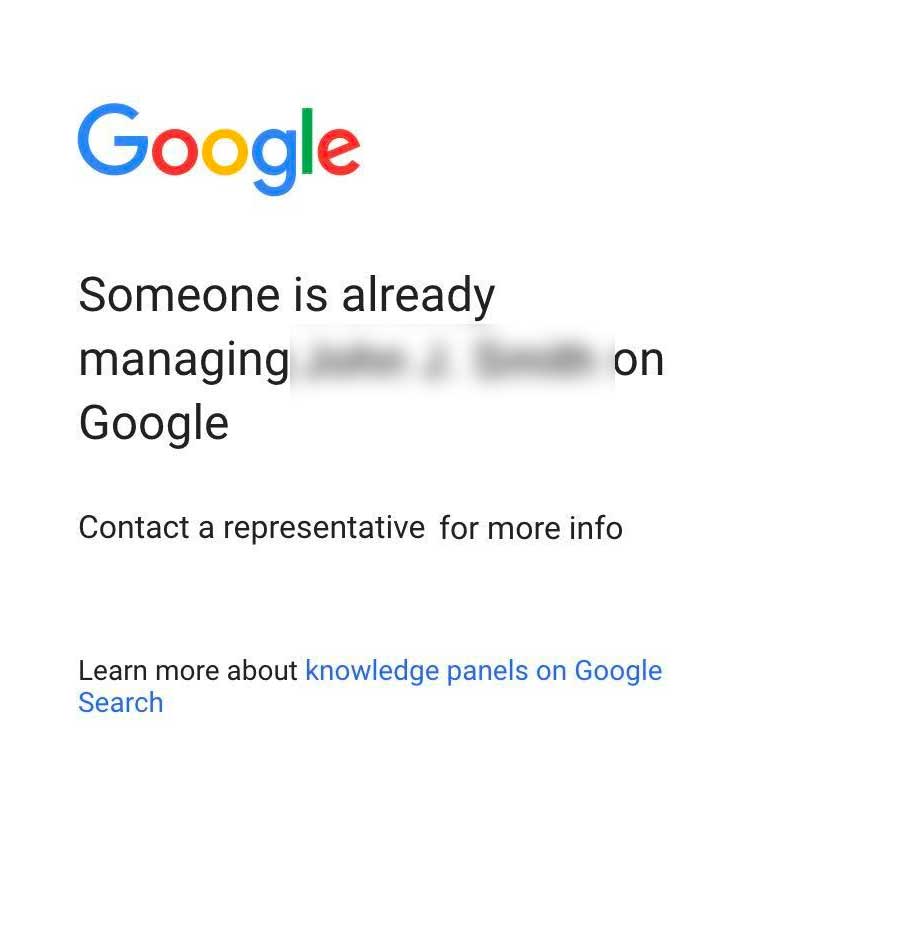
What to do if someone else claimed your Knowledge Panel first
If someone else has claimed your Google Knowledge Panel, you should contact Google. You can contact Google about Knowledge Panels at this link.
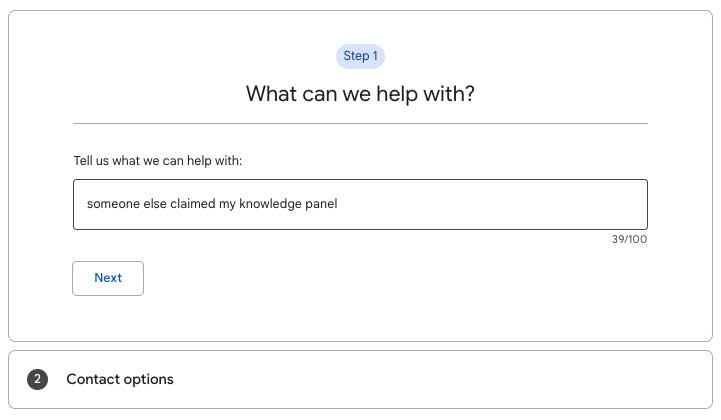
In the field, summarize the problem. For example, “Someone else claimed my knowledge panel”.
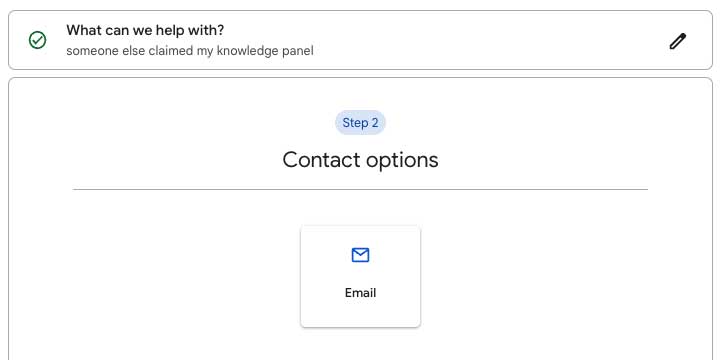
Next, click on the contact option. It’s usually “Email”.
Once you do that, you will be presented with a form. It will ask for your name (organization, person), country, email address, and the URL of the Knowledge Panel you are inquiring about. If you are logged in, your email address should be in the form.
One challenge many people have is how to find the URL of a Knowledge Panel. You can find the URL for a Google Knowledge Panel by clicking the Share icon to the right of the name of the entity. For example:
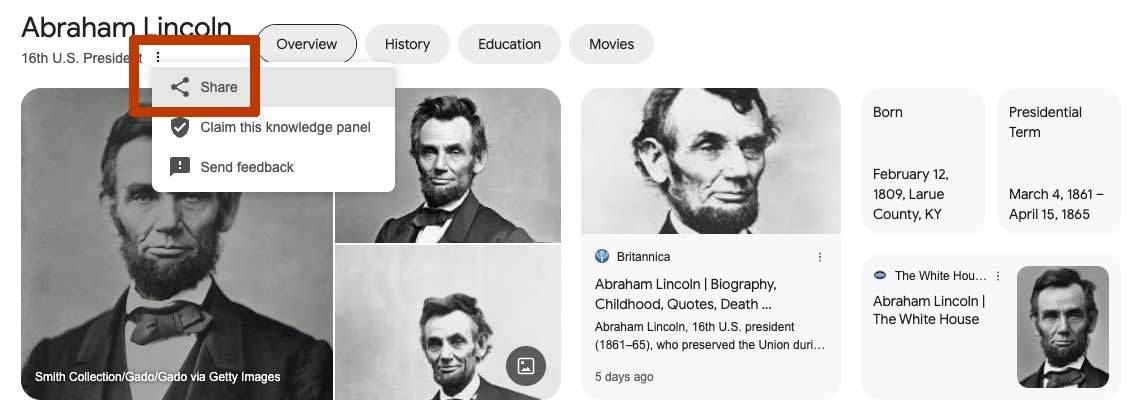
The rest of the form should be pretty straightforward. You’ll describe your entity, etc., then click “Submit”. Google should respond to your request, but sometimes it takes days or weeks for them to do so.
Conclusion
Your Google Knowledge Panel might seem like a small detail in your broader strategy, but it plays a significant role in how you or your brand appears online. It’s not just about looking good—it’s about clearly representing who you are, what you do, and the credibility you’ve earned. Taking ownership of that information ensures people find the accurate story you’ve worked so hard to build.
Of course, your online presence isn’t static—businesses evolve, careers shift, and your information naturally changes over time. Viewing your Knowledge Panel not as a one-time task but as an ongoing part of managing your online reputation is key. Think of this step as the start of a long-term project, not a checkbox task. It’s a commitment to continual, genuine representation.
In many ways, your digital identity speaks before you even do: potential clients, colleagues, customers, or press often form their first impressions simply from search results. By investing a little time now, you’ll lead with clarity, credibility, and professionalism—qualities your stakeholders value highly.
So, here’s an actionable takeaway: think about what you want others to see when they search your name or your business. Are you putting your best forward, or leaving it up to algorithms and chance? Claiming your Google Knowledge Panel puts you squarely in control, allowing you to shape your narrative authentically. There’s no better time than now to take that practical, definitive step.
Frequently Asked Questions





Protect Your Online Reputation
Every day you wait, negative content gets stronger. Talk to our experts about a custom strategy for your situation.
Get Your Free Analysis