
How to Use Web Schema to Improve Branded Search Results
Schema markup is one of the most underused tools in online reputation management — here is how to apply it strategically to shape what Google knows about your brand.

- Add Person schema to biography pages to help search engines understand who you are and surface accurate profile info.
- Use Organization schema globally across your site to describe your brand, founding details, and social profiles.
- Schema does not change how your page looks — it only exists in the HTML and is invisible to visitors.
- FAQ schema can trigger expanded search result features that increase your brand's visibility in Google.
- Person schema and Organization schema can both apply to personal brands — like a public figure who is also a company.
Schema markup is code added to a page's HTML that helps search engines better understand and categorize web content without changing how the page looks. For online reputation management, the most important schema types are Person, Organization, and Article. Using Person schema on biography pages and Organization schema site-wide can improve how your brand appears in branded search results.
How to Use Web Schema to Improve Branded Search Results
-
1
Understand why schema markup matters
Schema markup helps search engines understand your web pages more deeply, including information that may not appear in visible page text. It can enable enhanced search result features like FAQ dropdowns and helps search engines better place your brand in results. Schema does not change how a page looks to visitors — it lives only in the HTML.
-
2
Choose the right schema types for your brand
Focus on the three schema types most relevant to online reputation: Person, Organization, and Article. Each type serves a different purpose depending on whether you are describing an individual, a company, or a piece of content. Selecting the correct type ensures search engines interpret and display your information accurately.
-
3
Apply Person schema to biography pages
Use the Person schema type on any page dedicated to an individual's biography, whether hosted on a company site or a personal one. Include key properties such as name, URL, photo, social media profiles, job title, and company. Unlike Organization schema, Person schema should only be placed on the specific biography page, not applied globally across the entire site.
-
4
Apply Organization schema globally across your site
Use the Organization schema type to describe a company and place it on every page of the site. Include properties such as the organization's name, website address, founding date, NAICS code, postal address, description, and associated social media profiles. If a person functions as a brand — like Martha Stewart — it also makes sense to use Organization schema site-wide.
-
5
Combine Person and Organization schema when appropriate
When an individual is both a person and a brand, use both schema types together on relevant pages. For example, a biography page on a branded site could carry the global Organization schema plus the Person schema specific to that page. This layered approach gives search engines a fuller picture of both the individual and the brand.
-
6
Add your schema markup to the page HTML
Schema is typically added to a page's HTML using a script tag with the type attribute set to 'application/ld+json', which is the recommended format. Work with your site's Webmaster to insert the structured data correctly without affecting the visible layout of the page. Use the schema.org documentation to reference a complete list of available properties for each schema type.
Schema markup can improve search results. It helps search engines understand web pages better. It is helpful in letting search engines know many things that may not be present in the text of a web page. Schema does not change the way a web page looks. It exists in the HTML of a page and is normally added by the site’s Webmaster.
Why use schema?
Schema gets your site recognized better in search results. For example, FAQ schema can help Google add frequently asked questions to your search results, like this:
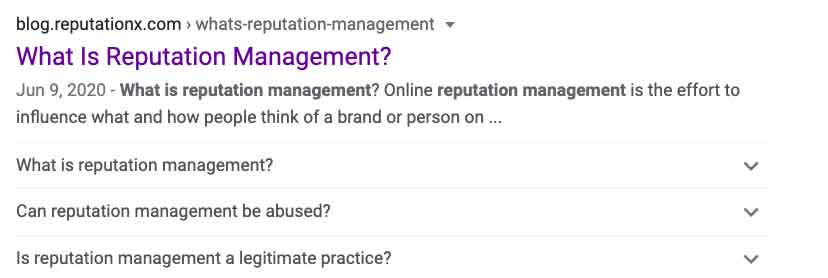
It can also help search engines understand more about your page, about the pages related to it, about the author of the page, specifics about your brand, and more. This helps search engines better place your brand in search results.
Types of schema
There are quite a few different “types” of schema markup. There’s markup for companies, people, web pages, blog posts, reviews, events, even recipes. We’re going to focus on the types of schema most used for online reputation programs. These include:
- Person
- Organization
- Article
How schema is organized
- Itemtype: ItemType is the general type of thing you are classifying (thing, organization, person, or an event).
- Itemprop: These are the properties that thing can have (name, date of birth, title, author, description).
The Person schema type
Use the Person schema to describe a person. The Person schema type should always be used on biography pages. A person’s biography may be on a company website or a personal one. The Person schema is normally only placed on the biography page and not on the entire site globally. Its placement is different than that of an Organization schema type, which is normally placed globally (on every page).
Get a Free Reputation Assessment
Find out what people see when they search for you online. No obligation — results in 24 hours.
What the Person schema properties describe
- Name
- URL
- Photo
- Social media profiles
- Job title
- Company
and many more. A complete list of Person schema properties can be found here.
Example of Person schema
Below is an example of the Person schema used in the HTML of the page you are currently reading:
–
<script type=”application/ld+json”>
{
“@context”: “https://schema.org/”,
“@type”: “Person”,
“name”: “Kent Campbell”,
“jobTitle”: “Chief Strategist”,
“description”: “Kent Campbell is the chief strategist for Reputation X, an award-winning online reputation management agency. He has over 15 years of experience with SEO, Wikipedia editing, review management, and online reputation strategy. Kent has helped celebrities, leaders, executives, and marketing professionals improve the way they are seen online. Kent writes about reputation, SEO, Wikipedia, and PR-related topics, and is an expert witness for reputation-related legal matters.”,
“url”: “https://kentcampbell.com/about/”,
“image”: “https://kentcampbell.com/wp-content/uploads/2023/07/kent-photo-lg-square.jpg”,
“sameAs”: [
“https://www.linkedin.com/in/kentcampbell/”,
“https://x.com/kentcampbell”,
“https://www.reputationx.com/author/kent-campbell”,
“https://kentcampbell.com/”,
“https://www.google.com/search?kgmid=/g/11hcbrt3vv”,
“https://muckrack.com/kent-j-campbell”
]
}
</script>
The Organization schema type
The Organization schema type is used for companies. But if a person is a brand, then it makes sense to use Organization schema too.
What the Organization schema properties describe
- Name of the organization
- Website address
- Date founded
- NAICS code
- Social media properties associated with the organization
- Postal address
- Description of the organization
There are many more types, you can explore them all here.
For example, Martha Stewart is both a person and a brand. On the site MarthaStewart.com it would make sense to have the Organization schema on every page. But if she had a page on that site that was all about Martha the person, that one page would also have the Person schema in addition to the global Organization schema on every page.
Example of Organization schema
<script type=”application/ld+json”>
{
“@context”: “http://www.schema.org”,
“@type”: “Organization”,
“name”: “Reputation X”,
“url”: “https://www.reputationx.com/”,
“foundingDate”: “2005-04-05”,
“naics”: “541511”,
“telephone”: “1-800-889-4812”,
“sameAs”: [
“https://x.com/reputationx”,
“https://www.linkedin.com/company/reputation-x”,
“https://www.facebook.com/Reputationx”,
“https://www.wikidata.org/wiki/Q46044180”,
“https://www.crunchbase.com/organization/reputation-x”,
“https://www.youtube.com/channel/UC4kfGT9Io2S-kS5EETwmRaQ”
],
“logo”: “https://landing.reputationx.com/hubfs/redesigned-images/logo.png”,
“image”: “https://landing.reputationx.com/hubfs/redesigned-images/logo.png”,
“description”: “Reputation X is an online reputation management services company founded in 2005. The company provides online reputation repair, review management, and online brand building services for corporate clients and individuals. The company is located in the San Francisco Bay Area.”,
“address”: {
“@type”: “PostalAddress”,
“streetAddress”: “100 Shoreline Highway, Suite 100B”,
“addressLocality”: “Mill Valley”,
“addressRegion”: “California”,
“postalCode”: “94941”,
“addressCountry”: “United States”
}
}
</script>
How to use the Article schema type
Schema types are often nested. For example, Article schema has sub-types such as NewsArticle or BlogPosting. A news site would use NewsArticle and a blog normally uses BlogPosting.
Unlike the Organization schema, the Article schema should only be used on Articles. It is not for global use.
Example of the Article type BlogPosting schema
How to create a schema
There are many tools to generate schema. Most will not allow you to add every possible schema property type. But you can start with a basic schema generator to save time, then customize the code manually. It isn’t as hard as it might sound.
This is our favorite schema generator. But there are many others.
If you do not use WordPress
- Step 1: Choose the type of schema you want to create. For example, Person, Organization, or Article.
- Step 2: Fill in the information you can. The schema will magically appear to the right.
- Step 3: Copy and paste the schema into the code of your page.
Where do you put the schema?
You can put it pretty much anywhere in the HTML, but just in case, you can check Google’s documentation on it here. Remember that Organization schema can go on every page of your site. For example, you could put it in the Header or Footer on every page. But if you are placing Person schema on the biography page of your corporate site for an individual executive, it should only go on that page – not globally.
If you do use WordPress
There are many plugins available for schema in WordPress. Some of them include:
We use Schema & Structured Data for WP most often. Once you install the plug-in it’s easy. Just do this:
Click on “Structured Data” in the left sidebar. Then click on “Add Schema Type” at the top.
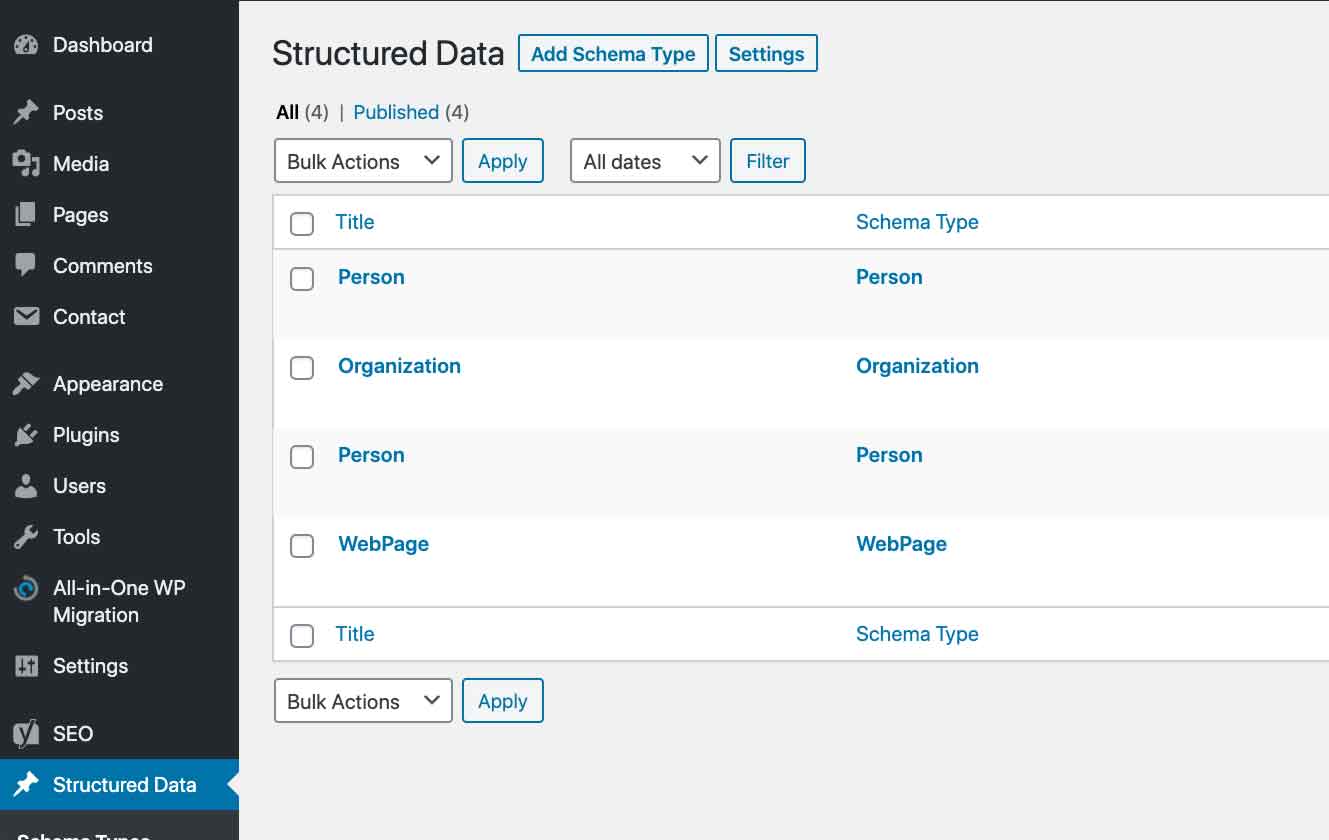
Choose the type of schema you want. Person and Organization schema are at the bottom of the scrolling list.
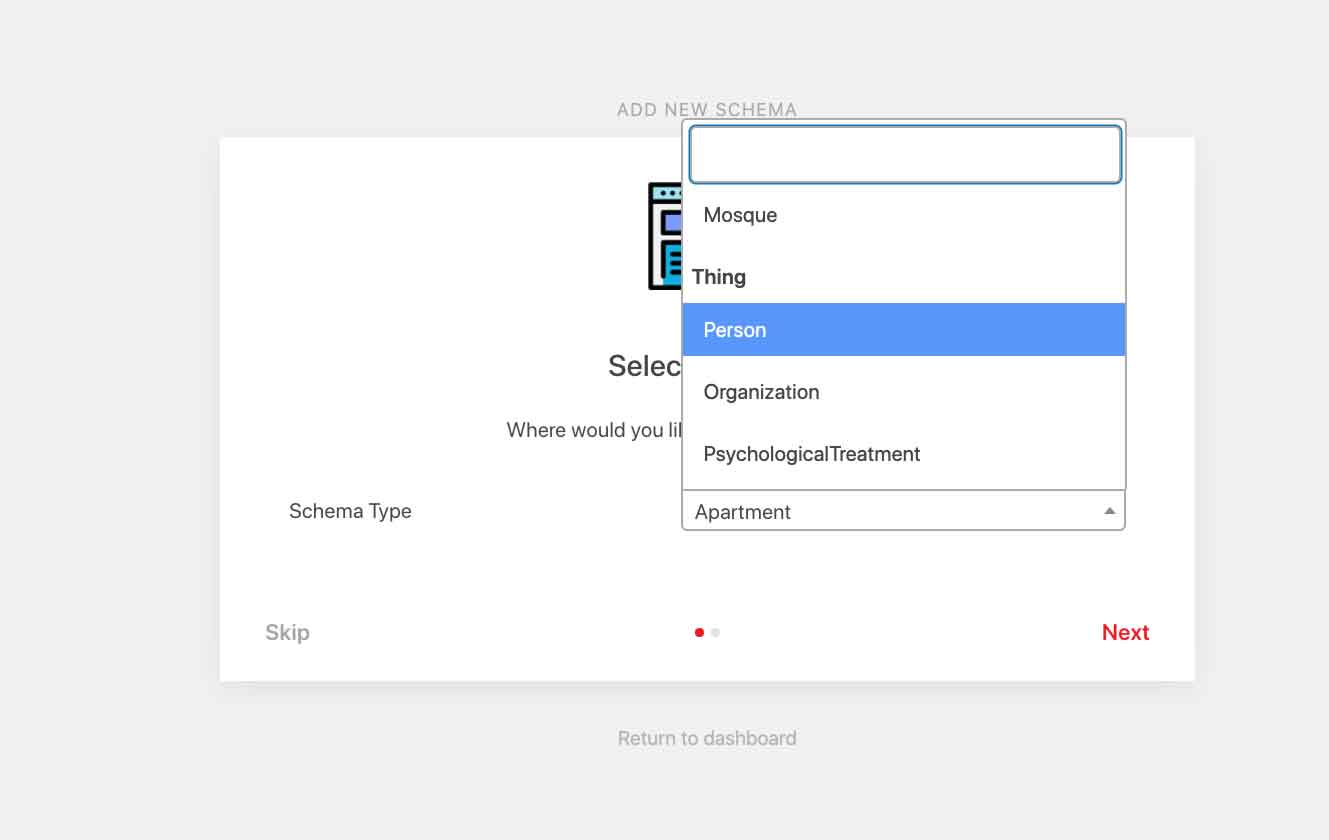
After that, it will ask you where you want the schema to go. You can place it everywhere in the site, or just on one page, or even just for certain types of users.
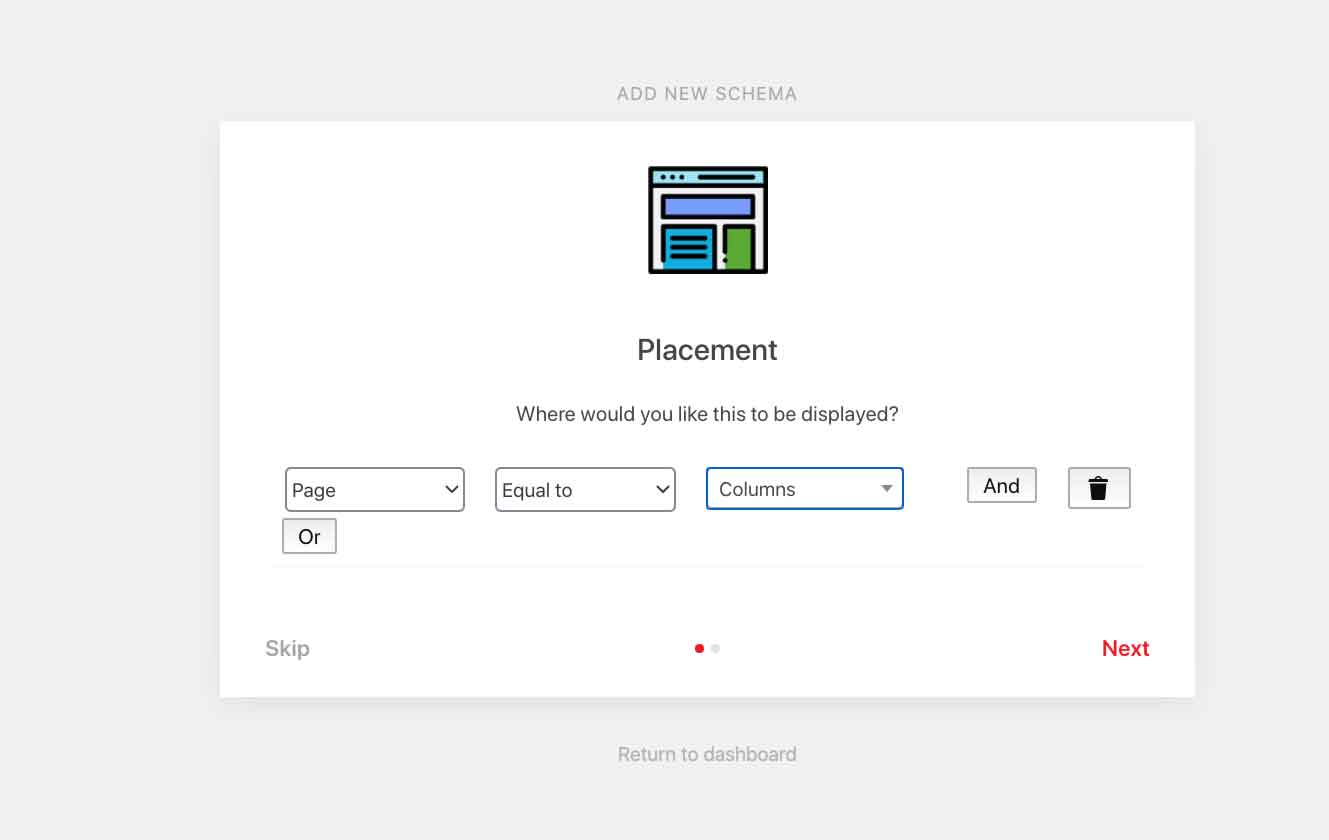
Once you have chosen which type of schema you want, in this example, it is Person schema, click “Modify Schema Output” and then “Add Property”.
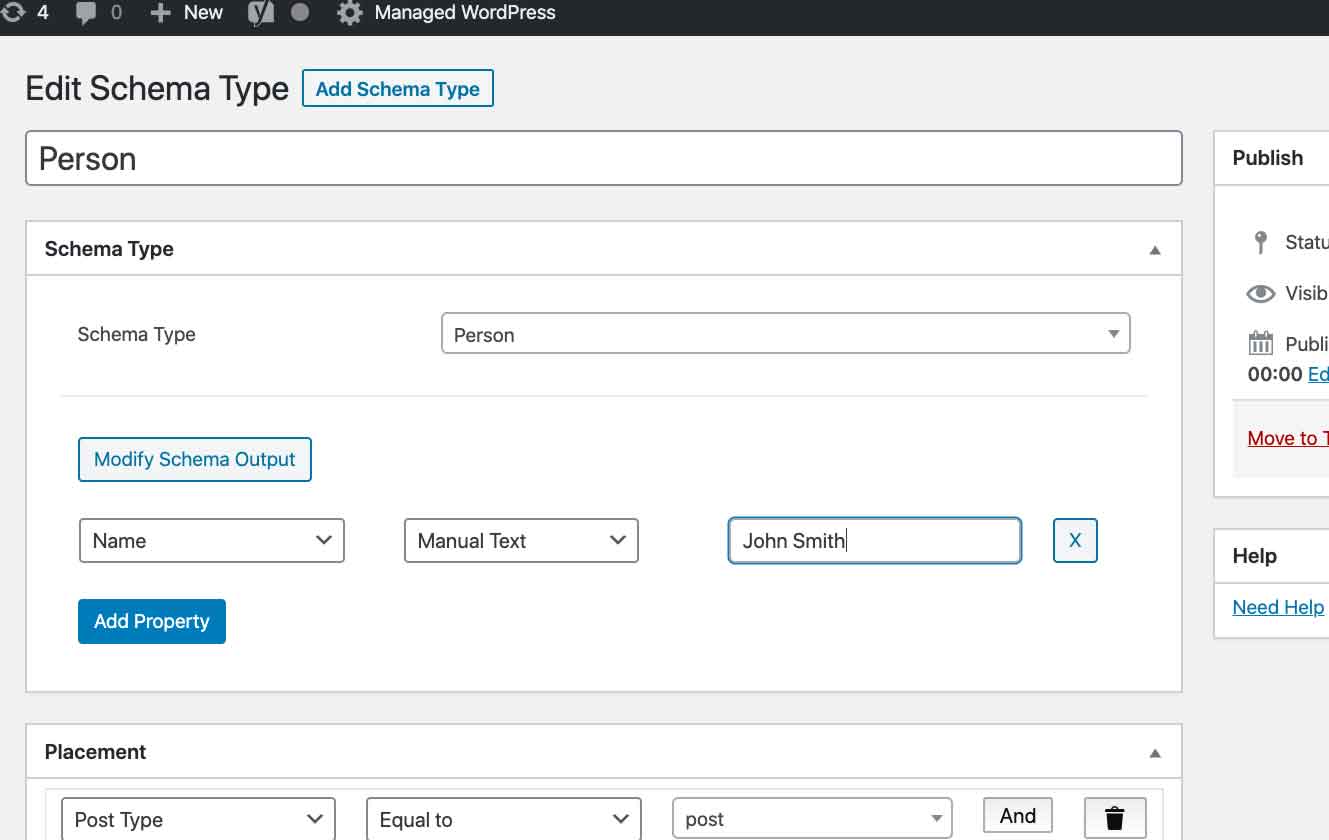
Add all of the properties you want to.
When you are done, click Update in the right sidebar. Don’t forget to test your schema.
Structuring the “SameAs” part of schema
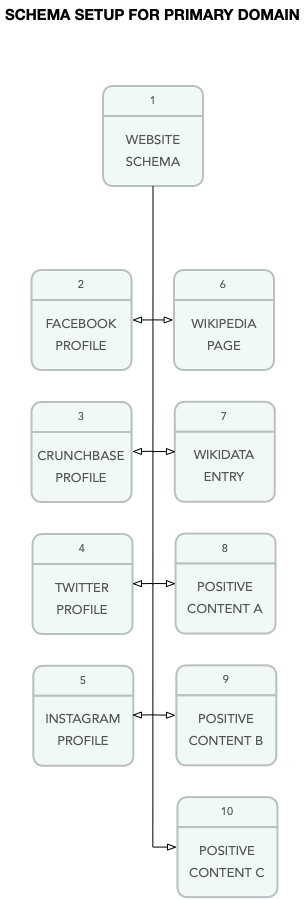
Schema can help search engines understand what other web properties are related to yours. For example, you can add Facebook.com, Instagram.com, LinkedIn.com and other websites you control to the SameAs section of schema. You can also add the URL of your Wikipedia page if you have one, and to your WikiData entry. WikiData entries are setup when a Wikipedia page is created, but it can also be setup independent of a Wikipedia page.
Recall that above we demonstrated how “SameAs” can be added to some schema types and that it looks something like this:
“sameAs”: [
“https://x.com/reputationx”,
“https://www.linkedin.com/company/reputation-x”,
“https://www.facebook.com/Reputationx”,
“https://www.wikidata.org/wiki/Q46044180”,
“https://www.crunchbase.com/organization/reputation-x”,
“https://www.youtube.com/channel/UC4kfGT9Io2S-kS5EETwmRaQ”
Note: Creating a schema with SameAs references does not generate links that search engines follow. But it does give search engines a clue to what sites are related to yours. Schema is hidden in the HTML code of a page and not normally seen by visitors to your site.
The illustration below shows how your main website could identify other web properties related to your brand.
Testing your schema
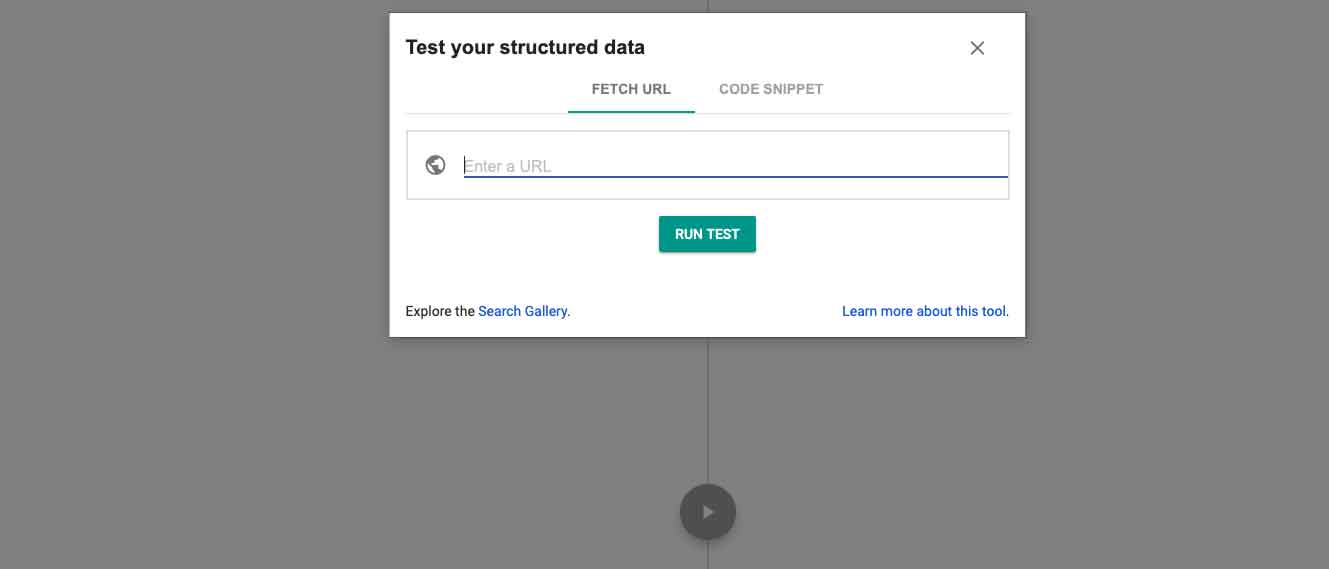
Always test your schema once it’s up. While a plugin usually won’t mess up your schema, there are certain types of schema Google does not support. By testing it you can see which ones may not be allowed. It does not break your schema to have a property Google doesn’t agree with, it will just be ignored, or they may be used, it’s hard to tell. But it shouldn’t hurt your schema so long as the rest of it is structured properly.
Google retired the Structured Data Testing Tool in 2021 — use the Rich Results Test instead:
More schema resources
- Getting started with schema
- Google structured data guidelines
- Steal our JSON – a great place to get schema examples
- Official schema.org site (challenging for beginners)
- Moz schema best practices
Frequently Asked Questions








Protect Your Online Reputation
Every day you wait, negative content gets stronger. Talk to our experts about a custom strategy for your situation.
Get Your Free Analysis