
WikiData – How and Why to Set Up and Maintain a WikiData Entry
WikiData gives Google the structured brand signals it needs to build your Knowledge Panel — even if you have no Wikipedia article to your name.

- You can create a WikiData entry manually even if your business doesn't qualify for a Wikipedia article.
- Google pulls WikiData information to populate Knowledge Panels shown in desktop and mobile search results.
- Each WikiData entry has a unique QID that helps search engines disambiguate entities with similar names.
- WikiData entries that lack relevance or accuracy can be deleted by other editors, so keep yours maintained.
- Wikimedia provides a step-by-step guide to simplify the process of setting up your WikiData entry.
WikiData is a multilingual knowledge graph hosted by the Wikimedia Foundation that Google uses to power its Knowledge Graph and Knowledge Panels in search results. Unlike Wikipedia, most businesses can create a WikiData entry manually without meeting notability requirements. While WikiData entries don't appear directly in search results or provide backlinks, they help search engines accurately identify and understand your brand as a distinct entity.
How to Set Up and Maintain a WikiData Entry
-
1
Check whether a WikiData entry already exists
Search wikidata.org for your company or brand name to see if an entry has already been created. WikiData entries are automatically generated when a Wikipedia article is published, so your brand may already have one. If an entry exists, review it to identify any missing or inaccurate information that could be improved.
-
2
Create a new WikiData entry if none exists
Even without a Wikipedia article, you can manually create a WikiData entry for your brand. Wikimedia provides an easy-to-follow guide that walks you through the creation process. You will need to provide a unique description and label to distinguish your entry from any similarly named items.
-
3
Add properties, values, and statements
WikiData entries are structured around statements in which a property is paired with a value — for example, linking your company to its industry or founding date. Add all relevant properties that accurately describe your business so search engines can better understand it. The more complete and accurate your statements, the more useful your entry will be for Google's Knowledge Graph.
-
4
Model your entry on well-constructed WikiData examples
Review established WikiData entries such as Apple Computer (Q312) to understand how high-quality entries are structured. Use these as templates to ensure your own entry follows best practices for completeness and formatting. Cross-reference related Wikipedia articles to identify additional properties and values worth including.
-
5
Add organization schema markup to your website
After setting up your WikiData entry, implement organization schema (JSON-LD) on your website to reinforce the structured data signals search engines receive about your brand. There are tools available that can generate this schema automatically, including some that also create WikiData information for brands that already have Wikipedia articles. Connecting your on-site schema to your WikiData entry strengthens search engines' understanding of your business.
-
6
Test and verify your schema implementation
Use Google's Structured Data Testing Tool to confirm that your organization schema markup is valid and correctly reflects your business information. Fix any errors or warnings flagged by the tool before relying on the markup to influence search results. Regular verification ensures your structured data remains accurate as your website evolves.
Wikidata is a free, multilingual knowledge base of more than 120 million structured data items (wikidata.org, 2026) that feeds Google’s Knowledge Graph — the entity data behind Knowledge Panels. You can find your entity in Google’s Knowledge Graph with the free Google Entity Finder. Unlike Wikipedia, most brands can create a Wikidata entry without meeting notability requirements, and this article shows you how to set one up and maintain it.
What is a WikiData article?
There’s a reason Wikipedia content dominates search engine results articles (SERPs): it’s credible, recognized, and very SEO-friendly. And when we say dominate, we’re not using that term lightly.
Back in 2018, a study that analyzed 1,000 randomly generated search terms found “Wikipedia ranked on page one for an overwhelming 99% of searches” — the chart below comes from that study. The number is dated now, but the underlying reality hasn’t changed: Wikipedia and Wikidata remain among the most-referenced sources feeding Google’s Knowledge Graph and the entity layer that AI assistants draw on, and Wikidata alone now holds more than 120 million structured data items (wikidata.org, 2026). But Wikipedia has a little-known sibling known as WikiData that can serve your brand well.
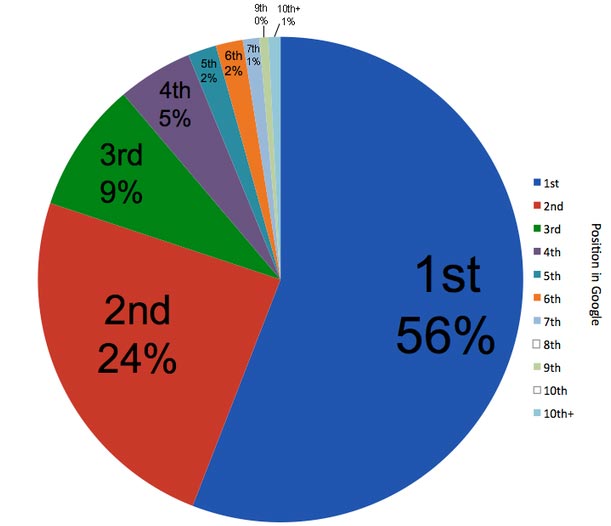
Chart courtesy of Econsultancy.
Clearly, having Wikipedia content is crucial to your business developing a strong presence on the web if you can earn it. But Wikidata is where search engines pull data from.
Even if you do not have a Wikipedia article, you can probably have a WikiData article. That’s where setting up a WikiData article is important.
Does Your Company Qualify for a Wikipedia Page?
Run a free notability check. Our analysis engine reviews real press coverage against Wikipedia's actual notability standards and emails you a detailed report — no sales call required.
Your notability check is running
We're analyzing coverage of right now — it usually takes 10–15 minutes. Your report link will arrive from noreply@reputationx.com; check spam if you don't see it. Keep reading — nothing else to do here.
According to its Wikipedia article, WikiData is “a collaboratively edited multilingual knowledge graph hosted by the Wikimedia Foundation. It is a common source of open data that Wikimedia projects such as Wikipedia can use, and anyone else, under a public domain license.”
WikiData and the Knowledge Panel
The data in these articles represents key information about topics, concepts, or objects that could be search terms. More importantly, Google uses WikiData information – and many other sources – for its Knowledge Graph. The Knowledge Graph feeds the Knowledge Panel you often see in the upper right corner of search results (desktop) or on top in mobile searches. Not only do these articles contain that information, but they also have it in myriad languages.
Why Wikidata Matters More in the AI-Search Era
The same structured entity data that feeds the Knowledge Panel now does double duty. When an AI assistant answers a question about your brand, it leans on the entity understanding built up in sources like Google’s Knowledge Graph — and Wikidata is one of the established inputs to that graph. A clean, accurate Wikidata entry is therefore no longer just about the box in the corner of a search results page; it is part of being represented correctly when someone asks an AI assistant who you are.
The practical upshot: keep your entry accurate, consistent with your website and schema, and free of puffery — the same discipline that underpins AI search visibility work generally. For the fuller picture of how entities get built and connected, see our guide to building your entity in Google’s Knowledge Graph.
Persistent identifier
Each WikiData article has a unique, persistent identifier that starts with the letter “Q” and ends in a positive integer — i.e. Elvis Presley (Q303) — known as a “QID.” This enables search engines to find the basic information required to identify a search topic. But the item labels (in the case of our example, “Elvis Presley”) do not have to be unique, just the QID and the Wikidata article’s description.
For example, Elvis Presley (Q303) represents data for Elvis himself, the American singer and actor, whereas Elvis Presley (Q610926) is data for his self-titled album. While an article’s label does not have to be unique, its description and QID must be to dissolve any ambiguity between homonymic search terms.
The following is an example of the top of a WikiData article:

Why should you set up a WikiData article?
WikiData has been highly relevant to how search engines display results for more than a decade, and it’s showing no signs of slowing down. Building a WikiData entry is not your starting point to prop up your overall Wikipedia profile. Creating a WikiData profile does not give you a Wikipedia article; in fact, it’s the opposite – creating a Wikipedia article creates a WikiData entry automatically. But you don’t have to have a Wikipedia article to have a WikiData profile for your brand. You can just create one to help search engines better understand your brand. It’s basically invisible but helps nonetheless.
Still, if you can earn a Wikipedia article, it is highly recommended. Here is a quick rundown as to why:
- Unique and in-depth content that ranks organically. Wikipedia articles are written around specific search terms and typically include relevant and related keywords and links that help them rank organically on SERPs. The nature of the content, matched with Wikipedia’s high domain authority, makes these articles nearly impossible to trump when it comes to SEO. Wikipedia is a well-established brand and a massive website. Data sources like WikiData help these articles remain reliable and authoritative, which means their high rankings don’t appear to be going anywhere.
- Excellent internal linking structure. Wikipedia is great at contextual linking internally. This allows Wikipedia to spread its domain strength throughout its site. It’s a brilliant formula that keeps Wikipedia content relevant on the web.
- Knowledge graphs. Appearing at the top right of search articles, Google’s Knowledge Panels give topics and information more visibility on SERPs. The data in these boxes are almost always taken from Wikipedia if a Wikipedia article exists.

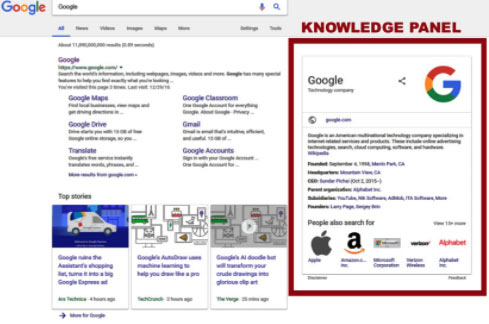
WikiData shares some of the SEO benefits of having a Wikipedia article.
If a WikiData article for your business already exists, you should check it to see if there are ways you can improve your WikiData entry. When your company is getting the type of visibility on the web that Wikipedia articles can create, having your WikiData in order is a worthy investment.
We suggest looking at the WikiData entry for Apple Computer. It’s the template we often use when building out a client’s WikiData entry because it includes nearly every available option for a corporate client. That said, it’s probably a lot more inclusive than you’ll need for your brand.
How do you set up a WikiData article?
Setting up a WikiData article might seem like an arduous task at first glance, it is certainly an “intermediate” level exercise. But Wikimedia has created an easy-to-follow, step-by-step guide to setting up a WikiData article.
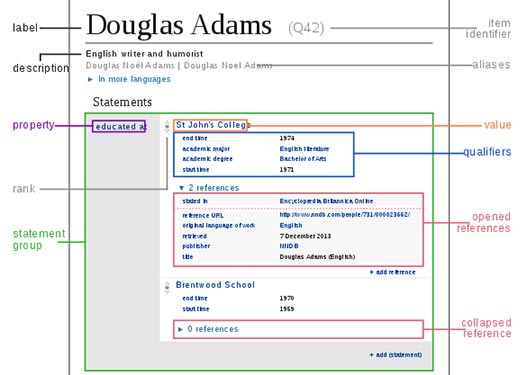
The major elements of WikiData articles that have been added are properties, values, and statements. In short, a property paired with a value forms a statement.
The statements section of a WikiData article stores the individual pieces of data about the entry that are taken from other Wiki sources.
Below, the WikiData entry for the world’s best author, Douglas Adams, is used as an example (at least, we think he’s the best).
On top of setting up the “bones” of your WikiData article, there are a few ways to optimize it:
- Use Wikipedia for your source of information as much as possible
- Learn from similar listings
- Add social media profiles
All of this may sound like a lot to set up and maintain, and it certainly takes a bit of time. A partnership with a digital services company can help take a lot of this work off your plate. From the opening stages of finding out if you’re eligible for a Wikipedia article to the granular work of ensuring your WikiData entry is optimized, uniting with a digitally savvy SEO company is a good way to ensure your Wiki content is up to snuff.
And to answer the inevitable question, does Reputation X edit Wikipedia articles? Yes, we do.
Combine WikiData with Schema for ultimate clarity
While a WikiData entry can help your brand alert Google to your address, coordinates, social profiles, parent company, subsidiaries, and more, pairing with on-site schema ties it all together.
We strongly recommend that after you’ve set up a WikiData entry for your brand, you create a website schema of the “organization” variety, including SameAs statements to make it obvious the WikiData entry is really about your brand.
To do this, use a WordPress plugin that creates website schema (free in most cases), or create it manually using a tool like this one. Select “organization” as the schema type, and when it asks for SameAs URLs (may be called Social) like your brands’ Facebook, LinkedIn, or Crunchbase profile, add one for your WikiData entry too.
Remember to test your schema with Google’s Rich Results Test (for rich-result eligibility) and the Schema.org validator (for general schema validation) to make sure it works right!
Conclusion
Once you learn how valuable WikiData content is across SERPs (Search Engine Results articles), the opportunity for quiet background SEO improvement becomes apparent.
Amid an increasingly competitive results article landscape, adding this layer of visibility can make a significant difference in a business’s web presence. If nothing else, the power and pervasiveness of Wikipedia’s content in the SERP rankings should serve as a reminder of how important domain authority, quality content (updated, readable, concise), and great internal linking is to acquiring and maintaining visibility on Google.
Frequently Asked Questions








Protect Your Online Reputation
Every day you wait, negative content gets stronger. Talk to our experts about a custom strategy for your situation.
Get Your Free Analysis