
Master Google Knowledge Panel Management: The Definitive Guide
Your Google Knowledge Panel is your brand's digital front door — here's how to claim it, correct it, and make it work in your favor.

- Claim your Knowledge Panel through Google's verification process to gain the ability to suggest edits.
- Add Schema markup to your website so Google accurately displays your name, logo, and key details.
- Build external credibility through news coverage, Wikipedia, and social profiles to influence panel content.
- Monitor your panel regularly — third-party sources can update or introduce inaccurate information at any time.
- Inaccurate panel data can damage your reputation, so treat it as an active part of your brand management.
Google Knowledge Panels are your brand's digital first impression, and leaving them unmanaged means letting an algorithm tell your story. This guide explains how Knowledge Panels work, how to claim and verify yours, and how to keep the information accurate over time. Using structured data, authoritative external sources, and routine monitoring, you can take control of what audiences see the moment they search for you.
How to Manage Your Google Knowledge Panel
-
1
Understand what drives your Knowledge Panel
Google Knowledge Panels are dynamic information boxes that appear on the right side of search results for specific entities like people, brands, and organizations. Their content is pulled from a combination of structured data, trusted web sources like Wikipedia and Wikidata, and verified entity information. The more your entity is referenced across authoritative sources, the more likely Google is to generate and maintain an accurate panel for you.
-
2
Distinguish between panel types
Google Knowledge Panels come in three main varieties: personal panels for public figures, brand panels for companies and organizations, and local panels for physical businesses. Each type surfaces different information—personal panels highlight achievements and social links, brand panels show reviews and contact details, and local panels emphasize operating hours and location data. Knowing which type applies to you helps you focus your optimization efforts in the right areas.
-
3
Claim your Knowledge Panel
Google provides a verification process that allows individuals and organizations to officially claim their Knowledge Panels. Once verified, you gain the ability to suggest edits and flag inaccuracies directly to Google. Claiming the panel does not grant full editorial control, but it is the critical first step toward actively managing what your audience sees.
-
4
Implement structured data on your website
Adding Schema markup to your website signals key details to Google—such as your name, logo, social media profiles, and notable achievements. This structured data helps Google's algorithms accurately interpret who you are and what your entity represents. A well-marked-up site significantly improves your chances of displaying a complete and accurate Knowledge Panel.
-
5
Build authoritative external signals
Google populates Knowledge Panels using external references like news articles, Wikipedia pages, and verified social profiles. Consistently earning coverage on high-authority websites and maintaining up-to-date public profiles strengthens the signals Google uses to describe your entity. Think of earned media and credible citations as ongoing contributions to the accuracy of your panel.
-
6
Monitor your panel regularly
Knowledge Panels update automatically as new information becomes available across the web, which means your panel can change without any action on your part. Routinely checking your panel ensures that outdated or incorrect information is caught and corrected promptly. Proactive monitoring is essential to keeping your digital first impression accurate over the long term.
Ever googled your name or your company’s name and found that little box on the right-hand side of the search results? You know, the one with your logo, a brief description, maybe some key facts. It’s called a Google Knowledge Panel, and while it looks like something Google magically creates, it’s actually not as “set-it-and-forget-it” as it seems. What shows up there—and what doesn’t—can say a lot about your brand. But here’s the tricky part: what happens when the info is incomplete, or worse, just plain wrong?
For marketers and brand managers, that little box is more than just a collection of fun facts—it’s a front-door impression for your audience. Whether it’s potential customers, industry peers, or the media, it’s probably the first thing they’ll see when they search for you. Getting there, though, can feel like navigating a maze, especially when Google isn’t exactly known for holding your hand through the process.
This guide covers what you need to know about Google Knowledge Panels, how to manage and update them, and why mastering them can give your brand a serious edge. If you’re not shaping your own narrative, some algorithm will do it for you—and that’s a gamble you don’t want to take.
Key Takeaways
- Google Knowledge Panels are your brand’s search engine calling card. When someone Googles your name or business, that panel on the right side of search results is your digital first impression—it needs to represent you well. Whether you’re an individual, a brand, or a local business, managing this feature helps you shape audience perception from the very first search.
- What Google gives, Google can also misrepresent. Knowledge Panels appear authoritative, but the information they display isn’t always accurate. Left unchecked, outdated or incorrect data can mislead your audience or damage your reputation. See what your panel shows today with the free Knowledge Panel checker. Claiming and updating your panel keeps you in control of your own narrative.
- It all starts with the Knowledge Graph. The backbone of a Google Knowledge Panel is the Knowledge Graph—an interconnected web of information Google uses to understand people, places, and things. Structured data, PR, and verified sources all determine what ends up in that display.
- Claiming your panel is less daunting than it sounds. Google offers a verification process for individuals and organizations to claim their panels. Once verified, you can directly suggest updates and correct inaccuracies. Claiming the panel doesn’t give you full editorial control, but it’s a powerful starting point for managing your online presence.
- Structured data is the secret sauce. Schema markup on your website helps Google understand key details about you—your name, logo, social links, awards—and boosts your chances of presenting an accurate, polished panel.
- Think of publicity as a megaphone for your panel. Your Knowledge Panel draws from external signals like news articles, Wikipedia pages, and social profiles. Consistently building these sources enhances your credibility and steers the narrative Google displays to your audience.
- Managing a panel requires regular care. Even after you’ve claimed and optimized your Knowledge Panel, information can go stale or get updated by external sources without your input. Routine monitoring keeps your digital front door accurate over the long term.
Good Knowledge Panel management doesn’t happen by accident. It’s a mix of strategy, hands-on effort, and understanding how Google interprets the web’s vast ocean of data.
Understanding Google Knowledge Panels
Search engine result pages (SERPs) display Knowledge Panels as dynamic information boxes on the right side when users search for specific entities—people, brands, landmarks, and organizations. They summarize important information through a visually organized format, helping users access authoritative data from trusted online repositories while improving search efficiency.
Brands and individuals who want to build credibility and manage their online presence need to understand these panels. They control first impressions and highlight essential information in a highly visible format.
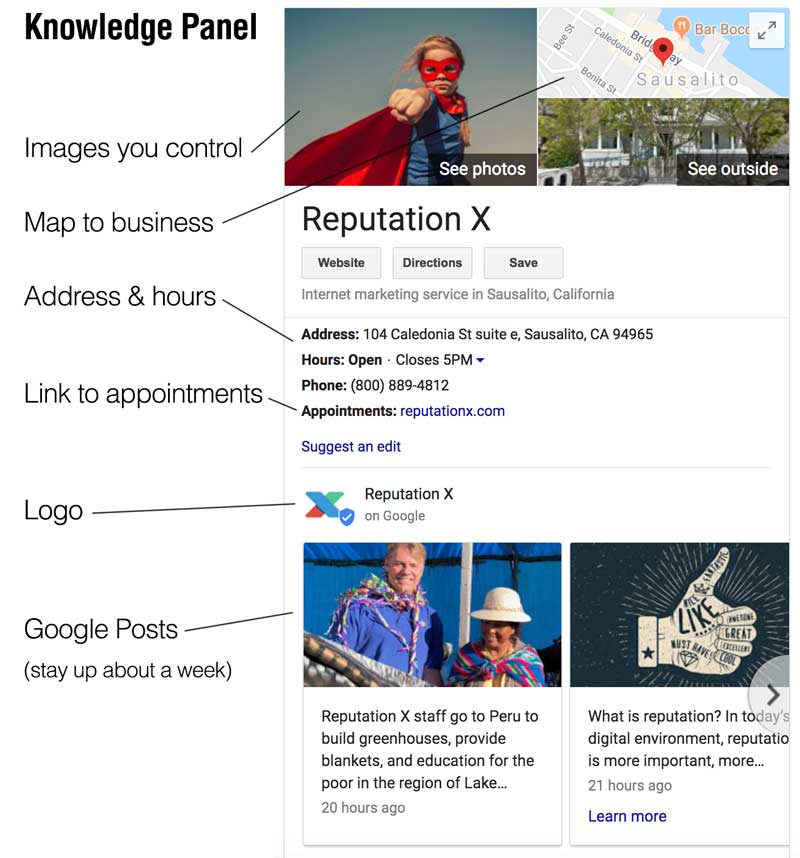
The Knowledge Graph serves as a massive database Google uses to extract information about entities and their connections. Through this integration, displayed information becomes more contextually relevant to user needs. A Knowledge Panel about a public figure includes their profession, notable achievements, and social media links. Business panels present reviews, contact information, website links, and operating hours.
Users have no complete control over how Google generates Knowledge Panels. Panels receive their content through a combination of structured data, web sources including Wikipedia and Wikidata, and verified information from entity owners. A Knowledge Panel’s appearance reflects how Google’s algorithms perceive an entity’s importance and how actively it is referenced online.
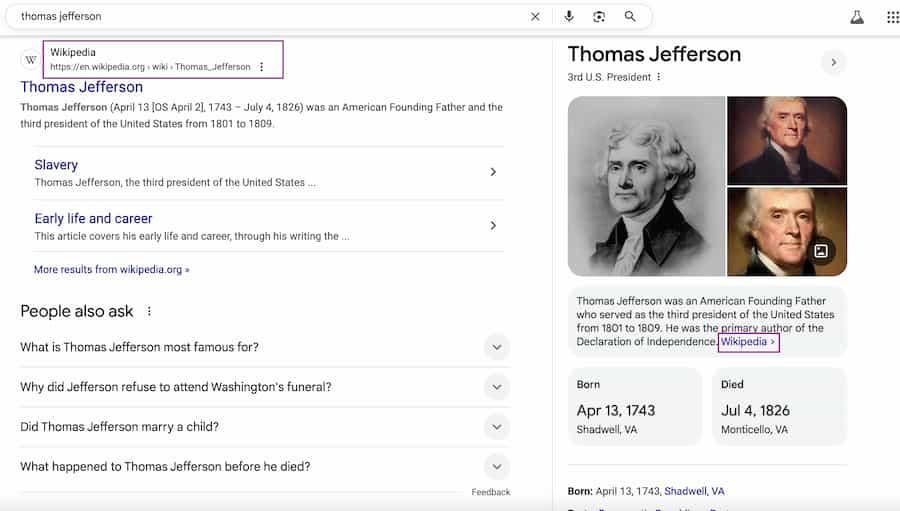
Panels maintain a dynamic nature—their content updates automatically as new information becomes available. New achievements documented on high-authority websites can appear in the corresponding Knowledge Panel quickly. Organizations must monitor and manage their panels proactively to ensure their representation stays accurate and relevant.
A verified connection to your Knowledge Panel can be established through Google’s verification process when you claim ownership. Entity owners who claim their panel can update information, though Google maintains authority over certain changes. Optimizing external data sources—including Wikipedia article improvements, website structured data, and media outlet collaboration—heavily influences the narrative in Knowledge Panels.
Understanding Knowledge Panels’ influence on public perception is essential for effective utilization. This is especially important for executives and corporate brands whose reputations are frequently scrutinized in search results.
Knowledge Graph vs. Knowledge Panel: Key Differences Explained
At first glance, the terms “Knowledge Graph” and “Knowledge Panel” may seem interchangeable, but they represent two distinct yet interconnected components of Google’s information ecosystem. Understanding their differences is essential for effectively managing your online presence and ensuring accurate representation.
Overview of the Knowledge Graph
The Knowledge Graph is Google’s extensive database connecting real-world entities to their associated relationships. Launched in 2012, it is the core system enabling Google to deliver search results that better match user intent. The Knowledge Graph contains entities ranging from famous individuals and geographic locations to corporate entities and abstract concepts. Each entity gains attributes and connections that form an extensive network of linked information.
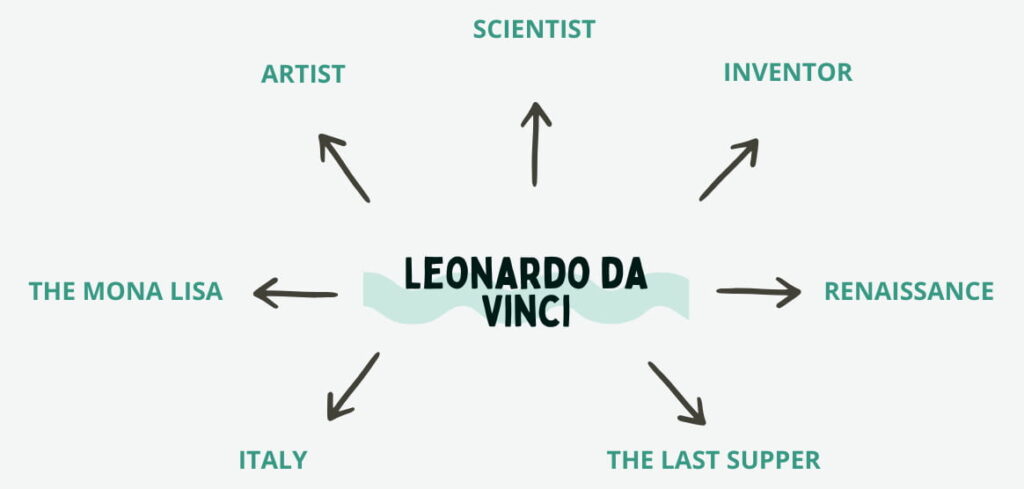
For instance, searching for “Leonardo da Vinci,” the Knowledge Graph doesn’t identify him as a person alone. It links him to categories like “artist,” “scientist,” and “inventor,” and to related entities like the “Renaissance,” “The Last Supper,” and “Italy.” This deep understanding allows Google to figure out what the user is looking for and present results that go beyond simple keyword matching.
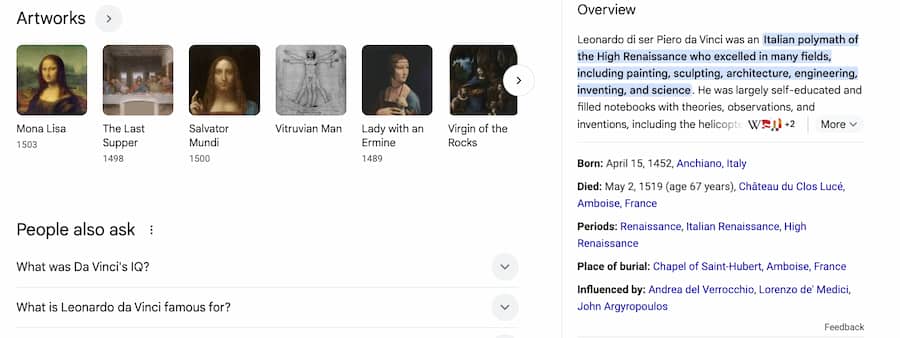
How Knowledge Panels Derive Information from the Knowledge Graph
Knowledge Panels are the user-visible representation of selected Knowledge Graph data. Displayed at the top of mobile screens or at the right side of desktop search results, these panels provide a convenient summary of key information about an entity. Their design objective is to present users with short, dependable responses without requiring further clicks.
Information included in a Knowledge Panel—a person’s birthdate, a company’s headquarters, an artist’s most famous work—comes from the Knowledge Graph and from verified third-party sources such as Wikipedia, Wikidata, and official websites. For instance, a well-known author’s panel would extract biographical information from Wikipedia and publication data from the Knowledge Graph.
Another key difference: Knowledge Panels only include a subset of entities in the Knowledge Graph. Out of the billions of entities it contains, Google’s algorithms determine which ones are relevant or notable enough to warrant a panel. The Knowledge Panel is more than a passive reflection of the Knowledge Graph—it is an actively curated selection of information designed to enhance the user search experience.
Get a Free Reputation Assessment
Find out what people see when they search for you online. No obligation — results in 24 hours.
Key Differences and Their Implications for Management
The Knowledge Graph is a sprawling database that individuals and organizations cannot directly control. Its content evolves dynamically as Google draws information from trusted sources and refines how entities connect. Brands and individuals can increase their visibility in the Knowledge Graph through better digital presence management, but they cannot modify the Graph directly.
Knowledge Panels, by contrast, offer management capabilities subject to Google’s guidelines. Users verified by Google—business owners, public figures, or their representatives—can submit suggestions to modify specific elements of their panel, including correcting factual mistakes or adding an official website link. This ability is crucial for reputation management because errors in a Knowledge Panel can profoundly impact public perception.
Think of the Knowledge Graph as the “engine” and the Knowledge Panel as the “interface.” Managing your relationship with the Knowledge Graph means creating reliable structured online assets: consistent business listings, optimized schema markup, and authoritative third-party profiles. Managing Knowledge Panels means keeping their content accurate, professional, and relevant.
Consider a brand whose Knowledge Panel incorrectly states its founding year. The problem originates from incorrect information in the Knowledge Graph’s sources, not from the panel itself. The brand must both request a correction through Google and verify that foundational data across key sources—the company website, social media pages, and reputable directories—is consistent and current.
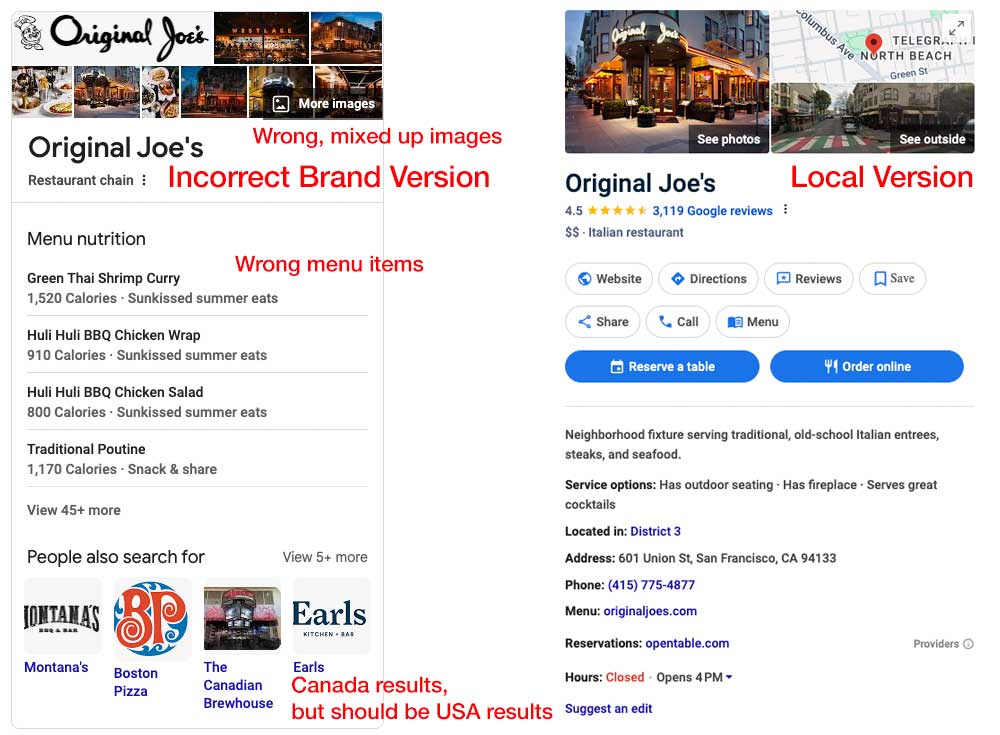
The relationship between Knowledge Graph and Knowledge Panel shows that effective management requires a comprehensive strategy. Success depends on grasping and utilizing the specific characteristics of both components, allowing individuals and organizations to position themselves optimally within Google’s information network.
Take Control of Your Knowledge Panel
Our team specializes in claiming, optimizing, and maintaining Google Knowledge Panels for brands and executives. Let’s make sure your digital first impression is the right one.
Tip: see what Google’s Knowledge Graph already knows about you with the free Google Entity Finder.
Understanding Personal, Brand, and Local Knowledge Panels
Google Knowledge Panels organize data into a clear, accessible format for people, businesses, and locations. Each panel type functions differently within Google’s ecosystem and requires its own management approach for optimal results.
Personal Knowledge Panels
Personal Knowledge Panels contain information about public figures, professionals, authors, artists, and other well-known individuals. These panels display the person’s name, photo, birth date, occupation, and a brief description derived from Wikipedia or their official website. They also link to verified social media profiles, published works, and notable career achievements.
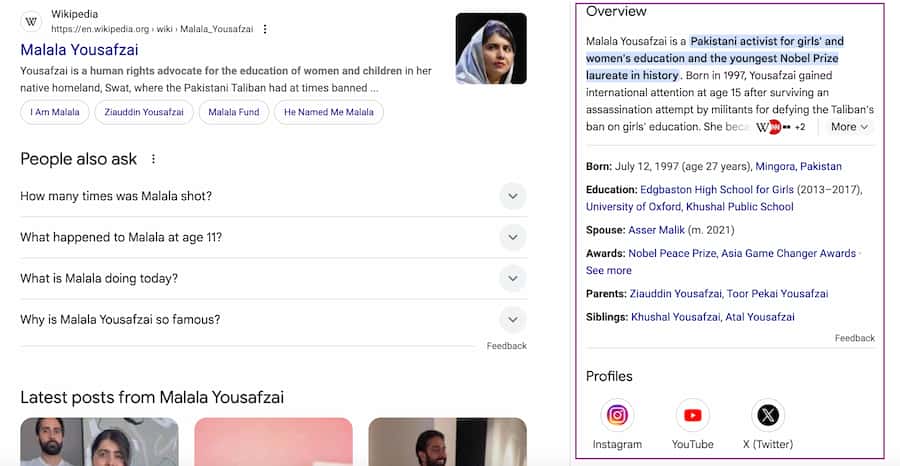
For instance, a well-known author’s Google Knowledge Panel would include a bibliography, awards received, and affiliations with literary organizations—retrieved directly from trusted sources related to the person’s online identity.
Claiming or optimizing a Personal Knowledge Panel requires authenticity and authority. Contributing to authoritative platforms, maintaining consistency across main profiles, and ensuring online sources are credible all build the necessary foundation. Public figures can use Wikipedia, verified Google profiles via Google Search Console, and media coverage to influence what appears in the panel. Maintaining factual accuracy and avoiding over-sensationalized information is essential for long-term credibility.
Brand Knowledge Panels
Brand Knowledge Panels are specific to businesses, organizations, and public entities. They summarize the company name, logo, founding year, headquarters, industry sector, and executive leadership. A technology company’s panel might include its mission statement and key products, sourced from reliable industry websites, corporate pages, and Google’s Knowledge Graph. This centralization of data builds trust with potential customers and partners.
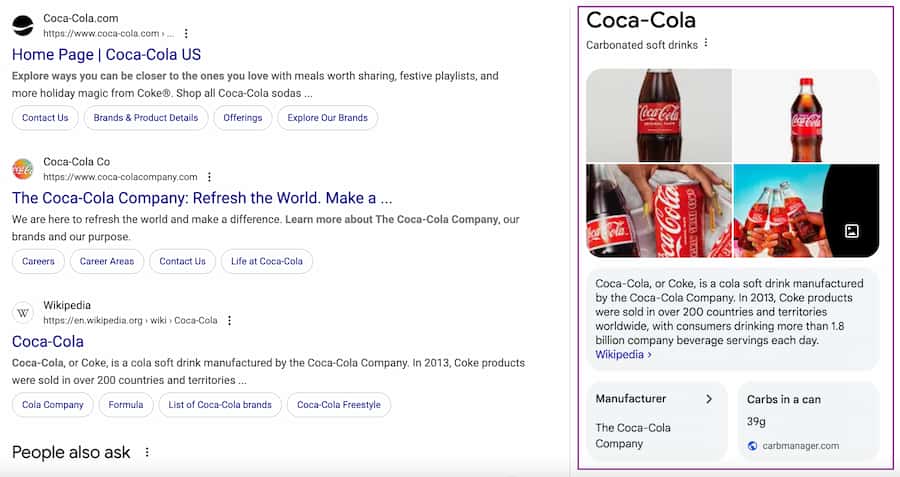
Managing a Brand Knowledge Panel starts with proactive structured data implementation. Businesses should ensure their official website uses schema markup to specify organization attributes like contact information, social media links, and product descriptions. Maintaining a verified Google Business Profile and earning media coverage in trusted outlets enhances both the accuracy and visibility of the panel. Visibility in industry-specific directories and databases further reinforces legitimacy.
Local Knowledge Panels
Local Knowledge Panels provide information specific to businesses with physical locations and local service providers. These panels serve restaurants, retail stores, healthcare providers, and other local entities. They feature user reviews, operating hours, directions via Google Maps, address details, and photos of the business or its services.
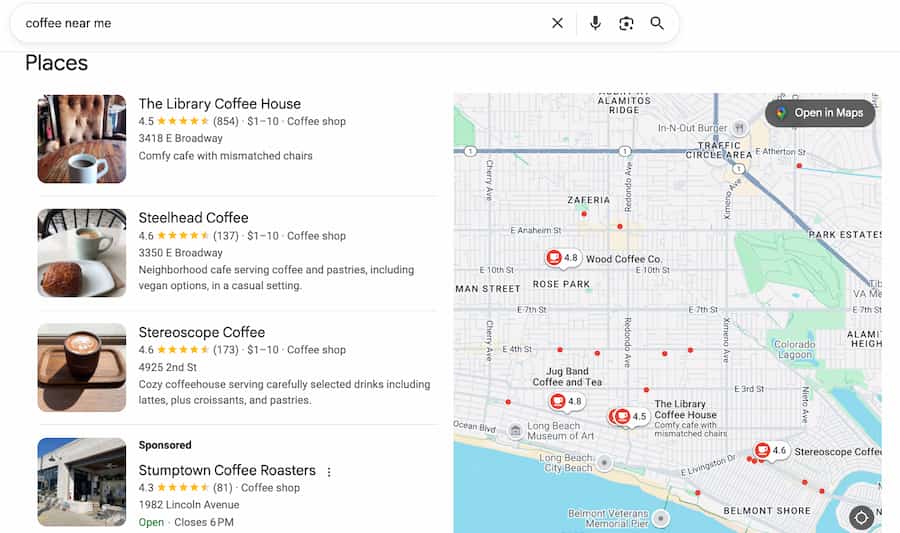
Optimizing a Local Knowledge Panel starts with a robust Google Business Profile. Ensure information is consistent and accurate across all local directories such as Yelp and mapping services. Engaging with customers by soliciting and responding to reviews builds trust and improves local search positioning. High-quality images, regular updates, and customized posts help personalize the experience for local customers.
Variations in Management and Optimization for Each Type
While Personal, Brand, and Local Knowledge Panels share common elements, their optimization strategies differ significantly. Personal and Brand panels rely on digital authority and credibility built through content curation and public relations. Local panels depend on accurate geographic and customer data management.
Each panel type has its own triggers and audience expectations. Understanding these distinctions ensures panels consistently appear in search results and display the most accurate, impactful information. The optimization process requires both technical skills and continuous online reputation management to improve online exposure and maintain a strong digital presence.
Step-by-Step Guide to Claiming Your Google Knowledge Panel
Claiming your Google Knowledge Panel is a necessary step in managing and maintaining your online presence. Taking ownership gives you the ability to improve the information presented about you or your brand, ensuring accuracy and consistency. The following steps walk you through the process efficiently.
Verifying Your Identity or Connection to a Brand
Before you can claim a Knowledge Panel, Google requires verification to ensure that only authorized individuals or representatives make changes. This step is critical for establishing trust and preventing misuse.
- Search for Your Knowledge Panel. Use Google’s search engine to find the Knowledge Panel you want to claim. The panel appears on the right side of search results for well-known people, organizations, and brands. Confirm your public presence includes enough substantial information—a personal bio, official website, or structured data—before starting the process.
- Locate the “Claim This Knowledge Panel” Option. At the bottom of the Knowledge Panel you will find a link that reads “Claim this Knowledge Panel.” Clicking this link starts Google’s verification process.
- Choose the Appropriate Google Account. Proceed with a Google account that maintains a direct connection to your professional persona or organizational affiliation. An account matching your official email domain (e.g., yourname@yourcompany.com) boosts your credibility during verification.
- Submit Verification Documentation. Prepare evidence that proves your identity and official position in your organization. Acceptable documentation includes:
- Government-issued IDs for individuals.
- Business registration documents or legal trademarks for organizations.
- Access to official websites, email addresses, or social media channels connected to the Knowledge Panel subject.
Follow the on-screen prompts to upload or link supporting materials to your application.
The Claiming Process
Once verification is initiated, the next steps focus on completing the formal request and gaining control of your Knowledge Panel.
Authenticate With Third-Party Platforms
Google conducts identity verification through third-party platforms such as X (formerly Twitter), YouTube, and Instagram. When prompted, connect these accounts to demonstrate a social media presence linked to the entity or individual in the Knowledge Panel.
Submit for Review
After providing all necessary information, submit your claim for Google’s review. The review process typically takes between several days and a week, depending on the volume of submitted requests and the complexity of your case.
Monitor Email and Google Account Notifications
Google will send notifications through both your email address and your linked Google account about the status of your claim. If your application is rejected, review their feedback and verify that your documentation accurately reflects your relationship with the Knowledge Panel subject.
Access and Manage Panel Features
After your claim receives approval, you will gain editing capabilities and the ability to suggest updates through Google tools—including modifications to bio sections, links, and other details. This access allows you to keep your personal information and brand details current.
Common Challenges and How to Overcome Them
The claiming process often presents obstacles. Here are the most common issues and how to resolve them.
Missing Knowledge Panel
If a Knowledge Panel does not exist for your name or brand, start by establishing a stronger online presence. Creating credible content, adding structured data to your website, and participating in public relations efforts will eventually prompt Google to generate a panel automatically.
Verification Denials
If your claim is rejected, verify that your submitted documents meet Google’s authentication standards. Your email domain should display official branding, and you should link accounts from LinkedIn or integrate your Google account with a verified company website.
Delayed Responses
Google’s review and approval process operates at varying speeds. During the waiting period, maintain your online presence by updating your website, boosting social media engagement, and creating authoritative content to build credibility.
A strategic approach to these challenges will improve your claiming process and help you acquire control over how your online identity is represented.
How to Update Your Google Knowledge Panel Information
Google Knowledge Panels are a powerful digital presence management tool, but maintaining accurate, current information requires continuous monitoring. The feature does not have a direct edit option like traditional web pages—Google uses its Knowledge Graph database, which aggregates public information from multiple authoritative sources, to generate displayed information. That said, the system does provide methods to update information and resolve inaccuracies.
Methods to Request Updates
Updating your Google Knowledge Panel starts with making suggestions through the panel interface. First, confirm you are signed in under the Google account that verified panel ownership. Then follow these steps:
- Find the “Suggest Edits” or “Feedback” link at the bottom of your Knowledge Panel. Clicking this link opens a form where you can flag incorrect or outdated content.
- Present your proposed changes clearly and with supporting documentation. Include links to credible sources—your website, verified social media profiles, or notable publications—that corroborate your suggested edits.
- When correcting specific facts such as incorrect founding dates or outdated leadership roles, provide evidence through official sources such as press releases, news articles, or verified biographies.
Google’s team manually reviews all requests. Updates can take anywhere from several days to multiple weeks to appear, depending on the complexity of the change and the strength of supporting evidence.
Handling Incorrect or Outdated Information
When Knowledge Panels display incorrect or outdated information, start by evaluating the sources responsible for the error. Google retrieves information from third-party sources including Wikipedia, official websites, media outlets, and structured markup data. Correcting the source data often leads to automatic panel updates.
For example:
- Wikipedia Corrections: Work with Wikipedia editors by offering verifiable sources that support the corrections. Follow Wikipedia’s precise policies about verifiable sources and neutral presentations when making your request.
- Structured Data: Check your official website for proper schema markup optimization. Incorrectly marked-up content or neglected meta information can confuse Google’s automated systems.
- External Databases: The Knowledge Graph receives updates from external databases including Wikidata, Crunchbase, and professional directories. Check and update your entity information across these platforms.
When outdated information originates from incorrect news reporting, implement PR strategies to achieve consistent, accurate web coverage.
Ensuring Accurate and Regular Updates
Once your Google Knowledge Panel displays correct information, ongoing vigilance protects its accuracy. Follow these recommendations:
- Update verified social media profiles, Wikipedia entries, and industry-specific directories regularly. These platforms power the Knowledge Graph.
- Implement structured data standards such as “Organization” and “Person” markup on your website. This allows Google’s algorithms to retrieve essential details—job titles, affiliations, contact information—directly. Learn more in our guide to adding schema to corporate biography pages.
- Regularly search for your brand name or personal name to detect information inconsistencies early. Set up Google Alerts for your name or brand to receive notifications about new online mentions.
- Partner with respected media organizations to publish articles and features about your brand’s achievements. Authoritative references help maintain accurate information within the Knowledge Graph.
Proactive management of these areas prevents outdated information from appearing and gives you greater control over your online presence over time.
Mastering Knowledge Panels with Structured Data Optimization
Structured data is the primary mechanism connecting your website to search engines and influencing how Google populates Knowledge Panels. When embedded correctly, structured data helps Google understand essential details about your entity—whether a person, brand, or business—resulting in accurate user-facing presentation. Proper schema markup implementation produces both technical standards compliance and the relevant context needed for better search engine visibility.
Role of Structured Data in Knowledge Panel Generation
Google’s Knowledge Panels are data-driven representations of entities aggregated from a variety of sources, with the Knowledge Graph as their backbone. Structured data serves as the connection that allows search engines to interpret web content in a machine-readable way. This implementation relies on schema markup—a standardized vocabulary of tags.
The Person schema works for individual professionals; the Organization schema works for businesses. Both provide fundamental details including names, logos, job titles, and founding dates. These data elements help Google maintain accurate information in Knowledge Panels. Without structured data, Google may misinterpret unclear or scattered data points, resulting in harder-to-fix inaccuracies.
Consider a public speaker who implements Person schema with biographical information, work highlights, social connections, and speaking events. This precise application of structured data improves Google’s confidence in the information’s authenticity and increases the likelihood of direct Knowledge Panel integration.
Implementing Schema Markup to Influence Knowledge Panels
While structured data does not guarantee the appearance of a Knowledge Panel, it significantly increases the likelihood of one being generated correctly. Start with a precise understanding of the entity type you wish to optimize for, then layer relevant attributes specific to that type.
For brands, this might include logo, url, sameAs (to link official social profiles), and contactPoint (for public-facing contact details). Local businesses should use the LocalBusiness schema to include attributes like address, openingHours, and geo coordinates. The sameAs field can also consolidate trust across multiple digital platforms by explicitly linking back to official websites, Wikipedia pages, or LinkedIn profiles.
Here’s an actionable starting point for schema markup implementation:
- Identify Opportunities: Audit your public-facing information to determine gaps or inconsistencies that could hinder Google’s understanding of your entity.
- Choose the Right Schema Type: Refer to Schema.org for an exhaustive list of schemas—such as
Bookfor authors orMusicGroupfor bands—that align with your entity. - Markup Key Pages: Add structured data to high-authority pages such as your homepage, “About Us” page, or personal portfolio, using inline JSON-LD code placed logically within the page.
- Test with Google Tools: Use Google’s Rich Results Test to validate your implementation and resolve errors. The Schema Markup Validator at validator.schema.org is also a reliable companion tool for catching structural issues before they affect your panel.
Best Practices for Structured Data Optimization
To elevate the impact of structured data on Knowledge Panel optimization, adopt best practices that focus on quality, accuracy, and sustainability. A “set-and-forget” approach is counterproductive in a dynamic digital ecosystem where factors influencing Knowledge Panels evolve regularly.
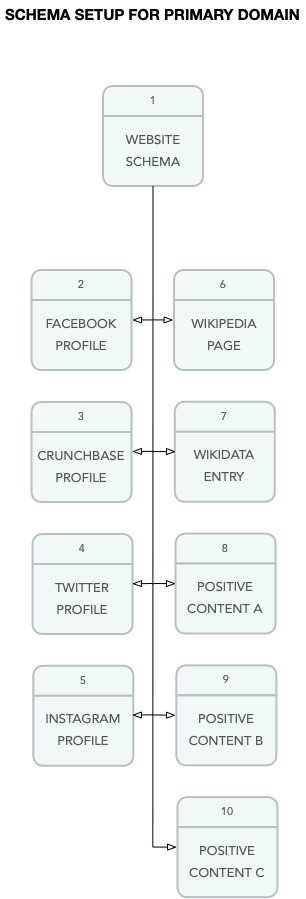
- Validate Consistency Across Platforms: Data consistency is paramount. Ensure details in structured data match those on other authoritative sources like LinkedIn, Crunchbase, or local business directories, minimizing the risk of conflicting signals.
- Keep Information Fresh: Outdated structured data undermines credibility. Regularly update your schema attributes to reflect new industry recognitions, leadership changes, or revised operating hours.
- Diversify Data Sources: While structured data is foundational, its real strength lies in complementing other data sources. Claim and optimize listings on platforms such as Google Business Profile, Wikidata, and Wikipedia, which all play influential roles in Google’s Knowledge Graph.
- Prioritize User Intent: Structured data supports what users are searching for. Including unnecessary or tangential attributes may dilute relevance and reduce the panel’s ability to reflect what truly matters to your audience.
Ultimately, structured data optimization is about building trust—both with Google and with your audience. Providing clarity through schema markup, aligning it with a robust online presence, and maintaining precision in your entity’s digital footprint can transform how you control visibility in organic search and Knowledge Panel results alike.
What You Can and Cannot Change on a Knowledge Panel
Knowledge Panels: Challenging to manipulate
Google’s knowledge panels are fairly reliable and difficult to manipulate. The panels are automatically generated from various sources across the web that make up Google’s Knowledge Graph. Google works with data partners who provide authoritative data in their respective areas of the knowledge panels.
Searches that generate branded knowledge panels are typically prominent figures or organizations that can be self-authoritative.
Brands have limited direct control of Knowledge Panel information
Figures and organizations are allowed to provide direct feedback and verify the information that is in their panels. This type of self-authorization requires an individual or company to claim its knowledge panel by clicking the button under the panel. Google will ask for proof, such as a driver’s license, screenshots of the admin screens of social media accounts and websites, etc. Upon verification, a brand can select a featured image for its panel and perform other limited changes.
No one can completely change a knowledge panel. Even verified users can change only a few things. Knowledge panels are dynamic, meaning they are updated automatically as information changes on the web.
For example, when it comes to e-commerce giant Amazon, the company has its own Google Knowledge Panel…

As does the company’s CEO, Jeff Bezos…
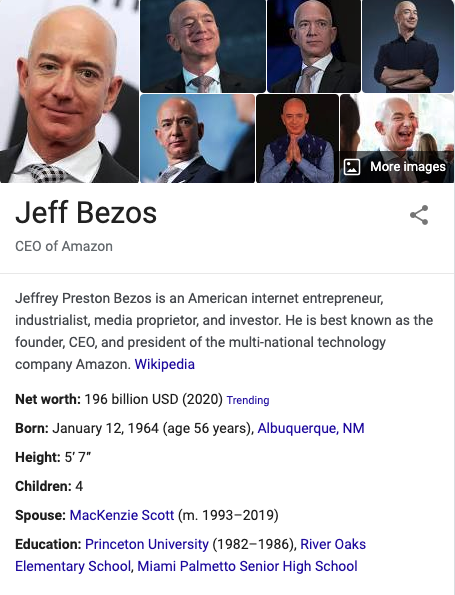
While they have a similar look on SERPs, knowledge panels are not to be confused with Google Business Profiles. Google Business Profiles are intended for businesses that serve customers at a specific location or cover a particular service area.
Advanced Strategies for Google Knowledge Panel Management
To master the intricacies of Google Knowledge Panel management, it’s essential to move beyond fundamental practices into a more strategic realm. Advanced techniques focus on harnessing external influences, proactive reputation building, and ongoing vigilance—ensuring your Knowledge Panel not only exists but accurately and authoritatively reflects your desired identity.
Leveraging Publicity and PR for Knowledge Panel Visibility
Publicity plays a pivotal role in shaping and enriching your Knowledge Panel. Google populates its panels with data from reputable sources, so strategic PR efforts can amplify your online presence and signal credibility to the algorithms. Publishing articles in high-authority, industry-relevant publications is one of the most effective ways to solidify your Knowledge Panel’s content and scope.
For example, if you’re a prominent figure in the tech industry, getting quoted or featured in outlets like TechCrunch or Forbes validates your expertise while increasing the likelihood of key information being included in your panel. Press releases, when properly syndicated through respected channels, can drive coverage in trustworthy media—and references to your brand or personal achievements may eventually ripple into Knowledge Panel data streams. Maintain quality over quantity: spamming low-quality PR campaigns can dilute your online presence and hinder your panel’s perceived authority.
Consider proactive outreach to trusted data publishers such as Wikipedia and Wikidata. While generating editorial content for Wikipedia is bound by strict guidelines, external PR campaigns that position you or your brand in the public spotlight can influence the type of content organically added to these encyclopedic platforms. Maintaining accurate Wikidata entries also strengthens Google’s ability to draw verified details into your panel.
Using Social Profiles and External Sources to Shape the Panel
Social profiles play an outsized role in the evolution of Knowledge Panels, particularly for public figures and brands. Linking your verified social profiles—LinkedIn, Instagram, X (formerly Twitter), or Facebook—ensures Google recognizes these as reliable sources of information about you or your organization. Consistency across social channels is paramount. Mismatched names, contact details, or branding can create confusion for Google’s algorithms, potentially leading to incomplete or inaccurate panel content.
Optimizing your social profiles to align with your Knowledge Panel goals is equally important. Ensure that profile bios, descriptions, and linked URLs are consistent with the information you want reflected in your panel. Platforms with high domain authority—LinkedIn for professionals, Crunchbase for businesses, IMDb for entertainers—carry particular weight as external signals. Regularly audit these profiles to ensure they reflect your current role, achievements, and contact details.
External sources beyond social media also matter. Industry databases, academic repositories, and government registries can all contribute data to the Knowledge Graph. If your entity appears in these sources, verify that the information is accurate and up to date. Proactively reaching out to database administrators to correct errors is a legitimate and often overlooked tactic for improving Knowledge Panel accuracy.
Frequently Asked Questions





Protect Your Online Reputation
Every day you wait, negative content gets stronger. Talk to our experts about a custom strategy for your situation.
Get Your Free Analysis