
How to Unlock Branded Today’s Search Features In Google
Learn how to dominate every element of your branded search results page and turn Google into your most powerful first impression.

Google has become the new home page for brands, making it critical to actively manage how your business appears in search results. Brands that control their Knowledge Panels, metadata, reviews, and Google Posts send stronger trust signals to prospective customers. This article outlines the most impactful steps brands can take to dominate their own branded search results and keep competitors out of their brand space.
How to Unlock Branded Search Features in Google
-
1
Optimize your metadata title and description tags
Update your site's HTML title tag to include your target keyword near the front and keep it under 60 characters. Google indexes home page title tags quickly, so changes to reflect sales or updated messaging will appear in search results soon after. Treat your title tag as a strong recommendation to Google rather than a guaranteed headline, and craft it to be concise and clearly relevant.
-
2
Set up and maintain your Google Business Profile
Create or claim your Google Business Profile and select the business type template that best fits your brand, such as adding a menu link for restaurants or a booking link for medical practices. Upload a strong library of high-quality, brand-approved images of your space and products to control your visual narrative. Enable notifications for suggested edits and log in frequently, since users can submit incorrect information or damaging images without your approval.
-
3
Claim and monitor your Knowledge Panel
Claim your Google Knowledge Panel to gain the ability to flag unauthorized edits and protect your brand's information. Monitor it regularly, as users can submit incorrect details or damaging images without prior approval. Keeping a close watch lets you catch and correct harmful changes before they go live.
-
4
Build authority through customer reviews
Encourage customers to leave genuine reviews on Google, keeping in mind that incentivizing reviews is prohibited and fake reviews violate FTC rules. Respond to both positive and negative reviews in a calm, authentic, and personalized way — avoid using the same template for every reply. Proactively managing reviews adds authority to your brand and can increase both traffic and sales.
-
5
Publish and manage Google Posts
Use Google Posts to share content directly within your local knowledge graph, where posts appear in a scrollable carousel on desktop search results. Unlike most Google features, you have total control over creating and managing your posts through your Google Business Profile dashboard. Consistent posting keeps your brand's information fresh and visible without relying on third-party sources.
-
6
Pursue a Wikipedia or Wikidata presence
A Wikipedia page can contribute content to your brand knowledge panel, as Google's Knowledge Graph draws from it as an authoritative source. Only create a Wikipedia page if your brand is notable enough to meet Wikipedia's standards — otherwise, the page is likely to be removed. If a Wikipedia page is not attainable, establishing a Wikidata entry is a viable alternative for signaling entity recognition to Google.
-
7
Implement structured data on your website
Add schema.org structured data markup to your website to help Google's Knowledge Graph recognize your brand as a verified entity. Structured data works alongside Google Business Profile, Wikidata, and other authoritative sources to strengthen your brand's entity signals. Proper implementation increases the likelihood of earning a brand knowledge panel even without a Wikipedia page.
-
8
Optimize your Bing business presence
Bing is a significant search engine that also displays knowledge panels, reviews, and business information in its results. Claim and update your business profile on Bing to ensure accurate information appears for users who search there. Managing your Bing presence alongside Google ensures broader coverage of your branded search results across platforms.
Google is your new home page. When a brand dominates its own search engine results, it sends trust signals to prospective customers. Controlling aspects of search results — such as the Knowledge Panel, carousel images, location information, Google Posts, and social media posts — lets brands showcase their strengths while keeping competitors out of their online brand-space. This article covers the most effective ways brands can control how they appear in search.
Contents
Get a Free Reputation AssessmentFind out what people see when they search for you online. No obligation — results in 24 hours. |
Search engines are more than a directory — they want to solve problems directly. Few people click through to a brand’s main website when Google or Bing offers an information shortcut on the results page itself.
Your new home page is Google. You want all of your important information displayed on the first page of results so customers and prospects can find it immediately. The challenge is that brands cannot control Google the way they control their own website. Unless a company actively manages its search profile, brand sentiment can suffer — potentially costing thousands or millions of dollars in lost revenue each year.
This article outlines the changes that make the most difference. Do these things, and your branded search results will improve.
Metadata: Title and Description Tags
The first thing a brand can do to influence search results is manage its own site’s metadata — specifically, the Title and Description elements of its HTML.

- Google indexes title tags for home pages more quickly than in the past. Change your
<title>tag and expect search results to reflect the update in short order. - Sale items, for example, can be added to the Title temporarily. When the sale ends, revert the tag and Google will follow.
- Both Bing and Google may override your HTML title tag in search results. Since Google’s 2021 title rewriting update, Google frequently substitutes its own version rather than using your tag verbatim — so what you write isn’t always what searchers will see.
- Your Title tag still serves as the primary input Google uses when generating its own headline. Think of it as a strong recommendation rather than a guaranteed headline.
Knowledge Panels: Local
There are two kinds of knowledge panels: local and brand. The knowledge panel is the grouping of information that appears in the upper right corner of search results. It contains images, logos, social media links, posts, Google Reviews, and more.
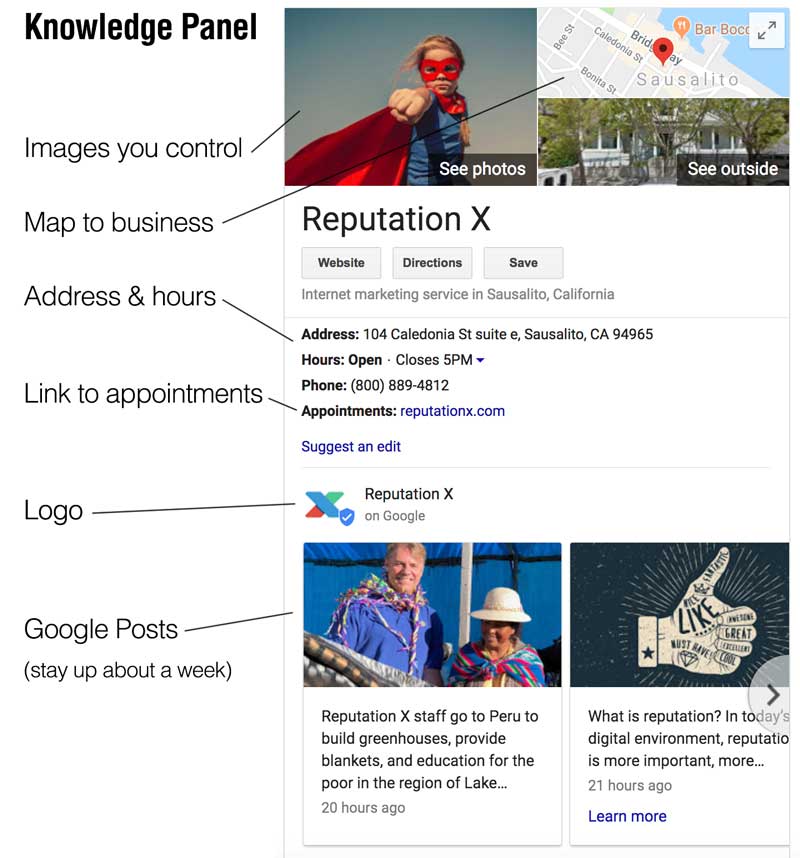
Knowledge panels are an important trust signal because they appear above the fold — no scrolling required. To understand the full range of panel types, see our guide to personal, brand, and local knowledge panels.
- Start with Google Business Profile (GBP) to begin populating your brand graph.
- GBP offers different templates depending on your business type. Restaurants can add a menu link; medical practices can add a booking link so patients can schedule appointments directly from search results.
- Hours and other details can be added and updated at any time.
- Tip: Log into your Google Business Profile dashboard frequently and enable notifications for suggested edits. Users can submit incorrect information or damaging images without your approval — catch these before they go live.
- Load your profile with high-quality images of your space and products. Since users can upload images too, a strong library of brand-approved visuals helps you control your own narrative.
Knowledge Panels: Brand
Brand knowledge panels work a little differently from local panels and appear for recognized entities.

- Wikipedia content often appears in brand knowledge panels.
- Google’s Knowledge Graph draws from Wikidata, structured data (schema.org), Google Business Profile, and other authoritative sources to determine whether a brand qualifies as an entity. A Wikipedia page alone is no longer the only path. Learn more about the sources Google’s Knowledge Panel relies on.
- If your brand is not yet recognized as an entity, it can still earn a local knowledge panel.
Reviews
Good reviews add authority to your business and can increase both traffic and sales.
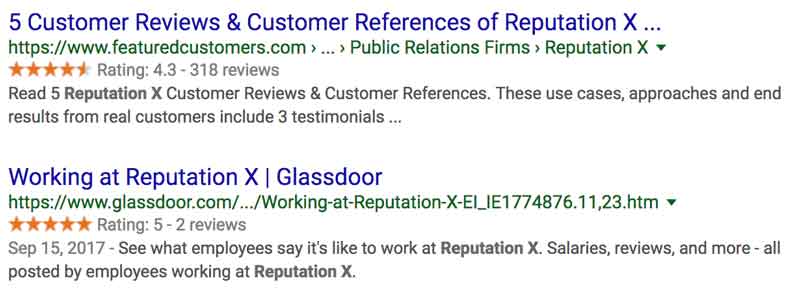
- Reviews can come from many sources. Third-party review sites you may not recognize can surface in your SERPs.
- Yelp discourages businesses from soliciting reviews. Google encourages them, though its policies have tightened — incentivizing reviews is prohibited, and the FTC’s 2024 rule banning fake reviews (effective October 2024) applies across all platforms. Ask genuinely; never pay or pressure.
- Respond to both positive and negative reviews on Google. Stay calm and authentic.
- Avoid using the same template for every response. Replying with “Thank you for your review” to every submission is a missed opportunity and can undermine the trust you’re trying to build.
Take Control of Your Branded Search Results
Our team helps brands dominate their own search results — from Knowledge Panels to structured data and beyond.
Google Posts
Google Posts live in your local knowledge graph and sometimes appear in other locations within search results. On desktop, arrows on either side of the post carousel allow users to scroll through your content.

- Unlike most Google features, you have total control over your Google Posts.
- Posts are created and managed through your Google Business Profile dashboard, or directly within Google Search and Maps when signed in.
- Google Posts appear automatically in your Knowledge Panel.
- Standard posts expire after about 7 days. Event posts stay live until the event date. Keep your post stream fresh, and check your GBP dashboard to confirm how posts are currently displaying.
- You can add a call to action to each post.
- Only the first 100 characters or so appear in the search results preview. Make those characters count — the rest is visible only after a user clicks through.
Wikipedia and Wikidata
Wikipedia
Don’t create a Wikipedia page if your brand isn’t notable enough — it will likely be removed. Focus on Wikidata instead (see below).
If your brand is notable and doesn’t yet have a Wikipedia page:
- Always start with a stub.
- Add five notable references.
- Build the page up over time. For a deeper look, see how Wikipedia affects brand reputation.
Wikidata
If your brand can’t earn a Wikipedia page, Wikidata is a strong alternative.
- You can submit your brand as a Wikidata item — not as a full page, but as structured data.
- Google sometimes uses Wikidata to populate the Knowledge Panel. Learn more in our guide to setting up and maintaining a Wikidata entry.
Google Business Profile and Knowledge Panel Claiming
Google Business Profile
Google Business Profile (formerly Google My Business) is the hub for managing how your brand appears across Google Search and Maps. Verify your profile and keep all information accurate and current.
- A verified GBP establishes a consistent foothold in Google’s ecosystem and reinforces your brand’s presence in search results.
Claim Your Knowledge Panel
- Claiming your Knowledge Panel lets you suggest changes to images, facts, and other details. Search for your brand on Google and click “Claim this knowledge panel” to get started. The types of edits available are limited — Google controls what can be modified — but verification gives you a direct line to flag inaccuracies. See our step-by-step guide to claiming your Google Knowledge Panel for a full walkthrough.
Bing and the Bing Brand Panel
Bing Places for Business
Don’t overlook Bing. It holds a meaningful share of search traffic and has its own brand panel features.
- Set up your Google Business Profile first — it saves time when configuring Bing.
- You may be able to import your GBP information into Bing Places for Business, though what transfers can vary. Check the Bing Places site directly for current import instructions.
Bing Brand Panel
- Bing has traditionally cited sources within its brand panel, making it easier to trace where information originates. With the integration of Microsoft Copilot in 2023, Bing’s search experience has evolved significantly. Source citations remain a feature of AI-powered results, but how brand information surfaces continues to change as Microsoft refines the Copilot experience.
Structured Data
Structured data is code added to your web pages to inform search engines about your organization, owned social profiles, and more. The most important schema type for brands is Organization. For a practical walkthrough, see our guide on using schema markup to improve branded search results.

A fast way to get started is to use a schema template tool like this one. Key schema types to implement include:
- Organization — can include logo, social profiles, founding date, CEO, website, and detailed contact information
- Breadcrumb / Site Navigation — includes
SiteNavigationElementandBreadcrumbList - Video — pulls video content into SERPs
- Product — supported types continue to expand; review Google Search Central’s structured data documentation regularly for current rich result eligibility
Social Media and PPC
Social Media
Social media has a growing influence on branded SERPs because much of it is pulled directly into your branded search result page. Social sections appear when a brand is highly active and shows recent posts.
The most important platforms to manage:
- X (formerly Twitter) — appears as a carousel and as a standalone SERP item; engagement signals and posting frequency both influence visibility; X card markup (managed through X’s developer platform) helps boost engagement
- Facebook — appears as a SERP result; Facebook Recommendations can display as star ratings in search results, though this display has become less consistent; check current Bing Places features for available Facebook integrations
- Instagram — less prevalent in Google but appears in SERPs; Bing surfaces significantly more Instagram content than Google does
- YouTube / Vimeo — claimed accounts and individual videos rank in the search result carousel; Google prominently surfaces YouTube videos; content from Facebook and X may also appear, though YouTube receives the most consistent placement
- LinkedIn, Pinterest, TikTok — all surface in search results; TikTok in particular now appears regularly in Google SERPs; note that SlideShare was sold to Scribd in 2020 but still surfaces for some brands
PPC
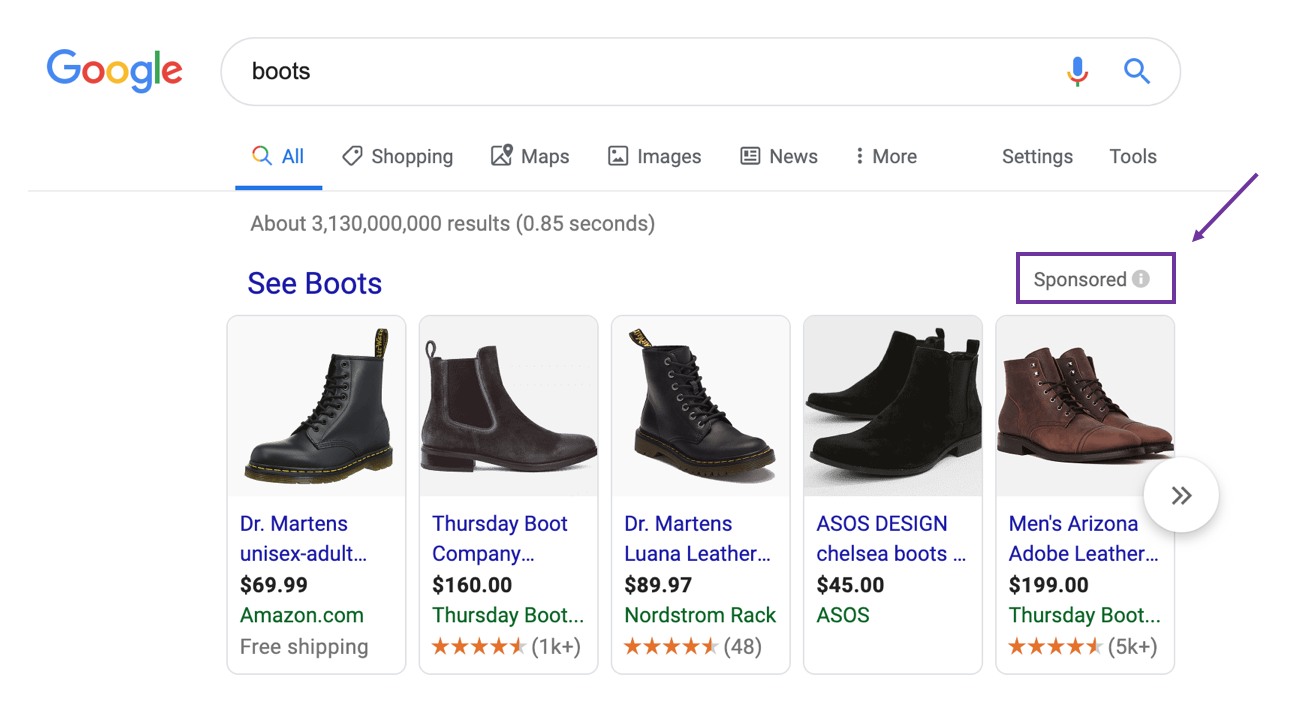
- PPC (Pay Per Click) ads appear first in SERPs, above organic results.
- As the name implies, you pay for each click — this is not organic traffic.
- Adding ad assets (formerly called extensions) — such as sitelinks to specific pages — makes your ad larger and helps your brand own more above-the-fold screen real estate. Explore current options like Performance Max campaigns within your Google Ads dashboard.
There is much more you can do to improve your branded search results, but the strategies above will help almost any company gain a stronger foothold in Google.
Frequently Asked Questions






Protect Your Online Reputation
Every day you wait, negative content gets stronger. Talk to our experts about a custom strategy for your situation.
Get Your Free Analysis