
About Google Knowledge Panels and How to Get One
A Google Knowledge Panel can instantly elevate your brand's credibility — here's exactly what it takes to get one and why it matters more than ever.

- Local businesses can apply for a Local Knowledge Panel by verifying their Google Business account.
- Branded or personal Knowledge Panels require Google to recognize you as a distinct entity.
- Building a strong online presence with Wikipedia coverage helps establish entity status.
- Knowledge panels are critical for voice search, which now accounts for nearly 70% of queries.
- Brands cannot directly control panel content, but can influence it via Wikipedia and structured data.
Google Knowledge Panels are information boxes that appear in search results and play a growing role in brand visibility and online reputation. There are two types: Local Panels for businesses and Branded/Personal Panels for recognized entities. Getting a branded panel requires Google to recognize you as an entity, which typically means having a Wikipedia page or substantial online coverage. Managing your Knowledge Panel is a key part of any reputation management strategy.
How to Get a Google Knowledge Panel
-
1
Build a strong online presence
Establish and maintain profiles on major platforms like Wikipedia, LinkedIn, and social media, which Google uses to identify and classify entities. Make sure your brand name, details, and images are consistent across all platforms to reinforce your identity. Consistency across sources signals to Google that you are a clearly defined, trustworthy entity.
-
2
Earn mentions on authoritative websites
Being featured or mentioned on well-known news publications, authoritative blogs, or reputable websites increases the probability that Google will recognize you or your brand as an entity. Gaining public recognition, media coverage, or awards can also prompt Google to take notice. This kind of notability is also a key requirement for earning a Wikipedia article about your brand.
-
3
Implement structured data markup
Add schema markup to your website to help Google understand your content and its connection to your entity. Structured data makes it easier for Google to classify who or what you are within its Knowledge Graph. This is one of the most direct technical signals you can send to improve your chances of triggering a Knowledge Panel.
-
4
Claim your Knowledge Panel
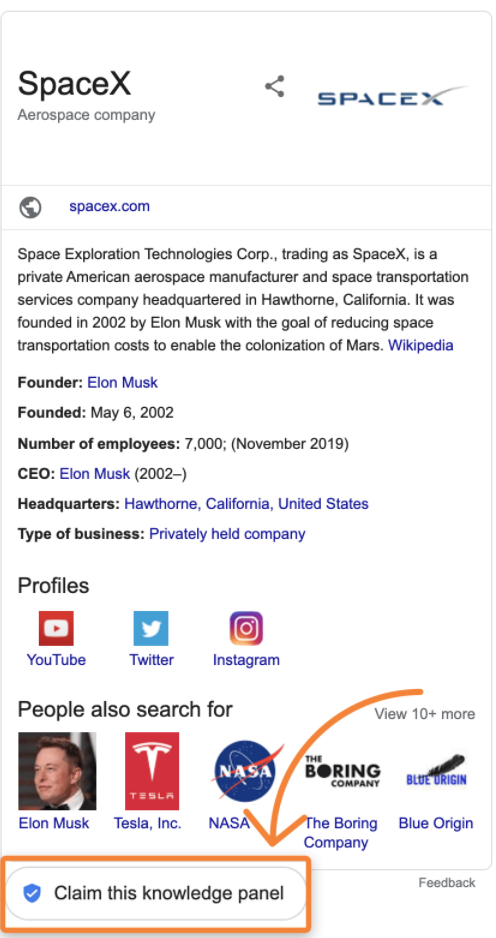
Once a Knowledge Panel appears for your brand or name, click the claim button located beneath the panel to begin the verification process. Google will ask for proof of identity, such as a driver's license or screenshots of admin screens for your social media accounts and website. Upon successful verification, you can select a featured image and make other limited changes to the panel.
-
5
Manage your Knowledge Panel through reputation efforts
Editing and improving a Knowledge Panel is often a core part of a broader reputation management campaign. The interconnection between Wikipedia, social media, and search results directly influences what information appears in your panel. Keeping these sources accurate and up to date gives Google better data to draw from when populating your panel.
-
6
Optimize for voice search and rich results
Knowledge panel summaries are commonly used when voice queries are made, making them especially important as natural language searches grow. Google Assistant is now built into over one billion devices, and nearly 70% of queries are expressed in natural language or voice. Ensuring your Knowledge Panel information is accurate and complete means it is more likely to be surfaced in these high-visibility contexts.
What is the Google Knowledge Panel?
With the hustle and bustle of everyday life, people don’t always have time to take a deep dive into your company’s history and overall profile. When performing search queries on Google, most people are just looking for a quick snapshot of information about their search topic.
To maximize brand awareness, companies need to make sure the important information about the brand is easily discoverable and digestible on the web. That’s where the Google Knowledge Panel comes in handy.
Google Knowledge Panels are boxes of useful information about a prominent person, place, or thing that appear on Google search engine results pages (SERPs) when someone searches related to that topic. On a mobile device, they sit above or in the middle of the search results, while on a desktop computer, they appear on the right side at the top of the search results.
They provide a summarized look at information about your search topic as well as a link to that entity’s Wikipedia page if there is one. Knowledge panels are a type of rich results that are segmented by Google to stand out and help users get their answers more quickly. Knowledge panels are becoming increasingly important as search engines like Google are expanding the number of subjects that trigger rich results.
The Role of Entities in Knowledge Panels
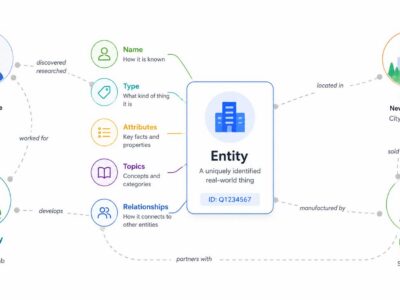
In Google’s context, an “Entity” is any unique thing, such as a person, place, brand, or concept that exists independently and can be distinctly identified.
When Google recognizes something as an entity, it understands more about it and how it relates to other entities. This recognition often leads to the creation of a Google Knowledge Panel—an info box that appears in search results summarizing key details about the entity. Being recognized as an entity improves visibility in search and helps control the narrative by providing authoritative information directly in search results.
How to tell if something is considered an Entity
You can tell if something is recognized as an “entity” by Google if it appears in a Google Knowledge Panel or is referenced in Google’s structured data, like in the “People also ask” or “Related searches” sections.
Does Your Company Qualify for a Wikipedia Page?
Run a free notability check. Our analysis engine reviews real press coverage against Wikipedia's actual notability standards and emails you a detailed report — no sales call required.
Your notability check is running
We're analyzing coverage of right now — it usually takes 10–15 minutes. Your report link will arrive from noreply@reputationx.com; check spam if you don't see it. Keep reading — nothing else to do here.
Entities are the building blocks of the Knowledge Graph. Put another way, the Knowledge Graph is a peek into the different attributes of an Entity Google thinks are useful to the user. The Knowledge Graph is, after all, a vast database of interconnected information about entities and their relationships to other entities.
Get a Knowledge Panel by becoming an Entity
The best way to get a Knowledge Panel is to become an Entity. Something is an entity when it has a Wikipedia page or when it has significant coverage online. To become recognized as an entity by Google, do this:
- Create a Powerful Online Presence: Establish and maintain profiles on major platforms like Wikipedia, LinkedIn, and social media, which Google often uses to identify and classify entities.
- Get Mentions on Well-Known Sites: Being featured or mentioned on authoritative websites, news publications, or authoritative blogs increases the probability that Google will recognize you or your brand as an entity.
- Use Structured Data Markup: Implement schema markup on your website to help Google understand your content and use it to identify its connection to the entity.
- Consistent Information: Ensure that your brand name, details, and images are consistent across all platforms to help to reinforce your identity.
- Gain Notability: For individuals or businesses, gaining public recognition, media coverage, or awards can also prompt Google to recognize you as an entity. This is also key for earning a Wikipedia article about your brand.
Knowledge Panels: Challenging to manipulate
Google’s knowledge panels are fairly reliable and difficult to manipulate. The panels are automatically generated from various sources across the web that make up Google’s Knowledge Graph. Google works with data partners who provide authoritative data in their respective areas of the knowledge panels.
Searches that generate branded knowledge panels are typically prominent figures or organizations that can be self-authoritative.
Brands have limited direct control of Knowledge Panel information
Figures and organizations are allowed to provide direct feedback and verify the information that is in their panels. This type of self-authorization requires an individual or company to claim its knowledge panel by clicking the button under the panel. Google will ask for proof, such as a driver’s license, screenshots of the admin screens of social media accounts and websites, etc. Upon verification, a brand can select a featured image for its panel and perform other limited changes.
No one can completely change a knowledge panel. Even verified users can change only a few things. Knowledge panels are dynamic, meaning they are updated automatically as information changes on the web.
For example, when it comes to e-commerce giant Amazon, the company has its own Google Knowledge Panel…

As does the company’s CEO, Jeff Bezos…
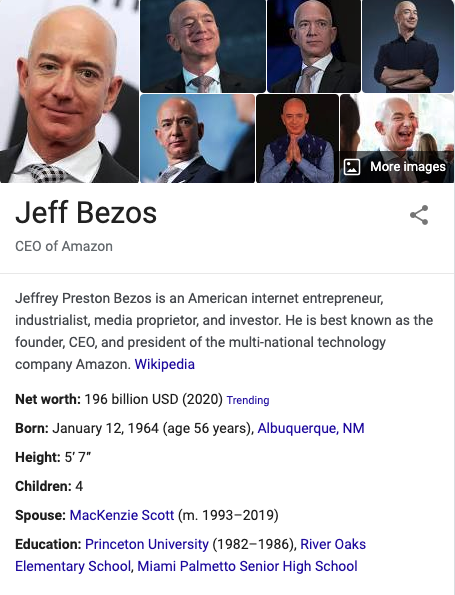
While they have a similar look on SERPs, knowledge panels are not to be confused with Google Business Profiles. Google Business Profiles are intended for businesses that serve customers at a specific location or cover a particular service area.
Why are Knowledge Panels important?
If Google decides you or your business deserves a knowledge panel, it’s a sign that you’ve arrived, that you’ve made it – a status symbol, even.
When you have a knowledge panel, it not only confirms that you’re doing superior search engine optimization (SEO), but it also makes you stand out from the crowd on the SERPs for topics about your company or brand due to the prominence of the information box itself. Having your company or brand’s website prominently displayed on a search page can lead to a major increase in clicks and visitors.
Benefits of Google Knowledge Panel for Businesses
- Increased visibility on the web
- Established authority
- Higher engagement with search engine users
Knowledge panels are also crucial when it comes to voice queries, which are becoming increasingly popular among search engines. Knowledge panel summaries typically are the information that gets returned when voice queries are made. Google Assistant is now built into over a billion devices, and nearly 70% of search queries are now being expressed in natural language or voice searches.
How to Get a Google Knowledge Panel
You cannot just request a Knowledge Panel from Google.
First, know that there are two basic types of Google Knowledge Panel: local panels and brand panels. The difference typically depends on the geographic location a person is searching from and whether the search topic is a local, national, or global entity.
Another major difference is that Google decides who gets a branded or personal panel, whereas local businesses must meet certain criteria and take steps of their own to be considered for receiving a local panel.
Since a person or business cannot create a knowledge panel on their own, the best you can do is take steps to position your brand or company so that Google will consider you for a panel. These steps include creating a Wikipedia page for your entity and using Schema Markup to tag your website elements.
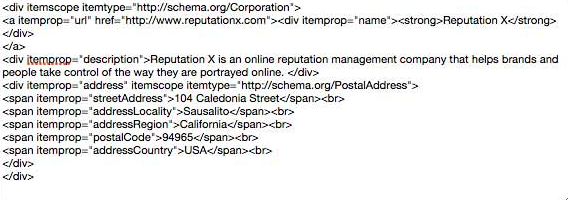
Here is an example of the type of Schema Markup a company can add to the HTML of its website to give search engines a better description of what the company does and where it’s located.
Local Knowledge Panels
Google may give well-known local businesses a local knowledge panel to serve up the company’s pertinent information when someone in their local area searches for them. Outside of the businesses’ geographic area, the panel will not show up.
If you are a local business and want Google to display a local panel for you, start by opening a Google Business Profile account. Having done that, you’ll be able to claim your account by verifying that you’re the owner of that business. Once verified, you’ll be able to add or edit any relevant information about your business and make sure your knowledge panel stays updated and accurate.
If you search for your entity and an unclaimed knowledge panel already appears in the search results, look for a “Claim this knowledge panel” button at the bottom of the panel.
Keep in mind that verifying your Google account doesn’t guarantee a knowledge panel. Ultimately, Google will decide who does and does not get a panel. Factors that Google considers include, but are not limited to, a business’s relevance, their location, and whether or not the business’s website has a high-authority domain.
Typical information that can be found on a local knowledge panel include:
- Customer reviews
- Critic reviews
- Daily hours
- Phone numbers
- A link to the website
- Reservation options
- Popular times
- Area of service
- Directions
Branded/Personal Knowledge Panels
You cannot apply for a branded or personal knowledge panel. Google decides who is worthy of this honor. If your company or brand has enough authority and clout, Google will create a panel for the SERPs. Brands and personalities that are well-known and have Wikipedia pages are the most likely to have knowledge panels. Not all brand knowledge panels need a Wikipedia page, but it does make it far easier.
Conclusion
Google Knowledge Panels can be a great asset to your brand and its reputation. If you’re a local business, you should be doing everything in your power to try and get yourself a local panel. If you’re already fortunate enough to have a branded/personal panel, you’ll want to make sure you keep the information that’s displayed clean with good online corporate reputation management.
Frequently Asked Questions





Protect Your Online Reputation
Every day you wait, negative content gets stronger. Talk to our experts about a custom strategy for your situation.
Get Your Free Analysis