
How to Edit Wikipedia Anonymously to Protect Your Privacy
Before you make that edit, here's what Wikipedia actually knows about you — and how to minimize your digital footprint without getting flagged.

Editing Wikipedia without an account no longer exposes your IP address publicly: since 2025, logged-out edits are attributed to auto-generated temporary accounts, with the IP retained for 90 days and visible only to admins and users holding the “Temporary account IP viewer” right. A registered account is still the more private option. Wikipedia also uses device fingerprinting to identify editors beyond IP addresses, making true anonymity very difficult, and attempts to block fingerprinting, such as VPNs or browser plugins, can trigger sock puppet investigations and result in a ban.
How to Edit Wikipedia Anonymously to Protect Your Privacy
-
1
Edit from a friend's computer
Visit a friend's home and create a new Wikipedia account using their computer and residential IP address, not a public location like a coffee shop. Make your desired edits while logged into the new account, then log out and never use that computer or account again. This approach prevents your home or office IP address and device fingerprint from being tied to the edit.
-
2
Build autoconfirmed account status
A brand-new account with only one edit is more likely to draw suspicion from Wikipedia editors. Make at least 10 legitimate edits spread across more than four days to achieve 'autoconfirmed' status, which Wikipedia grants to accounts meeting those thresholds. Autoconfirmed accounts can access more articles and appear less suspicious than newly created ones.
-
3
Use residential IP addresses
If you need additional accounts, tie each one to a unique residential IP address rather than a commercial or data-center IP. Residential IPs were previously assigned to real apartments or homes and are considered more trustworthy by Wikipedia's tracking systems. They are more expensive than standard dynamic IPs but are more effective at circumventing tracking technologies.
-
4
Switch to a privacy-focused browser
Rather than using your default browser like Google Chrome, consider using Tor Browser, which encrypts your traffic and routes it through multiple nodes to obscure your identity. Using a different browser reduces the consistency of your device fingerprint across editing sessions. Be aware that using fingerprint-blocking tools can sometimes trigger sock puppet investigations if Wikipedia flags the behavior as suspicious.
-
5
Avoid single-purpose account patterns
Do not create an account that exclusively edits one article or a narrow topic closely related to your business or personal brand. Wikipedia editors watch for 'single-purpose accounts' as a sign of conflict-of-interest or sock puppet behavior. Spreading edits across unrelated topics makes an account appear more like a genuine contributor.
-
6
Understand device fingerprinting risks
Wikipedia can identify editors through device fingerprinting even without an account login, collecting data points such as your IP address, browser plugins, installed fonts, screen resolution, and time zone. This fingerprint can link your anonymous edits to other activity across sessions or devices. Knowing what data is collected helps you make more informed decisions about how and where you edit.
Highlights:
- Anyone can edit Wikipedia, but that doesn’t mean you should.
- Wikipedia doesn’t want spammers to make non-useful edits, so some are tracked in a limited way.
- While it is possible to make an anonymous edit on Wikipedia, you won’t be able to hide entirely, thanks to various forms of tracking employed.
- Editing under a username is still more private than editing logged out. Since Wikipedia introduced temporary accounts in 2025, a logged-out edit no longer shows your raw IP address publicly — but the IP is retained for 90 days and stays visible to admins and users granted the “Temporary account IP viewer” right.
Anyone can edit Wikipedia. Yet just because you can edit the article doesn’t always mean you should – especially if it’s about you or your company.
Editing articles about entities you are close to is considered a “conflict of interest” or “COI” in Wiki-speak, which some Wikipedia editors have strong negative feelings about. It’s also why many businesses and people turn to Wikipedia editing services rather than chance editing their own pages.
However, many people still want to edit articles without being detected. It may be for privacy reasons or because they fear being labeled a COI editor.
If you think being tracked is just plain creepy, take heart. If you are just surfing Wikipedia, they most likely won’t track your IP. The tracking comes into play when you edit Wikipedia. Most tracking is done to manage “sock puppets” or spamming activities.
Whichever camp you might fall into, here is what you need to know about editing Wikipedia anonymously:
- Without an account, Wikipedia can still see who made edits by logging some basic information about you or your company using what is called device fingerprinting.
- According to Wikipedia, “A device fingerprint or machine fingerprint is information collected about the software and hardware of a remote computing device for the purpose of identification.”
- Advanced tools can identify your IP address, browser type, screen resolution, and more (discussed below) when editing anonymously, meaning you can’t entirely hide behind anonymous edits. When your machine makes other edits elsewhere, and at other times, Wikipedia will know if you aren’t protected.
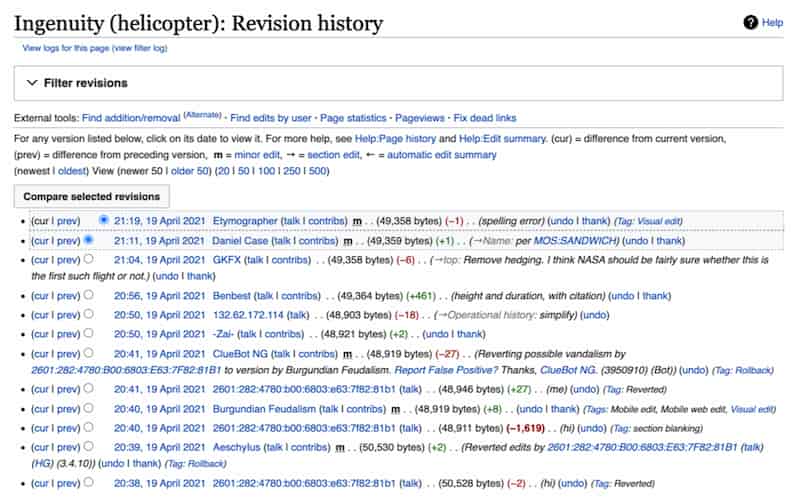
Can anyone edit a Wikipedia page?
Yes. Anyone can edit most Wikipedia articles, with or without an account, and the change goes live immediately. The exception is protected pages, which restrict editing to autoconfirmed accounts or higher and are typically articles that attract vandalism or sustained disputes.
Being able to edit is not the same as being able to make an edit that sticks. Every change is public, reversible, and watched by other editors, and edits about yourself or your own company carry a conflict of interest regardless of which account makes them.
What changed in 2025: Wikipedia temporary accounts
For most of Wikipedia’s history, editing while logged out meant your raw IP address was written into the page history for anyone to read. That is no longer true. Wikipedia now replaces publicly visible IP addresses for logged-out editors with auto-generated “temporary accounts,” so an edit made without logging in is attributed to a temporary username in the form ~2025-31096-01 — a tilde, the year, and a serial number — instead of your IP address (Wikimedia Foundation, “Say hi to temporary accounts,” Diff, November 5, 2024).
The IP address itself is still recorded. It is retained for 90 days and can be seen only by administrators, users granted the “Temporary account IP viewer” right, and CheckUsers (Trust and Safety Product/Temporary Accounts, MediaWiki). The change was piloted on a small set of wikis in late 2024, expanded across Wikimedia projects through 2025, and reached English Wikipedia on November 4, 2025 (Wikipedia Signpost, “News and notes,” October 20, 2025).
The distinction matters. Temporary accounts reduce casual public exposure of your IP address, but they do not make you anonymous to Wikipedia — functionaries can still tie a temporary account back to the IP behind it. And they do nothing about the other half of the problem, which is how your machine identifies itself every time it connects.
Does Your Company Qualify for a Wikipedia Page?
Run a free notability check. Our analysis engine reviews real press coverage against Wikipedia's actual notability standards and emails you a detailed report — no sales call required.
Your notability check is running
We're analyzing coverage of right now — it usually takes 10–15 minutes. Your report link will arrive from noreply@reputationx.com; check spam if you don't see it. Keep reading — nothing else to do here.
What is device fingerprinting, and how does it work?
Device fingerprinting identifies a device or browser by collecting information about its unique configuration. To create a view of your device and who you are, device fingerprinting services collect various data points about your computer to create a unique digital “fingerprint.”
These data points include:
- Your IP address
- Browser plugins installed
- Your time zone
- Installed fonts
- Timestamp
- Flash data from your Flash plugin
- HTTP request headers
- Silverlight data
- User-agent string
- Mime-types

Device fingerprint trackers are pieces of code that collect and report all this information to put it together to identify you on various websites or web articles. Once the tracker has this information, it creates a unique fingerprint of who you are to allow for more advanced tracking than cookies could ever provide. It may not know your name, but it knows your computer.
To avoid this intricate tracking method, you can download plugins that help block websites from collecting a digital fingerprint for you. But these blocking devices often send up red flags for Wikipedia as someone who might be trying to obfuscate their actions. This can lead to a “sock puppet investigation” that can get you banned.
How to edit Wikipedia anonymously
Editing a Wikipedia article is simple. Just go to the top of the article and click the “edit” tab. Or you can edit one specific section in the article by clicking “edit” at the top of that heading.
If you aren’t logged into a Wikipedia account, your edit will be technically anonymous, but it will still be tied to your IP address, and your edit will still be fingerprinted. If you’re really concerned about that, here are some ideas.
Go to your friend’s house
If you want to edit without giving too much away, use someone else’s computer from a residential address – not a Starbucks. In other words, go to your friend’s place and create an account using their computer. Once you have logged in with the new account, make the edits you want to make. Then log out of their computer and never use that computer or Wikipedia account again. This doesn’t make you invisible, but it does eliminate others’ ability to be tracked or digitally fingerprinted – of course, your friend’s information will still be logged. You can return to your home or office and use Wikipedia normally without your identity being tied to the edit.
Become autoconfirmed
But going to your friend’s house doesn’t solve all problems. The temporary account you just used will have made only one edit. This shiny new account is not “confirmed.” But make a few more edits over a few days, and the account becomes “autoconfirmed.”
Wikipedia says this “…most English Wikipedia user accounts that are more than four days old and have made at least 10 edits (including deleted edits) are considered autoconfirmed.”
Many articles on Wikipedia cannot be edited without being at least autoconfirmed, but it’s also generally less suspicious if your account is autoconfirmed.
Residential IPs
Most paid Wikipedia editors (note: Reputation X has exactly zero paid Wikipedia editors on payroll) have many accounts. Each account is tied to a residential IP address. A residential IP address has been used previously in someone’s apartment or house and is reassigned, usually in blocks. Residential IPs are more expensive than normal dynamic IPs you might get from your cable provider. But they are used to circumnavigate tracking technologies.
Use different browsers
Rather than doing everything within Google Chrome, consider using Tor Browser. Tor Browser is encrypted, and data is bounced worldwide for extra security. Cookies are automatically cleared when you’re done browsing. If you are using a browser like Firefox, make sure to manually delete your cookies. But you cannot edit a Wikipedia article with the Tor Browser because the IP addresses used are excluded from editing Wikipedia articles (most of the time).
Anonymity for COI edits
Accounts with long histories
Reputation X doesn’t have a single Wikipedia account. We don’t edit Wikipedia. Instead, we ask seasoned editors to make suggestions in the Talk pages of certain Wikipedia articles with thoroughly researched information. Often, if the main editors of the article are not too biased, the information will be corrected organically. Other times we will reach out to editors we know well and ask them to make edits directly. Of course, it’s up to them whether they do or not.
Whether it’s a Talk page recommendation or a direct edit, we use very experienced editors with long-standing accounts because these accounts have “street credibility.” Simply put, their advice and edits are far more likely to be paid attention to and heeded by other editors.
Paid Wikipedia editors
Whether Wikipedia likes it or not, paid editors are a part of the Wikipedia ecosystem. Really experienced paid editors have something in common; accounts with long histories. Low-quality Wikipedia editors are extremely unreliable because they burn through so many new accounts and use such bad IP address hygene that you can almost see them from space. Essentially, if you see a Wikipedia editor advertising on a site like Upwork, they’re almost certainly of low quality.
Experienced Wikipedia editors are rarely subject to rollbacks because their account has made hundreds or thousands of wholesome edits to improve Wikipedia. One in one hundred edits might be paid. But those edits are still improving Wikipedia for the simple reason that they don’t want their long-held and experienced accounts to be reprimanded. Because they are so careful, they’re very hard to spot.
Single-purpose accounts on Wikipedia
Good editors have subject matter expertise, and so do their accounts. One account may focus on financial services and have hundreds or thousands of expert edits to related articles. Another might be about NASCAR. Some accounts specialize in biographies of living persons. But an “SPA”, or Single Purpose Account should be understood if someone is thinking about making COI (conflict of interest) edits.
Whether you’re just editing anonymously for privacy reasons or making gray area edits, you’ll want to know what an SPA is and how it’s treated.
A Single Purpose Account (SPA) on Wikipedia is a user account that is created solely to edit or contribute to a particular topic, issue, or article on Wikipedia. SPAs are often created to promote a specific point of view or agenda and are often used in cases of conflict of interest or bias.
SPAs are not prohibited on Wikipedia, but they are subject to closer scrutiny from the community and administrators to ensure that they adhere to Wikipedia’s policies and guidelines, such as the neutral point of view and verifiability.
What if I edit Wikipedia from a public device or internet access point?
Editing from a public computer – such as those available at a library or internet café – will make it more challenging for Wikipedia to track you but public IP addresses can raise red flags if the edits are suspect in any way. In these cases, Wikipedia will know very little about you specifically and will only see the changes you made to the Wikipedia article because the IP address and computer at the library are public. Keep in mind that there are databases available that log the IP addresses of Starbucks and other public wifi networks.
Can you edit Wikipedia without an account?
Yes, you can add information to Wikipedia without an account in most cases. Some Wikipedia articles are protected, so only the top editors can make changes to those articles. If an article is protected, it will have the icon of a lock in the upper right portion of the article. One example is shown below.
If you try to create an account that masks your identity just to make changes to articles about you or your business (known as creating a “sock puppet” account), your account will often still get flagged unless it’s done very carefully. Wikipedia logs every edit to an account’s article and every article an account creates, meaning it’s relatively easy for the algorithm to track down conflicts of interest or sock puppet edits.
Can you edit Wikipedia with a VPN?
A VPN is a virtual private network. It hides your IP address by creating a “tunnel” through the internet from your machine to another.
Technically, you can make a Wikipedia edit using a VPN, but Wikipedia may flag your account. Any sort of anonymizing proxy servers will send up red flags to Wikipedia that your account is not trustworthy. One example is when you try editing a Wikipedia article using the TOR browser. TOR bounces IPs from machine to machine worldwide to hide your identity. But Wikipedia can clearly tell if an IP, or “node”, is from TOR.
Such tactics could block you from editing until you disconnect from the anonymous network. The platform uses this system to avoid Wikipedia article vandalism and incorrect edits.
The “friend” method above or residential IPs can help you maintain anonymity.
Why is my IP address blocked from editing Wikipedia?
Even if you succeed in editing a Wikipedia article anonymously (again, please don’t be a spammer), know that Wikipedia is still connecting your edits and reviewing them as a whole. If the platform notices you’ve been making too many improper edits, it can block you from editing.
Improper edits are a squishy term. It may mean your edits are similar to those used by paid editing farms (sock puppet farms). It may mean the IP address you are using smells fishy to the algorithm. It could even be the article you are trying to edit. Wikipedia editors sometimes set up what we call “honeypots” to entrap paid editors. Anyone who attempts to edit the article is immediately suspected to increased scrutiny.
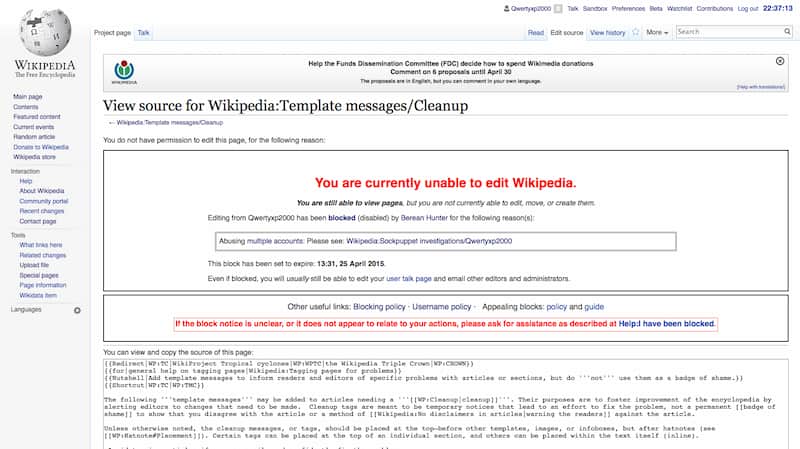
What does Wikipedia do? The users and IP addresses that make suspected improper changes or violate editorial policies – a lot of innocent people get caught in this net, but spam is a big problem on Wikipedia, and the editors are, for the most part, just trying to protect it. Keep in mind that to protect the integrity of the information the platform provides, it will sometimes block users and IP addresses from making future edits, as well.
How do you know if you’ve been blocked? You get a message that looks like this when you try to edit:
How easy is it to track my IP address to my location?
Wikipedia admits that people who create usernames are actually more anonymous than those who make anonymous edits tied to their IP addresses. That’s because your IP address is unique and, until 2025, it sat in the public record of every logged-out edit. Temporary accounts changed that: the raw IP is no longer shown to everyone viewing the edit history of an article, though admins and users with the “Temporary account IP viewer” right can still see it for 90 days.
After the 2016 presidential election, Justin Blinder created an application called Wikipedia Was Here. It showed the Google Maps image for a user based on their IP address, proving just how much anonymity users without usernames actually have on Wikipedia. The program shows screenshots of buildings, such as homes, where the edits apparently came from.
The real-time feed displayed the changes an IP address made to Wikipedia alongside the Google Maps information. Blinder was trying to bring greater awareness to the lack of integrity on Wikipedia at times.
But IP geolocation services are notoriously inaccurate, as one famous case described in detail. Therefore, more than just IP tracking is used in the ongoing effort for Wikipedia to track down and eliminate people using the platform nefariously.
Final thoughts
Editing Wikipedia requires a delicate balance between adding factual information to articles while still maintaining your interest. The suggestions in this blog can help you to edit Wikipedia anonymously but remember that the rules can change quickly, and your tactics must be adaptable to the wild Wikipedia climate.
Frequently Asked Questions







Protect Your Online Reputation
Every day you wait, negative content gets stronger. Talk to our experts about a custom strategy for your situation.
Get Your Free Analysis