
Knowledge Graph vs Knowledge Panel
The Graph is the database. The Panel is the display it powers — here's how they differ, connect, and what you can actually control.

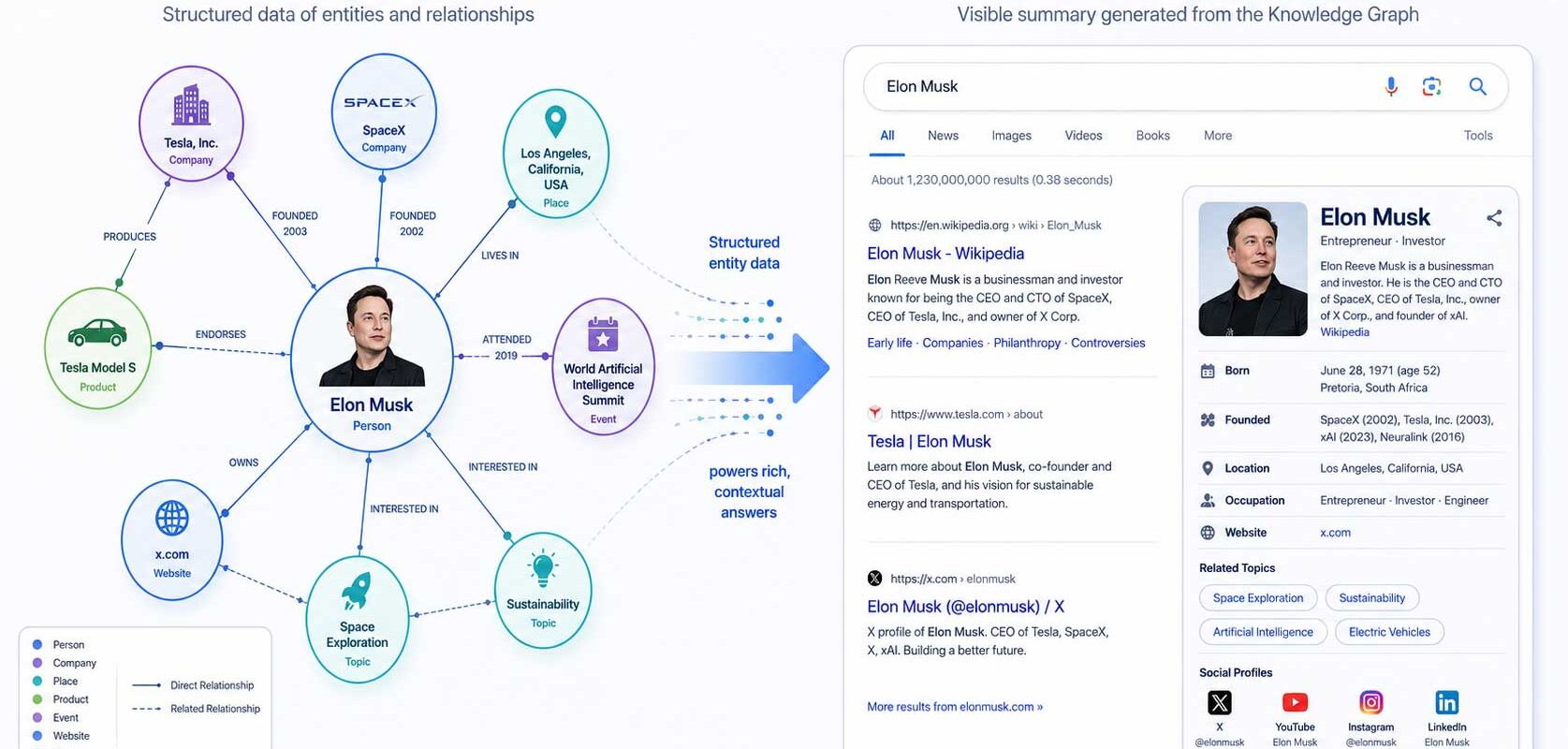
- Graph = database, Panel = display. A Knowledge Panel is powered by the Knowledge Graph but is not the same thing.
- A Panel's existence confirms an entity is in the Graph, but being in the Graph does not guarantee a Panel appears.
- You can't edit the Graph directly, but you can influence its sources (Wikipedia, structured data, authoritative coverage) and, once verified, claim your Panel to suggest edits.
- A Knowledge Panel is not a Google Business Profile and not a featured snippet.
The Google Knowledge Graph is Google's database of facts about entities and the relationships between them. A Knowledge Panel is the search-results info box that displays a summary of that data. The Graph is the database; the Panel is the display it powers. You can't edit the Graph directly, but you can influence its sources and, once verified, claim your Panel to suggest edits.
The Google Knowledge Graph is Google’s database of billions of facts about entities — people, places, and things — and the relationships between them. A Knowledge Panel is the search-results info box that displays a summary of that data for a single entity. Put simply: the Knowledge Graph is the database, and the Knowledge Panel is the display it powers. By May 2020, Google reported the Graph held over 500 billion facts about 5 billion entities, according to blog.google.
Knowledge Graph vs Knowledge Panel: the short answer
The difference comes down to one distinction: one is the data, the other is the display. The Knowledge Graph is the underlying database. The Knowledge Panel is what you see on the search results page. As Google puts it, “information within knowledge panels comes from our Knowledge Graph, which is like a giant virtual encyclopedia of facts,” per blog.google.
The table below compares them across the dimensions that matter most when you’re managing your own representation for online reputation management purposes.
| Dimension | Knowledge Graph | Knowledge Panel |
|---|---|---|
| Nature | A database of entities and their relationships | A search-results info box displaying entity data |
| Visibility | Behind the scenes; not directly visible to users | Visible on Search — right side on desktop, top on mobile |
| How it’s created | Built from many sources; you can’t apply to be added | Auto-generated by Google’s algorithm when enough open-web info exists |
| What you can control | Influence its sources only (Wikipedia, structured data, authoritative coverage) | Once verified, claim it and suggest edits (not full control) |
| Primary sources | Public web, licensed databases, Wikipedia, content-owner submissions | The Knowledge Graph, plus sources like Google Images and YouTube |
What is the Google Knowledge Graph?
The Google Knowledge Graph is a database that stores facts about entities — people, places, organizations, and things — and the connections between them. Google launched it on May 16, 2012, as part of a shift toward understanding “things, not strings”: modeling real-world entities rather than just matching keywords, as Schema App explains.
By May 2020, Google reported the Graph contained over 500 billion facts about 5 billion entities, according to blog.google and Wikipedia. That is the most recent figure Google has published, so treat 500 billion facts and 5 billion entities as a May 2020 snapshot, not a current count. The Graph grew fast from the start: it roughly tripled within about seven months of launch, reaching 570 million entities and 18 billion facts, and held around 70 billion facts by mid-2016, per Wikipedia.
How the Graph is structured
The Knowledge Graph is organized as nodes, edges, and attributes. Nodes are the entities, each with a unique identifier. Edges are the relationships between them. Attributes are the properties that describe each entity, as Semrush describes. This structure is built on ontology principles that link billions of entities together, according to Search Engine Land. The result is a web of connected facts rather than a flat list, which is what lets Google answer “who,” “what,” and “how are these related” questions directly.
Get a Free Reputation Assessment
Find out what people see when they search for you online. No obligation — results in 24 hours.
Where does the Graph’s data come from?
The Graph draws on the public web, licensed databases (for things like sports scores, stock prices, and weather), Wikipedia properties, and submissions from content owners, per Google’s documentation and blog.google. Historically it also incorporated data from Freebase, the Metaweb project Google acquired in 2010, and, according to Wikipedia, public reference sources such as the CIA World Factbook.
The mix of sources changes over time. That is one reason a fact in a Panel can be outdated or simply wrong: it may be inherited from a source that has since moved on. This is the practical lesson most explainers skip. The Graph is only as accurate as the sources feeding it, so fixing your representation usually means fixing those sources first. The Reputation X post on which sources Google Knowledge Panels rely on covers how to prioritize those upstream signals across the 200,000-plus trusted sources the Panel can draw from.
What is a Google Knowledge Panel?
A Google Knowledge Panel is the information box that appears on Search summarizing a person, place, or thing — on the right side of the page on desktop and at the top on mobile, as described by blog.google. It pulls a snapshot of an entity’s key facts into one place so searchers don’t have to assemble them across multiple results.
Panels are generated automatically. Google’s algorithm produces one when there is enough information about an entity on the open web, and you cannot apply for a Knowledge Panel, per Google’s documentation and Schema App. A Panel appears only when Google’s algorithm deems it useful and relevant to the query, and it may draw on sources beyond the Graph — for example Google Images and YouTube — to build a fuller overview, according to Semrush. Not all Panels are the same: personal, brand, and local Knowledge Panels each have their own signals and management paths.
The honest takeaway: no one, including any agency, can guarantee you a Panel. Its creation is algorithmic and tied to how much independent information about you exists online. What you can do is build the open-web foundation that makes one more likely.
How do the Graph and the Panel differ and connect?
The Graph and the Panel differ in one fundamental way: the Graph is the engine, and the Panel is one of its visible outputs. The Knowledge Graph is the underlying database and reasoning layer; the Knowledge Panel is the display on the SERP that draws from it, as Google and Semrush both lay out.
They connect, but not symmetrically. If you have a Knowledge Panel, that confirms your entity exists in the Knowledge Graph. The reverse isn’t true: being in the Graph does not guarantee a Panel will appear, as Hillweb Creations notes. Google can hold entity data without ever surfacing a Panel for it, because the Panel only shows up when the algorithm judges it useful. So “I’m in the Graph” and “I have a Panel” are two different milestones, and the gap between them is where much of the confusion lives.
Knowledge Panel vs Business Profile vs featured snippet
A Knowledge Panel is frequently confused with two features it isn’t: a Business Profile and a featured snippet. The distinction matters, because each is managed differently.
A Google Business Profile (formerly Google My Business) is a separate, claimable product built specifically for businesses that serve customers at a physical location or service area, per Google and its verification documentation. The business-listing box you manage through that product is not the same as the broader entity Knowledge Panel that can appear for a person, brand, or organization. If you run a local business, you may interact with both: a claimable Business Profile and an algorithmically generated Knowledge Panel, through different channels. The Reputation X guide on the different types of Google Knowledge Panels walks through how to become a recognized entity for each panel type.
A Knowledge Panel is also not a featured snippet or a “People Also Ask” result, as Digital Authority points out. A featured snippet is an answer extracted from a single webpage to respond to a query. A Knowledge Panel is a structured summary of an entity assembled from the Graph and other sources. They look different, come from different places, and respond to different kinds of influence.
How do you claim and manage your Knowledge Panel?
You can’t edit the Knowledge Graph directly, but you can do two things that matter: influence the sources the Graph reads, and, once a Panel exists, claim it to suggest edits. Both are legitimate, within Google’s rules, and the realistic limit of what anyone can control.
Claim your Panel by getting verified
If a Knowledge Panel already exists for you or your organization, verified subjects and authorized representatives can claim it and suggest edits. “Claiming” essentially means getting verified, per blog.google and Google’s verification documentation. Verification can be completed through methods such as Google Search Console, a YouTube channel, an X (Twitter) or Facebook account, or by providing identification along with logged-in screenshots. Agents or representatives can also be authorized to manage a Panel on someone’s behalf. Once verified, your feedback is prioritized, and Google reports that reviews of suggested edits typically happen within a few days, according to its help documentation.
Set one expectation clearly: claiming grants suggested-edit access, not full editorial control. You propose changes; Google reviews and decides whether to apply them, as Reputation X explains in its Google Knowledge Panel guide. It is a meaningful but limited form of influence — a request channel, not an edit button. For a step-by-step walkthrough of the verification process itself, see the guide to claiming your Google Knowledge Panel.
Influence the Graph’s sources
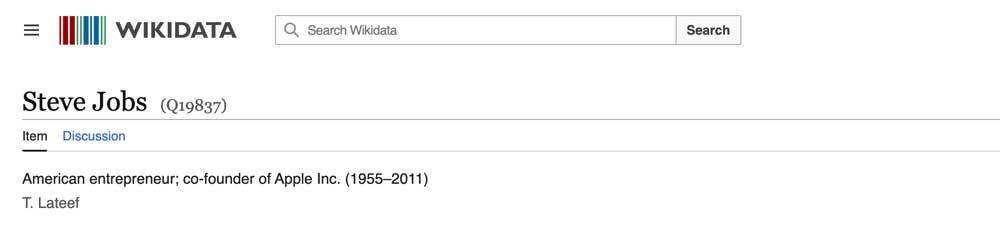
Because the Panel is downstream of the Graph, the most durable way to improve it is to improve the underlying sources. In practice, that means making your entity easier for Google to understand and verify from independent, authoritative material. Implementing structured data — particularly Organization markup — helps Google connect and confirm facts about you, as Schema App and Google’s developer documentation describe. Using the sameAs property to associate your official social and web profiles helps Google link your entity to the right accounts, per Search Engine Land. Accurate, consistent coverage across Wikipedia, your own properties, and reputable third-party sources gives the Graph reliable signals to draw on. A well-maintained Wikidata entry is one of the most direct signals you can contribute to that ecosystem, since Wikidata is among the structured knowledge bases the Graph reads.
You may see third-party claims of very fast turnaround — figures like “10 minutes to claim” or “edits approved in 24 to 72 hours” circulate on ORM blogs. Treat those as third-party estimates, not Google commitments. Google’s own documentation states only that verified users’ feedback is prioritized and reviews typically occur within a few days; it does not publish a fixed turnaround. If you need to make specific corrections to Panel content, the Reputation X post on how to change your Google Knowledge Panel covers both direct and indirect levers in detail.
Why this matters for reputation and AI search (GEO)
Your entity’s representation in the Knowledge Graph increasingly shapes more than the classic Panel — it can influence AI-generated answers too. Semrush reports that Google’s Gemini is trained on the Knowledge Graph, which means the way you’re represented in the Graph can affect how you appear in AI Overviews and AI Mode, per Semrush. That is a single secondary source, not a Google statement, so treat it as informed analysis rather than official policy. Still, the direction is clear enough that entity accuracy is now a generative-search concern, not just a SERP-aesthetics one.
Whether a Knowledge Panel is itself a direct ranking factor is unclear, and Google has not confirmed that it is, so don’t assume a Panel directly lifts your rankings. What a Panel does is consolidate and present your entity, which can affect perception and click behavior even where its ranking impact is unproven.
On accuracy and reputation: Google’s Search feature policies state that Google may remove information that is demonstrably false or outdated, as well as unsupported defamatory content, as described in its documentation. That describes Google’s policy and is not legal advice. If you’re dealing with defamatory or seriously inaccurate content about you, consult qualified counsel about your options alongside any platform-level request. The practical point for reputation management is that the cleanest path to a better Panel is usually upstream: correct the sources, strengthen the authoritative coverage, and use the verified-edit channel where it applies.
Sources
- Google — About Knowledge Graph and knowledge panels (blog.google)
- Google — Knowledge panels help (support.google.com)
- Google — Get verified to claim and suggest changes (support.google.com)
- Google — Suggest changes to a knowledge panel (support.google.com)
- Wikipedia — Knowledge Graph (Google)
- Schema App — What is Google’s Knowledge Graph?
- Semrush — Google Knowledge Graph
- Search Engine Land — Knowledge Graph guide
- Hillweb Creations — Knowledge Graph vs Knowledge Panel vs Business Listing
- Digital Authority — Knowledge Graph vs Knowledge Panel
- Google — Organization structured data (developers.google.com)
- Reputation X — Google Knowledge Panel guide
Frequently Asked Questions






Protect Your Online Reputation
Every day you wait, negative content gets stronger. Talk to our experts about a custom strategy for your situation.
Get Your Free Analysis